Introduction
According to Flexera's 2026 State of the Cloud Report, 29% of cloud IaaS and PaaS spend is wasted — money that evaporates through idle resources, oversized instances, and configurations nobody has revisited since launch day.
For SMBs, that waste isn't abstract. It shows up as infrastructure budgets that crowd out product development, margin pressure that compounds month over month, and engineering hours spent debugging billing anomalies instead of shipping features.
AWS RDS costs aren't inherently unreasonable. They become expensive through a series of configuration decisions made once at provisioning, that accumulate unchecked for months or years without triggering a single alert. No performance degradation, no error logs — just spend growing in the background while everything appears to be working fine.
This guide examines those decisions across three dimensions: what you chose at provisioning, how you manage RDS day-to-day, and how the environment surrounding your databases shapes your total bill.
Key Takeaways
- RDS costs accumulate across five independently billed dimensions — not as one visible line item
- Instance over-provisioning and on-demand pricing for stable workloads are the biggest avoidable drivers
- Graviton instances, GP3 storage, and open-source engines are the highest-leverage configuration changes
- Reserved Instances can cut costs by up to 69% versus on-demand, provided you have utilization data to back the commitment
- Ongoing governance (tagging, scheduled stops, snapshot lifecycle rules) prevents cost creep from returning
How AWS RDS Costs Typically Build Up
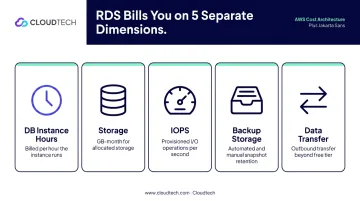
RDS doesn't send you one bill — it sends you five that grow independently.
Each of these dimensions is billed separately and can expand without affecting the others:
- DB instance hours — billed per second after a 10-minute minimum when the instance enters a billable state
- Storage — per GiB-month, regardless of how much data you're actually reading or writing
- IOPS — provisioned IOPS volumes carry a separate per-IOPS charge on top of storage
- Backup storage — automated backups beyond the size of your provisioned database incur additional charges; manual snapshots are billed indefinitely until deleted
- Data transfer — inter-AZ, cross-region, and outbound internet transfers each carry per-GiB charges
Each of those line items can drift upward on its own. An instance provisioned for a traffic spike keeps running at full cost after the spike passes. A manual snapshot created during a release is forgotten and continues billing every month. A Multi-AZ deployment enabled in a dev environment "just in case" doubles both instance and storage costs — every single month.
None of these problems trigger alerts. Performance issues get fixed because they break things. Over-provisioning just quietly adds to next month's bill.
Key Cost Drivers for AWS RDS
Instance Type and Size
The instance family and size determine your hourly rate more than anything else:
- M-series (general-purpose): balanced CPU and memory for mixed workloads
- R-series (memory-optimized): larger buffer pools for query-heavy databases
- T-series (burstable): cost-efficient for low-traffic dev databases, wrong choice for consistent production load
Most teams start large "for safety" and never revisit that decision. The instance keeps running at the original size even when utilization data would justify something smaller.
Engine Licensing
Proprietary engines carry significant licensing overhead. RDS for Oracle (License Included) bundles Oracle software costs into the hourly instance rate, a cost layer that doesn't exist with PostgreSQL, MySQL, or MariaDB. Depending on instance size, this licensing premium can push Oracle RDS costs 2–4x higher than equivalent open-source configurations.
Aurora uses its own pricing model and requires separate analysis depending on whether your workload is I/O-heavy or intermittent.
Storage and IOPS Architecture
GP2 storage bundles capacity and IOPS at 3 IOPS per GiB. When throughput requirements exceed what your actual data volume generates, the only option is over-provisioning storage — paying for disk space you don't need to reach the IOPS you do.
Provisioned IOPS (io1/io2) adds a separate per-IOPS charge on top of storage costs. Two patterns drive unnecessary spend here:
- Over-provisioned IOPS targets set during initial setup and never benchmarked against actual workload
- io1/io2 selected by default when GP3 would deliver comparable performance at lower cost
Contextual Costs
These rarely appear as headline line items, but they accumulate:
- Manual snapshots that never expire, billing as storage indefinitely
- Multi-AZ in non-production environments, which doubles instance and storage cost for workloads that don't need high availability
- Data transfer between Availability Zones and outbound to the internet, often appearing as a vague "Other" category on the bill
Cost-Reduction Strategies for AWS RDS
RDS cost reduction isn't one setting change. The right strategy depends on whether your costs originate from initial provisioning decisions, day-to-day operational gaps, or structural factors in the surrounding environment.
Strategies That Change the Original Decision
Switch to open-source engines. If your application can run on PostgreSQL, MySQL, or MariaDB, the licensing component of the hourly rate disappears entirely. For Oracle workloads specifically, the difference between a License Included instance and an equivalent PostgreSQL instance is substantial — check current AWS pricing for your specific instance class in us-east-1 to quantify the gap.
Match instance family to workload type. CPU-heavy workloads belong on M-series. Memory-intensive query processing belongs on R-series. Burstable T-series instances are only appropriate for development databases with genuinely low, intermittent traffic. Mismatches in either direction — too large or wrong family — create persistent, avoidable cost.
Migrate to Graviton (ARM-based) instances. AWS benchmarks show Graviton3 instances delivering up to 27% better price-performance than Graviton2 on RDS for MySQL, PostgreSQL, and MariaDB. No application code changes are required — RDS handles the infrastructure. For open-source workloads, it's one of the few optimizations that requires no application changes and delivers double-digit cost improvement.
Commit to Reserved Instances or Database Savings Plans for stable workloads. On-demand pricing is the most expensive default available. AWS-published savings break down as:
| Commitment Type | Maximum Savings vs. On-Demand |
|---|---|
| No Upfront, 1-year | Up to 30% |
| Partial Upfront, 3-year | Up to 60% |
| All Upfront, 3-year | Up to 63% |
| Overall maximum | Up to 69% |
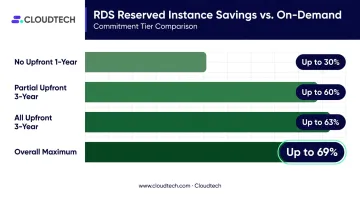
RDS Reserved Instances lock to a specific instance family and region. Database Savings Plans offer more flexibility across engine types, instance families, and regions for up to 35% savings — useful when your workload mix is harder to predict precisely.
Strategies That Change How RDS Is Managed
Rightsize continuously using CloudWatch. Review these specific metrics over a minimum 2–4 week window before making any production changes:
- CPU utilization
- Freeable memory
- Database connection counts
- Read/write IOPS
- Network throughput
Sustained CPU below 30% and I/O below 30% are reasonable signals to evaluate the next smaller instance within the same family. Standard CloudWatch metrics are included at no extra charge.
Enforce snapshot lifecycle rules. Manual snapshots do not expire automatically. They accumulate indefinitely as a separate storage charge. A practical approach:
- Define a maximum retention period for manual snapshots (90 days is a reasonable default unless compliance requires longer)
- Conduct a one-time audit to delete orphaned snapshots that predate the policy
- Use Amazon Data Lifecycle Manager to automate retention going forward
- Export older snapshots to S3 where backup storage costs significantly less
Disable Multi-AZ in non-production environments. Multi-AZ creates a synchronous standby replica in a second Availability Zone — which doubles both instance and storage costs. For development, testing, and staging environments, this is a zero-risk change. High availability guarantees are not a requirement when no production traffic is at stake.
Across our SMB client base, this pattern surfaces consistently: dev databases running Multi-AZ at full production cost, generating thousands in annual spend with no corresponding business requirement.

Schedule automatic stop/start for dev and test databases. Non-production databases run 24/7 by default but are used during business hours only. Using AWS Instance Scheduler to stop databases outside working hours eliminates instance-hour charges for that idle time. A database running 50 hours per week instead of 168 eliminates roughly 70% of its instance-hour charges.
Two important caveats: stopped instances continue billing for provisioned storage, IOPS, and backup storage. And AWS automatically restarts a stopped RDS instance after seven consecutive days — scheduling automation must account for this.
Structural Changes That Cut RDS Costs at the Source
Migrate storage from GP2 to GP3. GP2 ties IOPS to capacity (3 IOPS per GiB, minimum 100), which forces teams to over-provision storage just to hit performance targets. GP3 separates these dimensions entirely — provision the storage you need, then configure IOPS and throughput independently. Both volume types are priced at $0.115 per GiB-month in us-east-1, so savings come from eliminating that over-provisioned buffer, not from a per-GiB rate difference.
Reduce data transfer costs through architecture. Inter-AZ transfer charges apply when application servers and databases sit in different Availability Zones. Consolidating them into the same AZ eliminates this. Minimizing cross-region queries and large data exports reduces outbound charges. These fees are often the primary driver of the unexplained "Other" category on RDS bills.
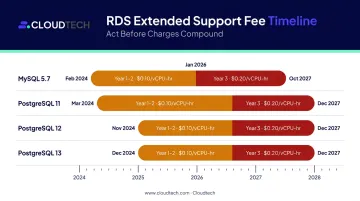
Upgrade legacy engine versions to eliminate Extended Support fees. Running MySQL 5.7, PostgreSQL 11, PostgreSQL 12, or PostgreSQL 13 past their standard support end dates triggers per-vCPU-per-hour Extended Support charges. AWS's published example uses $0.100 per vCPU-hour in years 1–2, rising to $0.200 per vCPU-hour in year 3. These fees appear as a separate billing line item and compound over time.
| Engine | Extended Support Started | Extended Support Ends |
|---|---|---|
| MySQL 5.7 | March 1, 2024 | June 30, 2029 |
| PostgreSQL 11 | April 1, 2024 | March 31, 2027 |
| PostgreSQL 12 | March 1, 2025 | February 29, 2028 |
| PostgreSQL 13 | March 1, 2026 | February 28, 2029 |
Practice ongoing database hygiene. Unused schemas, tables, and accumulated data increase storage costs directly. Unoptimized queries increase I/O requirements — and with GP3 storage, lower IOPS requirements translate directly to lower provisioning costs.
For SMBs and startups without dedicated database administrators, that's exactly where Cloudtech's Cloud Cost Optimization practice helps — identifying inefficiencies in RDS configuration, storage architecture, and database hygiene as part of a broader infrastructure review.
Conclusion
Effective RDS cost reduction requires knowing where each cost originates — whether in a provisioning decision made months ago, an operational default nobody revisited, or a structural factor in how your application and database communicate. Reducing instance size without addressing storage architecture or snapshot accumulation trims the bill at the edges — the larger charges keep compounding underneath.
Cost optimization is not a one-time project. The environment shifts: utilization patterns change as products evolve, engine versions age into Extended Support, and newer instance families like Graviton become available. A quarterly review cadence keeps savings compounding instead of eroding.
Three practices that make ongoing governance effective:
- Audit Reserved Instance coverage and Savings Plans commitments each quarter against actual usage
- Review snapshot retention policies and storage type assignments whenever workload patterns change significantly
- Track engine version roadmaps at least six months before Extended Support fees kick in
Frequently Asked Questions
What are the biggest hidden costs in AWS RDS?
Manual snapshots are the most overlooked — they never auto-expire, so charges accumulate indefinitely. Extended Support fees for legacy engine versions (MySQL 5.7, PostgreSQL 11–13) add a separate per-vCPU-per-hour charge that appears as a quiet billing line item. Data transfer between Availability Zones is the third common culprit, often showing up as a vague "Other" charge.
How much can Reserved Instances actually save on AWS RDS costs?
AWS publishes savings of 30% (one-year, no upfront), up to 63% (three-year, all upfront), and as high as 69% depending on configuration. The right choice depends on how confidently you can forecast workload stability — committing without solid utilization data risks locking into an instance you'll need to resize.
Should I use Aurora Serverless or Provisioned RDS for my workload?
Aurora Serverless v2 fits unpredictable or intermittent workloads — dev environments, seasonal apps, highly variable traffic. For steady production workloads, provisioned instances with Reserved Instances typically cost less: the Serverless v2 rate ($0.12/ACU-hour in us-east-1) can exceed equivalent provisioned pricing at consistent utilization.
How do I know if my RDS instance is over-provisioned?
Review CloudWatch metrics — sustained CPU below 30%, high freeable memory, and low connection counts — over a 2–4 week period. One low-utilization day isn't enough to justify downsizing; the pattern needs to hold across full workload cycles before making changes.
Does switching to Graviton instances require changes to application code?
No application code changes are required for PostgreSQL, MySQL, or MariaDB on RDS. The migration is an instance type change within RDS — AWS manages the underlying infrastructure. Graviton is not available for Oracle, SQL Server, or Db2 on RDS, so this option applies exclusively to open-source engines.
Is it safe to disable Multi-AZ for non-production environments?
Yes, and it's recommended. Development, testing, and staging databases don't require high availability guarantees — disabling Multi-AZ immediately halves the instance and storage cost for those environments with zero impact on production. The only caveat is ensuring your tagging and access controls are clear enough that a non-production change can't accidentally affect a production database.