McKinsey's survey of 443 global CIOs found that 38% of organizations experienced migration delays exceeding one quarter, with average annual migration spending running 14% above plan. Most of those overruns weren't caused by AWS limitations — they were caused by inadequate preparation.
This guide covers the most common AWS migration challenges SMBs face and, more importantly, what to do about them before they derail your project.
Key Takeaways
- Poor planning — not technical complexity — is the root cause of most migration failures.
- Compliance requirements for HIPAA, GDPR, and SOC 2 must be built into the landing zone, not added after go-live.
- 78% of cloud decision-makers cite insufficient expertise as a top migration challenge; address skills gaps before the project begins.
- Cost overruns are preventable with resource tagging, right-sizing, and AWS Budgets configured from day one.
- Long-term cloud success requires continuous governance, not just a successful cutover.
Common AWS Migration Challenges
Most AWS migrations run into the same set of obstacles — and recognizing them early is what separates a smooth transition from a costly stall.
Lack of a Clear Migration Strategy and Scope
Treating migration as a purely technical project is the single most common mistake. When teams skip dependency mapping, data volume assessments, and business continuity planning, they end up making critical architectural decisions under pressure mid-migration — exactly when they have the least flexibility.
AWS's 7 Rs framework (Rehost, Replatform, Refactor, Repurchase, Relocate, Retire, Retain) gives teams a structured way to assign each workload a migration strategy before anyone touches infrastructure. Without it, every application decision becomes its own negotiation.
The absence of a phased wave plan creates another problem: scope creep. Common signs it's already happening:
- Application owners discover their systems are included mid-migration
- Wave schedules get revised repeatedly with no agreed baseline
- No formal change control exists to manage scope additions
Data Migration Complexity and Compliance Risk
Large dataset migrations introduce bandwidth constraints, data consistency issues, and dependency mapping challenges that teams routinely underestimate. Add regulatory requirements and the complexity compounds fast.
For organizations subject to HIPAA, GDPR, or SOC 2, compliance isn't something to address after migration — it needs to be embedded in the landing zone architecture from the start:
- HIPAA requires encryption controls, audit logging, and a Business Associate Agreement (BAA) with AWS before any ePHI moves to the cloud.
- GDPR data transfers outside the EEA require adequacy decisions or appropriate safeguards such as Standard Contractual Clauses (SCCs).
- SOC 2 evaluates whether your described controls actually match implemented controls — which means controls need to exist before an audit, not after.
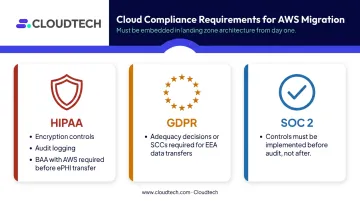
For healthcare and financial services organizations, a failed compliance check doesn't just create remediation work — it can halt an entire migration program.
Skills Gaps and Insufficient AWS Knowledge
Flexera's 2024 State of the Cloud Report found 78% of cloud decision-makers cite insufficient resources or expertise as a top challenge. That number tracks with what happens in practice: teams with deep on-premises expertise frequently underestimate how different cloud operations are.
The gaps that cause the most damage include:
- IAM configuration — over-permissive roles that create security exposure
- Infrastructure as Code — manual resource provisioning that can't be audited or reproduced
- Container orchestration — mismanaged EKS or ECS deployments that drive up cost and complexity
- Cost governance — managing AWS like an on-premises environment and missing the levers that control spend
These gaps don't resolve themselves post-migration. Left unaddressed, each one becomes a more expensive problem to fix after the workloads are already live.
Cost Overruns and Unexpected Cloud Expenses
AWS's pay-as-you-go model is cost-efficient when managed well — and expensive when it isn't. A McKinsey analysis of cloud migrations found average migration spending 14% above plan annually, and Flexera's 2026 State of the Cloud report estimated 29% of IaaS/PaaS spend is wasted across cloud environments.
The most common sources of budget shock during migration:
- Oversized instances chosen without right-sizing analysis
- Data transfer costs not factored into the migration budget
- Orphaned resources — forgotten snapshots, stopped-but-not-terminated instances — accumulating charges silently
- No resource tagging, making it impossible to attribute spend to teams or workloads
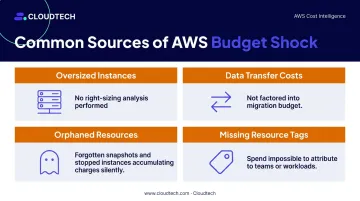
Without cost allocation policies and a pre-migration budget baseline, waste is invisible until the bill arrives.
Security Vulnerabilities and Downtime Risks
The shift to cloud opens new attack vectors that on-premises security models don't account for. Misconfigured IAM roles, unencrypted S3 buckets, and data moving in transit without TLS are common findings in SMB environments that migrated without security embedded from the start.
Cutover risk is equally serious. For customer-facing applications or regulated workloads, unplanned downtime during cutover can trigger SLA violations and erode customer trust — fast. Without a documented rollback plan for each migration wave, teams are making irreversible decisions with no safety net.
What Happens When These Challenges Go Unaddressed
Unresolved migration challenges compound fast. Stalled migrations increase sunk costs, delay business value, and often leave organizations running expensive hybrid environments with no clear exit.
Warning Signs Your Migration Is Headed for Trouble
These signals often appear early but get dismissed as temporary friction. Catch them quickly.
- Application owners are blindsided by scope — wave plans keep getting revised, and no change control process governs what gets added.
- Budget overruns appear before a single workload moves — undiscovered dependencies, disengaged stakeholders, and an incomplete inventory are usually the cause.
- Problems surface through user complaints, not dashboards — and no rollback plan exists when something breaks in production.
Any one of these signals warrants a pause. If you're seeing all three, the priority shifts from moving fast to stopping the bleeding — reassessing scope, resetting stakeholder alignment, and filling the gaps before the next wave starts.
How to Avoid AWS Migration Challenges
Avoiding migration failures isn't about a one-time checklist. It requires the right controls applied consistently across every wave — from discovery through final cutover.
Start with a Thorough Discovery and Assessment
Before defining any wave plan, conduct a full inventory of applications, dependencies, data flows, and infrastructure. AWS Transform (the successor to Application Discovery Service and Migration Hub, which closed to new customers in late 2025) supports this discovery process.
This phase produces the documented baseline that prevents scope from becoming a moving target. Without it, you're planning a migration against an incomplete picture.
Discovery outputs should include:
- Application dependency maps
- Data volume and classification inventory
- Compliance requirements per workload
- Business continuity requirements (RPO/RTO targets)
- Migration strategy assignment using the AWS 7 Rs framework
Define success criteria — cost reduction targets, performance benchmarks, compliance requirements — before the first workload moves.
Run Migrations in Phases, Not All at Once
Big-bang migrations fail more often than phased ones. Start with non-critical, low-dependency workloads to validate tooling, team processes, and the AWS target architecture before advancing to anything business-critical.
Good candidates for early waves include:
- Internal tools and developer environments
- File shares and archival storage
- Non-production test systems
Apply lessons from early waves before moving to higher-complexity workloads.
A typical SMB migration wave structure:
- Wave 1 (Weeks 1–4): Low-risk internal systems. Validate rollback procedures and build team confidence.
- Wave 2 (Weeks 4–12): Business applications and databases. Use AWS DMS for minimal-downtime database replication.
- Wave 3 (Weeks 8–16+): Customer-facing and compliance-sensitive workloads. Implement blue-green deployments and Route 53 weighted routing for gradual cutover with real-time CloudWatch validation.
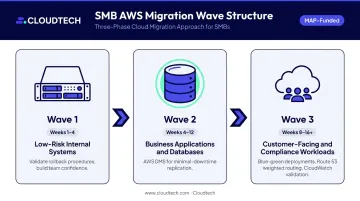
The principle that guides Cloudtech's wave planning: most migrations fail on the wave plan, not the technology. Sequencing matters as much as tooling.
Invest in AWS-Certified Expertise Early
Skills gaps that exist before go-live don't disappear afterward. Two practical paths to closing them:
- Build internal capability through AWS training and certification programs before migration begins, not after.
- Partner with an AWS-certified consulting firm to get immediate access to proven migration patterns without building expertise from scratch.
Cloudtech's team, primarily former AWS employees, holds AWS Advanced Tier Partner status with Service Delivery designations in Database Migration Service, Amazon DynamoDB, and AWS OpenSearch. For SMBs without a dedicated cloud team, that depth of expertise translates directly into fewer architectural mistakes, faster delivery, and access to AWS MAP funding programs that can significantly offset migration costs.
Embed Security and Compliance from Day One
Security controls belong in the landing zone architecture, not in a post-migration remediation backlog. Before migrating any workload, establish:
- IAM least-privilege policies with role-based access scoped to job function and MFA enforced for all admin access
- Encryption at rest via AWS KMS with customer-managed keys across S3, RDS, and DynamoDB
- Encryption in transit via TLS 1.2 or higher for all data movement
- CloudTrail enabled across all accounts, with logs centralized in an immutable S3 bucket
- GuardDuty and Security Hub active from the moment the first resource is provisioned
For regulated industries, configure AWS services to meet HIPAA, GDPR, or SOC 2 requirements as part of landing zone setup — not after the fact. Cloudtech's AWS Foundations package, built on AWS Control Tower, deploys these controls at the start of the engagement and enforces them continuously through automation rather than periodic manual checks.
Establish Cost Controls Before Go-Live
Cost visibility tools configured after migration rarely catch waste early enough. Set up the following before any workload moves:
- Resource tagging policies with mandatory tags for owner, environment, and cost center, enforced via AWS Tag Policies
- AWS Budgets configured with alerts for actual and forecasted spend by team, environment, and application
- AWS Cost Explorer enabled for granular spend analysis from day one
- A multi-account structure with separate accounts per workload or department, and Service Control Policies to limit uncontrolled resource scaling
- CloudWatch dashboards deployed before each wave cutover to monitor application performance and instance health
Right-sizing analysis before migration — using AWS Compute Optimizer — prevents overprovisioned instances from becoming the new normal in the cloud environment.
Tips for Long-Term Cloud Success After Migration
The cutover is not the finish line. Cloud environments drift — costs creep up, resources get oversized, and ownership gaps widen without active management. Sustained performance requires ongoing discipline across four areas:
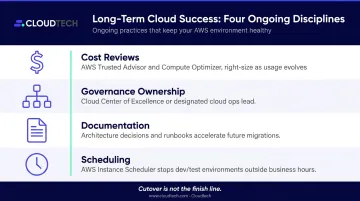
- Run regular cost reviews using AWS Trusted Advisor and Compute Optimizer to right-size resources as usage patterns evolve — a workload sized correctly at migration can easily be oversized six months later.
- Assign a clear cloud governance owner — a Cloud Center of Excellence (CCoE) or designated cloud ops lead — to enforce policies and drive continuous optimization. No clear owner means no active management.
- Document architecture decisions and runbooks so future workload migrations become faster and more predictable. Capturing what worked (and what didn't) in Wave 1 directly accelerates Wave 2.
- Use AWS Instance Scheduler to stop dev/test environments outside business hours — no architectural changes required, and the cost savings show up immediately.
Conclusion
AWS migration challenges are predictable. Organizations that struggle most are those that treat migration as a technical exercise rather than a structured business program requiring planning, expertise, and governance. The problems covered in this guide — unclear scope, compliance exposure, skills gaps, cost overruns, security misconfigurations — all have known prevention strategies.
The first step is an honest assessment of your current environment: what you're running, what it depends on, and what moving it to AWS actually requires. Cloudtech works with SMBs across healthcare, financial services, and manufacturing to run that assessment and carry the migration through to completion — securely and on budget.
For qualifying workloads, AWS MAP funding can significantly reduce or eliminate out-of-pocket migration costs. Start with a free migration readiness assessment to find out what applies to your environment.
Frequently Asked Questions
What are the three phases of the AWS migration process?
AWS structures migration into three phases: Assess (inventory and readiness evaluation), Mobilize (landing zone build, team preparation, and pilot migrations), and Migrate & Modernize (systematic workload migration with continuous optimization). Each phase has defined outputs before the next begins.
What are common AWS migration challenges?
The most frequent obstacles are lack of a defined strategy, data migration complexity, skills gaps, cost overruns, security misconfigurations, and unplanned downtime during cutover. Nearly all are preventable with thorough upfront planning.
How long does an AWS migration typically take?
Timelines vary by scope — simple workload migrations can complete in a few weeks, while phased data center migrations typically span three to twelve months. Experienced partners and pre-packaged migration tooling can shave weeks or months off that range compared to teams building processes from scratch.
What is the lift-and-shift approach in AWS migration?
Lift-and-shift (rehosting) moves workloads to AWS with minimal architectural changes. It's the fastest migration path, but it may not capture the full cost or performance benefits available through cloud-native redesign, and it's typically a starting point rather than a final state.
How can SMBs reduce AWS migration costs?
Right-size instances before go-live, configure resource tagging and AWS Budgets from day one, and eliminate idle resources early. For qualifying organizations, AWS MAP (Migration Acceleration Program) funding through an AWS Partner can significantly offset or eliminate out-of-pocket migration costs.
Do I need an AWS consulting partner to migrate successfully?
Independent migration is possible, but AWS consulting partners bring certified expertise, proven migration patterns, and access to AWS funding programs that reduce risk, cost, and time meaningfully. For SMBs without a dedicated cloud team, the gap between in-house capability and what's needed is often the primary reason migrations stall.