Introduction
Recommendation systems drive enormous business outcomes. McKinsey's research found that recommendations influenced 35% of Amazon purchases and 75% of Netflix viewing — numbers that explain why every major platform has invested heavily in personalization infrastructure.
Traditional systems match historical patterns. GenAI systems go further — generating context-aware, individually tailored content around those recommendations and turning a ranked item list into a personalized email, a themed promotion, or a dynamic product description.
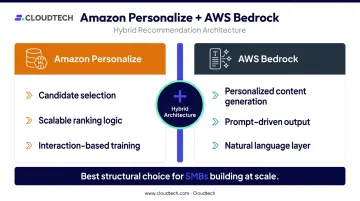
Results vary dramatically, though. Pure GenAI approaches — relying on an LLM alone — tend to be expensive, token-constrained, and hard to scale. The practical architecture for most SMBs pairs Amazon Personalize for core recommendation logic with AWS Bedrock for the generative content layer built around it.
This guide walks through that hybrid approach: the six-step build process, prerequisites, the parameters that determine output quality, and the mistakes that most commonly derail implementations.
Key Takeaways
- Combining Amazon Personalize for ranking with AWS Bedrock for content generation outperforms pure GenAI approaches on both cost and accuracy at scale
- Amazon Personalize requires at least 1,000 interactions, 25 unique users, and 2 interactions per user to train effectively
- Prompt engineering requires ongoing iteration across both development and production — not a one-time setup
- Automatic retraining in Personalize defaults to every 7 days and is configurable from 1 to 30 days
- SMBs can reach a working system in weeks with the right AWS services and setup
How to Build a Recommendation System Using Generative AI on AWS
Step 1: Collect and Prepare Your Data
Start by gathering three data types and loading them into Amazon S3:
- Interaction data — purchases, clicks, views, searches (required fields:
USER_ID,ITEM_ID,TIMESTAMP) - Item metadata — product categories, descriptions, attributes
- User attributes — demographics, preferences, segments
Only interaction data is technically required by Amazon Personalize, but including all three improves recommendation quality. AWS recommends that metadata columns be at least 70% complete to be useful.
Before ingestion, clean the data:
- Filter bot traffic from interaction logs
- Remove or anonymize PII to meet GDPR and CCPA requirements
- Group events into user sessions in chronological order
- Confirm CSV format: one record per line, unique unquoted headers, UTF-8 encoding
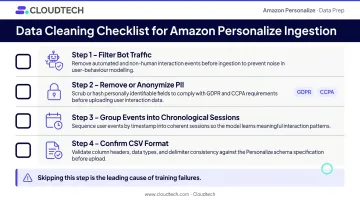
Skipping this step is the leading cause of Personalize training failures and poor recommendation quality.
Step 2: Set Up Amazon Personalize and Train a Recommender
Create a dataset group in Amazon Personalize and import your S3 data into the corresponding schemas. Then select the appropriate use-case recommender for your domain:
| Domain | Recommender | Output |
|---|---|---|
| Ecommerce | Recommended for you | Personalized products |
| Ecommerce | Frequently bought together | Co-purchased products |
| Video on demand | Top picks for you | Personalized videos |
| Video on demand | Trending now | Rapidly gaining popularity |
Domain recommenders handle configuration automatically. Before initiating training, verify that IAM roles, permissions, and S3 bucket policies are correctly set — access errors at this stage halt training entirely.
Step 3: Retrieve Personalized Recommendations via API
Query the trained recommender using the Amazon Personalize Runtime GetRecommendations API, passing user IDs to receive ranked item lists in real time. For domain recommenders, pass recommenderArn; for custom campaigns, use campaignArn.
Configure filters to exclude previously interacted items:
EXCLUDE itemId WHERE INTERACTIONS.event_type in ("*")
Validate the output format before moving to prompt construction. Bedrock calls downstream depend on clean, consistently structured item data from this step.
Step 4: Engineer a Personalized Prompt for AWS Bedrock
Combine Personalize-recommended items with user context into a structured prompt template. A high-quality prompt includes:
- Recommended item IDs and metadata from Personalize
- User demographic signals and behavioral history
- Contextual signals (time of day, location, recent activity)
- Output format instructions (email, product description, promotional copy)
- Persona framing to control tone
Weak prompt: "Write a recommendation email for this user."
Stronger prompt: "You are a personal shopping assistant for a 32-year-old outdoor enthusiast in Denver. Based on their recent purchases of hiking boots and trail maps, recommend the following three items in a friendly, adventurous tone, formatted as a three-paragraph promotional email: [Item A], [Item B], [Item C]."
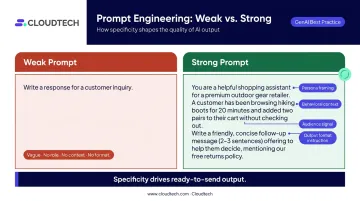
The second prompt gives the model a persona, behavioral context, audience, and format — producing output that's ready to send rather than a generic starting point. Test variations in AWS Bedrock's playground before finalizing.
Step 5: Generate Personalized Content via AWS Bedrock
Send the engineered prompt to a foundation model through the Bedrock API. Available text models include Claude 3 Sonnet and Haiku, Titan Text Lite and Express, and Meta Llama 3 8B and 70B. Choose based on your latency tolerance, output quality requirements, and per-token cost targets.
Key inference parameters to configure:
- temperature — lower values for consistent, on-brand output; higher for creative variation
- maxOutputTokens / max_tokens — controls response length and cost
- topP — limits token sampling to the most probable candidates
Post-process the model's output into a structured format your application can use — for example, parsing promotion details and mapping them to existing offer IDs in your database.
Step 6: Deliver Content and Establish a Feedback Loop
Deliver personalized content through the appropriate channel — email, in-app notification, product page, or push message — and instrument tracking for:
- Click-through rate — measures whether users engage with recommended content
- Conversion rate — tracks how often recommendations drive a purchase or desired action
- Session depth — signals whether recommendations are extending engagement beyond the first click
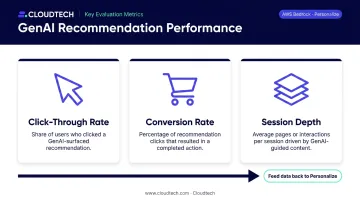
Feed user response data back into Amazon Personalize on a scheduled basis to retrain the recommender. By default, Personalize automatically creates a new solution version every 7 days; this is configurable from 1 to 30 days depending on how quickly your user preferences shift. Without this loop, recommendation relevance degrades as user behavior evolves.
When Should You Use GenAI for Recommendation Systems?
GenAI-enhanced recommendation is not the right fit for every scenario. A simple "users who bought X also bought Y" use case doesn't need Bedrock — Amazon Personalize alone is faster, cheaper, and equally effective for pure ranking tasks.
The hybrid approach creates clear value when you need:
- Dynamically generated product descriptions tailored to individual users
- Themed promotional campaigns ("Summer Adventure" bundles, seasonal collections)
- Personalized content summaries for media or learning platforms
- Context-aware suggestions factoring in real-time signals like location or time of day
Industries already seeing measurable returns from this architecture include retail, SaaS, streaming, travel, and financial services.
Where pure GenAI recommendation becomes inefficient:
- Processing individual customer records through an LLM at production scale increases latency and cost substantially
- Batch GenAI processing sacrifices personalization depth
- LLMs have context window limits that make large-catalog recommendations structurally difficult
These limitations point to the same conclusion: a hybrid architecture that uses Personalize for candidate selection and Bedrock for content generation is the right structural choice for most SMBs building at scale.
What You Need Before Building a GenAI Recommendation System
Preparation directly determines how quickly you reach a working system and how accurate early recommendations are.
System and Account Requirements
- Active AWS account with IAM roles configured for both Amazon Personalize and AWS Bedrock
- Manual access enablement for specific Bedrock foundation models (not all are active by default)
- Optional: a vector store if you plan to use Bedrock Knowledge Bases for RAG-enhanced recommendations
Cloudtech, an AWS Advanced Tier Partner, helps SMBs configure the right account architecture and IAM structure from day one — often with AWS Partner Funding that reduces out-of-pocket costs.
Data and Compliance Readiness
Your interaction data, item metadata, and user attributes must be cleaned, formatted, and stored in S3 before training begins. Non-compliance with GDPR or CCPA at this stage can invalidate your entire dataset and delay launch.
Before you collect a single record, confirm your data pipeline meets these compliance requirements:
- Data format: Interaction, item, and user datasets must match Personalize's schema specifications
- Consent & retention: GDPR and CCPA require documented lawful basis for collection and defined retention periods
- Deletion readiness: Personalize supports data-deletion jobs that remove user records and exclude them from future training — but only if your collection pipeline is compliant from the start
Skill and Tool Requirements
- Basic API integration experience for Bedrock and Personalize Runtime
- Teams without in-house ML expertise can rely on Personalize's managed domain recommenders
- Prompt engineering is the highest-leverage skill in this stack — budget for iteration cycles rather than treating prompt design as a one-time setup task
Key Parameters That Affect Recommendation Quality
Output quality is controlled by four variables that require active management throughout the system's lifecycle. Getting them right at launch matters, but so does maintaining them over time.
Data Volume and Interaction Density
Amazon Personalize requires a minimum of 1,000 user-item interactions, 25 unique users, and at least 2 interactions per user to generate statistically meaningful recommendations. Sparse interaction data hits hardest for new users and new items — the cold-start problem.
Partial mitigations:
- Enrich the dataset with item metadata and user attributes to compensate for thin interaction histories
- Use Personalize's exploration configuration to surface newer items to users even without extensive interaction data
- Item metadata that is at least 70% complete can meaningfully improve similar-item prediction
Foundation Model Selection
Different Bedrock models vary in their ability to interpret nuanced prompts, generate natural-sounding copy, and handle domain-specific terminology. The wrong model for your output type produces generic, misaligned output.
Validate model selection against your specific output type — marketing copy, product descriptions, conversational responses — using Bedrock's playground before production deployment. Beyond quality, cost and latency differ significantly between models. Check current Bedrock pricing for region-specific input/output token rates before committing to a model at scale.
Prompt Engineering Quality
The prompt is the primary lever for controlling what Bedrock generates. AWS recommends prompts that include clear instructions, relevant context, separators, output-format constraints, and 3–5 examples for few-shot tasks.
A vague prompt produces output indistinguishable from a basic search result. Prompts that specify user context, item metadata, output format, and persona framing consistently outperform generic alternatives — the before/after example in Step 4 above illustrates why specificity matters.
Feedback Loop Cadence
User preferences shift. A model trained once and left static will drift toward irrelevance over weeks or months.
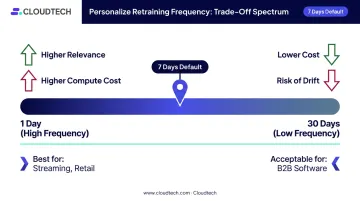
Personalize's automatic retraining runs every 7 days by default (configurable from 1 to 30 days), but only when new qualifying interaction data is available. Configure your dataset import cadence to ensure fresh behavioral data reaches Personalize consistently.
The right frequency involves a real trade-off:
- Higher frequency improves relevance but increases compute cost — best for fast-moving catalogs like streaming or retail
- Lower frequency reduces cost but risks drift — acceptable for stable use cases like B2B software recommendations
Common Mistakes When Building GenAI Recommendation Systems
Avoid these four pitfalls before they become production problems:
Sole reliance on an LLM: Relying on Bedrock alone — without Amazon Personalize handling core ML logic — is expensive at scale and hits context window limits fast. Always use the hybrid architecture: Personalize generates the candidate list, Bedrock generates the content layer around it.
Rushed data preparation: Importing uncleaned, improperly formatted, or PII-containing data into Personalize causes training failures, compliance violations, and degraded model accuracy. Poor data quality at Step 1 cannot be fixed by prompt engineering at Step 4.
One-and-done prompt engineering: Prompts that work in development frequently underperform against real production data variation. Teams that skip iterative testing and A/B evaluation end up with outputs that feel generic or inconsistent across user segments. Build iteration cycles in from the start.
No feedback loop: Launching without a mechanism to feed new interaction data back to Personalize is why recommendation quality plateaus or declines post-launch. Build monitoring and retraining cadence into the initial architecture — not as an afterthought.
Conclusion
The most reliable path to a production GenAI recommendation system on AWS is a clear division of responsibilities: Amazon Personalize handles scalable, accurate recommendation logic; AWS Bedrock generates the personalized content layer that makes each user's experience feel distinct. Most early failures trace back to three root causes — not the technology itself:
- Relying on GenAI alone without a structured recommendation engine
- Poor data preparation before model training
- Weak prompt engineering that produces generic, unhelpful outputs
SMBs don't need enterprise-scale ML teams to implement this. With the right AWS services and an experienced partner, a working recommendation system is achievable in weeks. Cloudtech's AWS-certified architects — a team of 70% ex-AWS professionals holding 100+ certifications — work with SMBs to design, build, and deploy GenAI recommendation systems matched to their industry, data environment, and use case.
Reach out at connect@cloudtech.com to discuss your project.
Frequently Asked Questions
What is an AI recommendation engine?
An AI recommendation engine uses machine learning and behavioral data to suggest relevant items — products, content, services — to individual users based on their past interactions and preferences. Unlike manual curation or basic search, it personalizes suggestions dynamically for each user without human intervention.
What is an example of a recommendation engine?
Spotify's Discover Weekly is one of the most concrete examples — it has delivered over 100 billion track streams by combining listening history with playlist co-occurrence data. Netflix's movie suggestions and Amazon's "frequently bought together" follow similar logic, using viewing history and purchase behavior respectively.
What is the difference between a traditional and a GenAI recommendation engine?
Traditional engines match users to items based on historical patterns — collaborative filtering, content-based filtering, or both. GenAI engines can generate new, context-aware content and explanations around those recommendations rather than simply ranking pre-existing items. Production systems combine both: traditional ML for ranking, GenAI for content generation.
Do I need a large dataset to build a GenAI recommendation system on AWS?
Amazon Personalize requires at least 1,000 interactions, 25 users, and 2 interactions per user to train. Item metadata and user attributes can compensate for sparse data, and Personalize's exploration configuration can surface new items before robust interaction histories exist.
How much does building a GenAI recommendation system on AWS typically cost?
Costs depend on dataset size, retraining frequency, Bedrock model selection, and API call volume, where token rates vary by model and region. AWS Partner Funding, available through certified partners like Cloudtech, can significantly reduce or eliminate out-of-pocket costs for eligible SMBs depending on project scope.