Introduction
Moving data to AWS sounds straightforward until you're three weeks into planning and realizing your 15TB of EHR records, legacy SQL databases, and unstructured file shares each need a completely different approach. Most businesses understand the why of cloud migration — lower infrastructure costs, better scalability, disaster recovery. The how is where projects stall.
According to the Flexera 2026 State of the Cloud Report, 29% of IaaS and PaaS spend is wasted, and 52% of European organizations cite understanding application dependencies as a primary migration hurdle. Those numbers reflect poor planning, not poor technology.
This guide covers:
- The core AWS migration methods — online, offline, and hybrid
- The main tools and what they actually cost
- A practical five-step migration process
- Specific tactics for controlling spend
Whether you're moving a handful of databases or a full on-premises data center, choosing the right method for your data type determines whether the project lands on time or stalls for months.
Key Takeaways
- Data volume and bandwidth determine your method — online tools work for most SMBs; physical devices (Snowball) are better for multi-terabyte datasets with limited connectivity
- AWS charges for transfer services, not data ingress — inbound transfers are free; compute, replication, and egress are not
- DMS is the default starting point for live database migrations — it keeps your source database running throughout
- Pilot migrations prevent costly surprises — running a pilot before full cutover prevents data loss and costly rollbacks
- AWS Partner Funding can significantly reduce out-of-pocket migration costs when working with an AWS Advanced Tier Partner like Cloudtech
What Is AWS Data Migration?
AWS data migration covers moving data, applications, workloads, or business systems from on-premises infrastructure (or another cloud) into AWS — including both one-time migrations and ongoing data replication. AWS groups these services into three categories: hybrid cloud storage, online data transfer, and offline data transfer, supporting files, databases, machine images, block volumes, and tape backups.
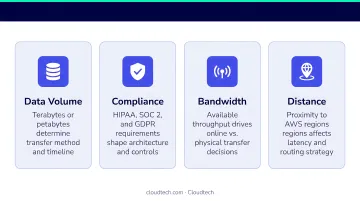
Four Factors That Determine Your Approach
Before choosing any tool, assess these variables:
- Total volume and format: a 500GB SQL database and 50TB of unstructured files require different methods
- Geographic distance from AWS regions: longer distances increase latency and make certain online methods impractical
- Available network bandwidth: AWS notes that 1TB over a 1.544 Mbps T1 connection at 80% utilization takes approximately 82 days — that math alone settles the online vs. offline debate
- Compliance and data privacy requirements: HIPAA-covered healthcare organizations and financial services firms under PCI-DSS must prioritize encrypted, private connections over public internet transfers
How to Choose the Right AWS Migration Method
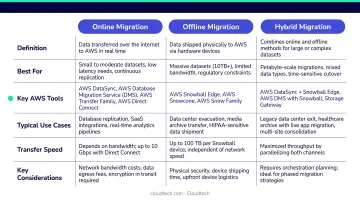
Three broad categories exist, and each fits a different scenario:
| Method | Best For | Example Tools |
|---|---|---|
| Online | Datasets under several TB with reliable connectivity | DataSync, DMS, VPN, S3 Transfer Acceleration |
| Offline | Multi-terabyte to petabyte datasets, limited bandwidth | Snowball, Snowcone |
| Hybrid | Ongoing sync between on-premises and AWS | Direct Connect, Storage Gateway |
The Quick Decision Framework
Before selecting a method, run this calculation: estimate how long your total data volume would take to transfer over your current bandwidth. If the answer is weeks, offline physical transfer is worth evaluating. Use the AWS Pricing Calculator to model costs before committing, and AWS Cost Explorer to analyze historical patterns if you're migrating an existing hybrid workload.
Compliance requirements add another layer to this decision. Regulated industries should prioritize methods that keep data off the public internet entirely:
- Healthcare: Public internet transfers may not satisfy HIPAA technical safeguard requirements for data in transit
- Financial services: PCI-DSS Requirement 4 mandates encryption of cardholder data across open public networks — Direct Connect removes that exposure
- Manufacturing: Operational data with location requirements (where data must stay within specific geographic or network boundaries) often demands private connectivity over shared paths
AWS Data Migration Methods: Online, Offline, and Hybrid
Online Migration Methods
Online migration transfers data over a network connection to AWS. It suits most SMB and startup scenarios where connectivity is reliable and data volumes are manageable.
AWS Site-to-Site VPN creates an encrypted IPsec connection between your on-premises network and AWS VPC. Standard tunnels support up to 1.25 Gbps throughput; Large Bandwidth Tunnels reach 5 Gbps for eligible Transit Gateway configurations. It's quick to set up and cost-effective for moderate data volumes.
AWS Database Migration Service (DMS) is purpose-built for migrating relational databases, data warehouses, and NoSQL stores to AWS targets including Amazon RDS, Aurora, Redshift, DynamoDB, and S3. The source database stays fully operational throughout, with near-zero downtime via continuous change data capture (CDC).
It's Cloudtech's go-to tool for live database migrations — particularly for heterogeneous migrations (for example, on-premises SQL Server to Amazon Aurora).
AWS DataSync automates data movement between on-premises storage and Amazon S3 or EFS, handling encryption, scheduling, integrity verification, and monitoring. AWS states DataSync transfers data at speeds up to 10x faster than open-source tools, and charges per GB transferred.
AWS S3 Transfer Acceleration speeds up uploads to S3 over long distances by routing traffic through CloudFront edge locations. It's particularly useful for distributed teams or recurring upload workflows — media files, backups, analytics data.
Offline Migration Methods
Offline migration means physically shipping encrypted storage devices to AWS. It's the right choice when network transfer would take weeks, or when bandwidth is severely constrained.
For remote edge collection in constrained environments, AWS Snowcone is the right fit. At approximately 4.5 lbs with 8TB usable storage, it's the smallest Snow family device and the simplest to deploy off-site.
AWS Snowball Edge handles large on-premises archive migrations at scale, available in Storage Optimized (210TB NVMe) and Compute Optimized configurations. Note: AWS discontinued the legacy 80TB model in November 2024. New customers should confirm current device availability and consider AWS DataSync or AWS Data Transfer Terminal as alternatives.
Important: AWS retired Snowmobile (the 45-foot shipping container for exabyte-scale transfers) in April 2024. For petabyte-scale migrations, consult directly with AWS on current options.
Hybrid Migration Methods
Hybrid approaches keep on-premises systems connected to AWS for low-latency access or ongoing synchronization.
AWS Direct Connect establishes a dedicated private fiber connection (1 Gbps or 10 Gbps) between your data center and AWS, bypassing the public internet entirely. It delivers consistent, high-throughput performance — essential for businesses with continuous large-volume data transfer needs. Higher upfront cost than VPN, but the consistency and security justify it for production workloads.
AWS Storage Gateway bridges on-premises applications to AWS storage through File, Tape, or Volume gateways. It enables cloud-backed file sharing and backup without refactoring existing applications.
In Cloudtech's Klamath Health engagement, the team used S3 File Gateway and Storage Gateway to handle both structured and unstructured healthcare data sources while maintaining HIPAA compliance.
| Method | Best For | Example Tools |
|---|---|---|
| Online | Reliable connectivity, manageable data volumes | DMS, DataSync, VPN, S3 Transfer Acceleration |
| Offline | Weeks-long transfer times, bandwidth-constrained sites | Snowcone, Snowball Edge |
| Hybrid | Ongoing sync, low-latency access, production workloads | Direct Connect, Storage Gateway |
AWS Migration Tools and What They Cost
AWS does not charge for inbound data transfer. Costs come from compute and storage resources used during the migration, plus data egress fees once your workloads are running in the cloud.
Current Pricing Reference
| Tool | Approximate Cost | Notes |
|---|---|---|
| Site-to-Site VPN | $0.05/hr per standard connection | 5 Gbps connections at $0.60/hr |
| AWS DMS | Free tier/credits for new accounts; on-demand from ~$0.018/hr | Verify current rates at aws.amazon.com/dms/pricing |
| AWS DataSync | $0.0125/GB (basic); $0.015/GB + $0.55/task (enhanced) | Per GB transferred |
| S3 Transfer Acceleration | $0.04–$0.08/GB inbound depending on edge location | Additional to standard S3 pricing |
| Snowball Edge | From $1,800/job (up to 100TB); $3,200 for 101–210TB | Includes 15 onsite days; $250/day after |
| Direct Connect | $0.30/hr (1 Gbps); $2.25/hr (10 Gbps) in U.S. | Excludes data transfer charges |
Always verify current pricing directly on AWS pricing pages before budgeting — rates change and vary by region.
Key Cost Variables
These variables tend to move the total bill the most:
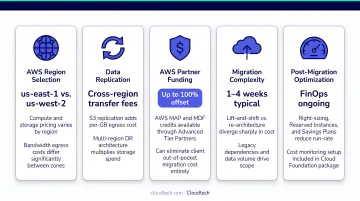
- Target region — AWS pricing differs across regions, sometimes by 10–20%
- Replication type — continuous DMS replication costs more than a one-time full load
- DMS instance configuration — Multi-AZ replication instances cost more than Single-AZ deployments
- Inter-AZ transfers — as of April 2022, transfers within the same AWS Region via PrivateLink and Transit Gateway are free, reducing costs for multi-AZ architectures
- AWS Partner Funding — companies working with an AWS Advanced Tier Partner may qualify for migration credits that reduce or eliminate out-of-pocket costs
How to Migrate Data to AWS: Step-by-Step Best Practices
Step 1 — Assess and Inventory Your Data
Before selecting any tool, catalog what you have:
- Document data types, volumes, and formats across all systems
- Map dependencies between applications and databases
- Flag data subject to compliance requirements — PHI for healthcare, PII for financial services
- Identify which systems are business-critical and which can tolerate downtime
Cloudtech initiates every engagement with a structured discovery workshop specifically designed to surface these dependencies before any technical work begins.
Step 2 — Choose Your Method and Tool
Match your tool to your situation:
- Database migrations → AWS DMS (start here for SQL and heterogeneous migrations)
- File and object data → AWS DataSync or S3 Transfer Acceleration
- Bulk historical data → Snowball Edge (confirm current availability)
- Hybrid, ongoing sync → Direct Connect + Storage Gateway
If you're uncertain about architecture choices, validate with an AWS-certified partner before committing resources. Using the wrong tool can force a full re-migration — adding weeks of work and doubling your data transfer costs.
Step 3 — Configure Network Connectivity and Security
Security configuration should happen before any data moves:
- Set up your VPC, security groups, and IAM roles with least-privilege principles
- Use temporary credentials via AWS STS rather than permanent IAM user keys
- Enable encryption in transit and at rest for all migrated data
- Configure AWS CloudTrail and AWS Config from day one — not as an afterthought
For healthcare clients, Cloudtech also enables Amazon Macie to automatically classify sensitive data and AWS KMS for encryption key management.
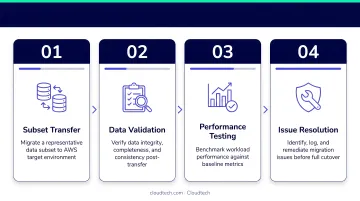
Step 4 — Run a Pilot Migration and Validate
Never go straight to full cutover:
- Migrate a representative data subset to the target AWS environment
- Compare row counts, checksums, and application behavior against the source
- Run user acceptance testing on your AWS Application Migration Service test instance for at least two weeks
- Document any issues and resolve them before scheduling cutover
Step 5 — Execute Cutover and Monitor
When you're ready to cut over, move deliberately:
- Schedule the cutover during a low-traffic window
- Keep source systems running until the target environment is confirmed stable
- Monitor migration progress in real time using Amazon CloudWatch and AWS DMS task logs
- Decommission source infrastructure only after confirming data integrity and application stability
How to Reduce AWS Data Migration Costs
Five tactics that have the most practical impact:
- Stay within one AWS Region and AZ where possible — cross-region and cross-AZ transfers add up fast
- Use VPC endpoints (Gateway endpoints for S3 and DynamoDB) — routes traffic over the AWS network instead of the public internet, avoiding data transfer charges
- Apply cost allocation tags from day one — without tags, it's nearly impossible to identify which workloads are driving the highest transfer costs post-migration
- Use Amazon CloudFront to reduce EC2-to-internet data transfer costs — CloudFront's free tier includes 100GB of data transfer per month
- Limit outbound transfers during migration — data egress from AWS is where many first-time migrators get surprised
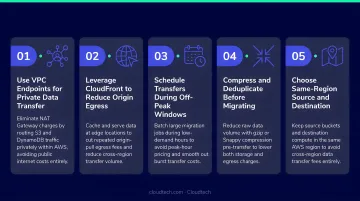
Those five tactics address the technical side. On the funding side, businesses that engage an AWS Advanced Tier Partner like Cloudtech may qualify for AWS Partner Funding — migration credits and technical support that can significantly offset out-of-pocket costs. Cloudtech's team includes former AWS professionals who can identify which funding programs apply based on your workload type, data volume, and migration scope.
Post-migration, set up AWS Cost Explorer and AWS Trusted Advisor to catch accumulating transfer costs — critical for businesses running hybrid architectures or multi-region deployments.
Frequently Asked Questions
How do you transfer data from on-premises to AWS?
On-premises data moves to AWS through online tools like AWS DataSync (for files), AWS DMS (for databases), or AWS Site-to-Site VPN — with AWS Snowball handling physical device-based migration when network transfer would take too long. The right choice depends on data volume, available bandwidth, and compliance requirements.
Is data transfer into AWS free?
AWS does not charge for inbound data transfer itself. However, the services used to perform the transfer — DataSync per-GB fees, DMS compute instances, Snowball job fees — do cost money. Data transferred out of AWS to the internet incurs charges, which is a common source of unexpected bills.
What is the fastest way to migrate large amounts of data to AWS?
For very large datasets (multiple terabytes or petabytes), Snowball is often faster in practice than any network-based approach. For online transfers, AWS DataSync and S3 Transfer Acceleration both significantly outperform standard file copy methods, with DataSync claiming up to 10x the speed of open-source tools.
How long does AWS data migration take?
Timelines vary widely. Small database migrations via DMS can complete in hours; tens of terabytes over a constrained network may take days or weeks. For Snowball, factor in up to four weeks for device provisioning before it even ships, plus return shipping and AWS import processing time.
What are the biggest risks of migrating data to AWS?
The main risks are data loss or corruption if migration isn't validated, application downtime during cutover, security misconfigurations such as overly permissive IAM roles, and unexpected egress costs. Thorough planning, a pilot migration, and proper IAM governance address most of these before they become problems.