Building a seamless handoff isn't just about adding an escalation button. It requires precise trigger logic, complete context transfer, intelligent agent routing, and continuous measurement. Get one of those wrong and the handoff becomes the problem — not the solution.
This guide walks through the exact steps to build your handoff system, what infrastructure you need beforehand, the parameters that most directly affect quality, and the mistakes that cause handoffs to fail in production.
Key Takeaways
- A seamless handoff requires three components: precise escalation triggers, complete context transfer, and intelligent agent routing
- Measure resolution rate on escalated conversations — not containment rate — from day one
- The minimum viable context packet includes the full transcript, customer intent, and prior resolution attempts
- AWS-native services (Amazon Bedrock, Amazon Connect, Lambda) provide a pre-integrated foundation that eliminates context-loss failures from stitched-together stacks
- Test edge cases like frustrated users, mid-conversation topic shifts, and agent unavailability — not just clean handoff flows
How to Build a Seamless AI Chatbot to Human Handoff
Step 1: Define Your Escalation Triggers and Conditions
Escalation triggers are the decision logic that tells the bot when to stop trying and hand control to a human. Vague or poorly scoped triggers are the single most common cause of failed handoffs. Configure four specific signal types:
- Sentiment signals — sustained negative tone or explicit frustration detected by the NLP layer (Amazon Lex V2, for example, integrates with Amazon Comprehend to return sentiment labels and scores per utterance)
- Intent signals — user explicitly requests a human agent
- Complexity signals — multi-step issue requiring account-level judgment the bot cannot resolve autonomously
- Failure signals — bot has attempted resolution two or more times without success
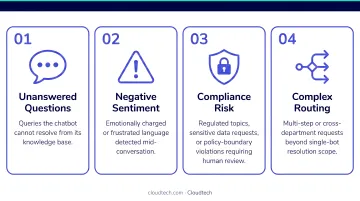
How to map triggers to your specific conversations: Pull 90 days of historical chat logs and identify the recurring cases where customers abandoned the bot or called back immediately after. Those interaction types are where handoff logic must be precise.
For regulated industries: Certain query types — billing disputes, fraud reports, medical records requests — should be configured as automatic escalations regardless of sentiment. The CFPB has warned financial institutions that chatbot "doom loops" — where customers are stuck without a clear path to a human — risk violating federal consumer financial laws. Don't wait for frustration signals on sensitive queries. Escalate them by default.
Step 2: Configure the Bot and Build the Handoff Function
Core bot setup requirements:
- Define the bot persona and system prompt
- Load the knowledge base — FAQs, policy documents, product data
- Configure the NLP model to distinguish intent categories the bot resolves autonomously from those that escalate
The handoff function is a dedicated trigger — call it transfer_to_human — that fires when escalation conditions are met. Its job is to:
- Send a POST request to your backend with the channel URL and conversation metadata
- Return a confirmation to the bot so it can inform the customer the transfer is in progress
What the function must capture at the moment of trigger:
| Field | Why It Matters |
|---|---|
| Channel URL | Identifies where the conversation is happening |
| Session ID | Links the context packet to the correct conversation thread |
| Customer inputs | What the customer told the bot |
| Bot resolution attempts | What the bot already tried (avoids repeated suggestions) |
| Current conversation state | Where in the flow the escalation occurred |
This data forms the context packet the live agent receives. Miss any of it and the agent starts the conversation blind.
Step 3: Set Up Context Transfer and Agent Routing
The minimum viable context packet includes:
- Full conversation transcript
- Identified customer intent
- Account or session identifiers
- Priority level
- Actions the bot already attempted
Without the transcript, agents ask customers to start over. Without intent, routing is guesswork.
Zendesk reports that 70% of customers expect any representative they interact with to have full context — yet 3 in 10 agents cannot reliably access that information, and 6 in 10 say the data gap directly causes negative experiences.
Configuring intelligent routing:
- Route to agent groups based on issue type (billing, technical, account)
- Set ticket priority dynamically — high priority for customers who have expressed anger or have repeat complaints
- Integrate with your CRM or ticketing system so agents receive context in the same interface they already use
Routing the wrong escalation to the wrong team causes a secondary transfer, compounding frustration and handle time. Intent-based routing — using the escalation trigger type to determine which agent group receives the ticket — consistently outperforms availability-only routing, particularly for complex or regulated-industry interactions.
Agent unavailability fallback: Configure a queue or callback mechanism before go-live. A handoff that drops a customer into silence is worse than staying with the bot.
Step 4: Test, Measure, and Refine the Handoff Flow
Test these four scenarios before launch:
- Clean handoff — user requests a human; confirm the full context packet arrives at the agent side
- Sentiment-triggered handoff — simulate escalating frustration across 3–5 turns and verify the trigger fires at the right threshold
- Complexity-triggered handoff — walk through a multi-step issue that exceeds the bot's resolution scope and confirm routing accuracy
- Failure-mode handoff — trigger a bot loop and a no-agent-available state; confirm the fallback (queue or callback) activates correctly
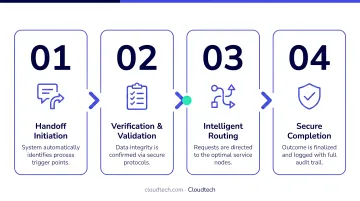
Metrics to track from day one:
- Resolution rate on escalated interactions (primary KPI)
- First-contact resolution (FCR) post-handoff
- CSAT scores specific to transferred conversations
- Re-contact rate — customers who contact support again within 24-72 hours after a handoff
Don't rely on containment rate alone. A bot that handles 80% of conversations but resolves only 40% is producing repeat contacts, not results.
Continuous refinement: Use bot flow analytics to identify where escalations cluster. If a disproportionate share of handoffs occur at the same question type, either improve the bot's response for that scenario or reclassify it as a permanent escalation type.
When Should You Implement AI Chatbot to Human Handoff?
Not every business needs a full handoff system on day one. It makes sense to build one when:
- The chatbot handles meaningful daily interaction volume
- A significant share of conversations involve account-sensitive, emotionally charged, or multi-step issues
- The business operates in a regulated industry where certain queries legally require human review
Industries where handoff becomes critical:
- Financial services and healthcare — real-money and health stakes mean unresolved interactions carry serious risk
- SaaS platforms — complex onboarding and billing edge cases frequently exceed bot capability
- Any operation where unresolved bot interactions directly cause customer churn
That said, there are situations where a handoff system is premature. Hold off if:
- Fewer than two to three dedicated agents available during business hours
- No functional base chatbot with a reliable knowledge base in place
- The majority of customer queries are genuinely resolvable by the bot
In those cases, a simpler fallback — a contact form or scheduled callback — covers the gap. Once your bot is handling real volume and your team has consistent coverage, that's the signal to build.
What You Need Before Building Your Handoff System
Preparation determines whether the handoff works in production. Gaps in infrastructure, data, or team readiness become failures at the exact moment a customer needs to be transferred.
Infrastructure and Platform Requirements
The bot must be built on a platform that supports webhook-based function calls or event triggers, and must be integrated with a helpdesk or ticketing system capable of receiving context data at the moment of escalation.
An AWS-native architecture — using Amazon Bedrock for conversational reasoning, Amazon Connect for the contact center layer, and Lambda for handoff logic — provides a pre-integrated foundation that avoids the context-loss issues common in stitched-together third-party stacks.
For SMBs building on this stack, firms like Cloudtech implement warm transfers that complete in under 2 seconds, passing full conversation context so customers never need to repeat themselves.
Data and Knowledge Base Readiness
Before layering in handoff logic, the bot must be well-trained. A poorly trained bot escalates too frequently, flooding agents with conversations the bot should have resolved.
Salesforce data shows AI currently resolves 30% of service cases and projects 50% by 2027 — but those figures assume a well-structured knowledge base and properly scoped intents. A bot without that foundation will underperform those benchmarks and over-escalate.
Agent Team and Process Readiness
Before the first handoff fires, the live agent team needs:
- A briefing on how handoffs work and what data they will receive
- Clear routing groups with skill tags assigned per agent
- A documented escalation SLA — specifically, the maximum wait time before a customer is notified that an agent is unavailable
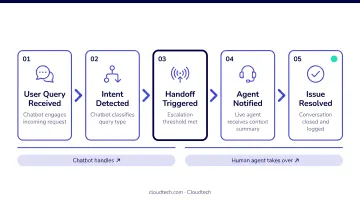
With infrastructure, data, and team readiness in place, you can move on to building the actual handoff logic.
Key Parameters That Affect Handoff Quality
Even a well-architected system produces poor outcomes if these four variables are misconfigured.
Escalation Threshold Calibration
If the threshold is too sensitive, agents receive conversations the bot could handle — contributing to the 56% of customer service reps who report burnout. If it's too high, customers hit their frustration ceiling before reaching a human.
The goal is a threshold calibrated to issue complexity, not just failure count. Review trigger logic quarterly against bot flow data to catch drift.
Context Packet Completeness
The context packet is the agent's only window into what happened before they joined. Three fields, when missing, most commonly cause agents to ask customers to re-explain their situation:
- Conversation transcript
- Customer-stated intent
- Prior bot resolution attempts
These three form the non-negotiable minimum. AWS Connect exposes Lex-derived contact attributes — including intent name, confidence score, slots, session attributes, sentiment labels, and alternate intents — that can populate the context packet automatically within an AWS-native architecture.
Agent Routing Logic
Routing an escalated conversation to the wrong team — a billing specialist receiving a technical configuration issue, for example — forces a secondary transfer. That compounds customer frustration and increases average handle time.
Intent-based routing, where the escalation trigger type determines which agent group receives the ticket, outperforms availability-based routing for any issue with meaningful complexity.
Channel Consistency
Routing logic only solves half the problem if your handoff breaks down across channels. If the chatbot operates across web chat, mobile, and voice but the handoff only works on one channel, customers on non-primary channels hit a dead end.
Multi-channel handoff requires a shared data layer across channels. Without it:
- A customer who starts on chat and calls in afterward must re-explain the full context to the voice agent
- Agent notes from prior sessions don't carry over between channels
- Escalation triggers may fire on one channel but fail silently on others
That fragmentation is one of the most common — and most avoidable — causes of lost customer trust.
Common Mistakes When Building AI Chatbot to Human Handoff
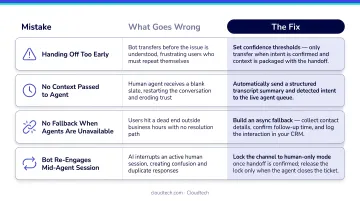
These four mistakes account for the majority of failed handoff implementations — and each one is fixable before go-live.
Miscalibrated escalation triggers. Firing escalation on "any unanswered query" creates two failure modes: agents fielding questions the bot should handle, or the bot looping before escalating. Define specific conditions — sentiment score, intent confidence threshold, topic category — and audit them quarterly against bot flow data.
Dropping context at handoff. This is a platform integration failure: the bot and ticketing system aren't sharing a data layer. Agents end up spending the first few minutes re-establishing what the bot already knew. Solve it at the architecture level by ensuring your conversational AI and CRM write to a shared session store before launch.
No fallback for agent unavailability. Systems that escalate without queue management leave customers in silence — which produces worse CSAT than staying with the bot. Configure three minimum fallbacks before go-live: queue position message, estimated wait time, and a callback option.
Reporting containment instead of resolution. A bot showing 80% containment while customers return with the same issue within 24 hours is masking a problem, not solving one. Zendesk distinguishes re-contact rate (same issue within 24, 48, or 72 hours) from true resolution — and so should your reporting. Containment alone won't surface miscalibrated handoff thresholds.
Frequently Asked Questions
What triggers an AI chatbot to hand off to a human agent?
Handoffs are triggered by a combination of signals: an explicit user request for a human, sustained negative sentiment detected by the bot's NLP layer, repeated resolution failures, or query types pre-classified as requiring human judgment — such as sensitive account issues or regulatory queries. Well-designed systems use all four trigger types together, not just one.
Can chatbots replace human customer support?
Chatbots handle high-volume, repeatable queries autonomously but are not a replacement for human agents. The most effective model is a hybrid: the bot resolves routine interactions and escalates complex, emotional, or sensitive ones to a human with full context. Gartner projects agentic AI will resolve 80% of common service issues by 2029, yet the most consequential interactions will still require a human.
What data should be transferred during a chatbot-to-human handoff?
The minimum viable context packet includes the full conversation transcript, identified customer intent, account or session identifiers, prior bot resolution attempts, and current issue status. This data ensures the agent can continue the conversation without asking the customer to start over.
How are AI chatbots used in customer service?
AI chatbots handle 24/7 self-service for common queries (order status, password resets, FAQs, appointment scheduling) and perform intelligent routing. When a conversation exceeds their autonomous capability, they escalate to live agents with full context, preserving continuity throughout.
How do I measure if my chatbot handoff is working effectively?
The primary KPI is resolution rate on escalated interactions, not containment rate. Track it alongside CSAT scores for transferred conversations, first-contact resolution post-handoff, and re-contact rate. Customers who reach out again within 24–72 hours signal the handoff did not actually resolve the issue.
What is the difference between escalation and handoff in AI chatbots?
Escalation is the decision to involve a human — triggered by logic or user request. Handoff is the actual transfer of the conversation, including the context packet and routing, to the live agent. A good escalation with a poor handoff — missing context, wrong routing — still produces a bad customer experience. Both components must work correctly.