Introduction
Data doesn't stay in one place. For most SMBs, it scatters across CRMs, ERPs, IoT devices, SaaS platforms, and legacy databases — and stitching it together manually is expensive, slow, and error-prone. In industries like healthcare, financial services, and manufacturing, where decisions move fast and compliance is non-negotiable, fragmented pipelines create real operational risk.
The stakes are real. According to a 2021 TDWI survey, 85% of organizations identified the time and effort required to access new data sources as a significant roadblock to their data initiatives — and 47% reported that most of their integration work still runs through spreadsheets.
This guide breaks down what SMBs need to know about AWS data pipelines: which services fit which workloads, and the design, security, monitoring, and cost decisions that determine whether a pipeline holds up under real production pressure.
Key Takeaways
- AWS Glue, Kinesis, and Step Functions cover ingestion, transformation, streaming, and orchestration for most SMB pipelines
- ETL vs. ELT architecture determines cost, performance, and maintainability — decide before you build
- HIPAA and PCI-DSS compliance must be designed in from day one, not retrofitted later
- Incremental loading with CDC cuts compute costs and enables near-real-time analytics
- AWS Partner Funding through Advanced Tier Partners like Cloudtech can significantly reduce implementation costs
AWS Data Pipelines and Data Integration: Understanding the Connection
A data pipeline is a series of automated processing steps — ingestion, transformation, loading, and delivery — that move raw data from its source to where it can drive business decisions. Without pipelines, data integration is a manual, error-prone process that burns engineering hours and degrades data quality over time.
Think of data integration as the destination and pipelines as the road that gets you there. Connecting your CRM, ERP, IoT sensors, and third-party APIs into a unified, queryable form means automating how data moves, how it gets cleaned, and where it lands — and pipelines are what make that automation possible.
Batch vs. Streaming Pipelines
The first architecture decision for any SMB is whether you need batch or streaming processing — and in many cases, the answer is both.
| Pipeline Type | How It Works | Best For |
|---|---|---|
| Batch | Processes high volumes of data on a schedule | Monthly financial consolidations, overnight inventory updates, weekly reporting |
| Streaming | Processes data continuously with low latency | IoT sensor monitoring, fraud detection, real-time clickstream analytics |
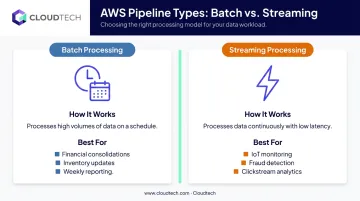
Most SMBs start with batch pipelines and add streaming components as specific real-time use cases emerge. Understanding this distinction early keeps architecture decisions proportionate to actual needs — and avoids committing budget to infrastructure you don't yet require.
Core AWS Services for Data Integration and Pipelines
AWS Glue
AWS Glue is a serverless data integration service built on Apache Spark. It handles ETL and ELT jobs without managing any infrastructure. Key components include:
- Data Catalog — a centralized metadata repository for schema discovery across your data sources
- Glue Studio — a visual interface for building, running, and monitoring ETL jobs (code-based authoring also supported)
- Glue Data Quality — native rule-based validation using DQDL rules like
IsComplete,ColumnDataType, andSchemaMatch
Glue is the right starting point when your workload is primarily ETL and you need a serverless Spark platform. For database migration specifically, AWS recommends AWS DMS; for simpler streaming delivery, Firehose.
Amazon Kinesis
Real-time ingestion on AWS runs through two Kinesis services, each suited to different use cases:
- Kinesis Data Streams — for custom low-latency processing applications; typical put-to-get delay is under one second. Use this for IoT telemetry, clickstream analytics, or any scenario requiring custom consumer logic
- Amazon Data Firehose (formerly Kinesis Data Firehose) — fully managed, buffered delivery to S3, Redshift, OpenSearch, and other destinations without writing delivery code. Redshift delivery stages data in S3 first, then runs
COPY
AWS Step Functions
Complex pipelines fall apart without reliable orchestration. Step Functions coordinates Glue jobs, Lambda functions, and other services with built-in:
- Retry logic — re-runs failed Task, Parallel, or Map states on configurable schedules
- Catch handling — routes to fallback paths once retries are exhausted
- Choice states — conditional branching based on job outputs
- Parallel execution — runs independent branches concurrently and waits for all to complete
Step Functions has native .sync integration with Glue, so you can trigger and monitor Glue jobs directly from your state machine without custom polling logic.
Amazon S3, Redshift, and RDS as Pipeline Endpoints
Where your data lands matters as much as how it moves. These three services cover the full range of storage needs in a pipeline architecture:
- Amazon S3 — scalable, cost-effective data lake storage for raw and processed data; the foundation for most SMB data architectures
- Amazon Redshift — cloud data warehouse for analytics-ready data; supports Concurrency Scaling to handle variable query loads without permanent peak provisioning
- Amazon RDS — managed relational database for transactional data integration workloads
A Note on AWS Data Pipeline (Legacy)
If your existing stack includes AWS Data Pipeline, it's worth knowing where things stand. AWS closed new-customer access on July 25, 2024. Existing customers can continue using it — AWS has published no end-of-life date. For any new pipeline builds, the current AWS recommendation is Glue combined with Step Functions, which offer greater serverless scalability and tighter integration with the modern AWS analytics stack.
Best Practices for AWS Data Pipeline Design and Architecture
Design for Modularity
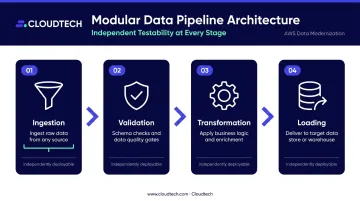
Structure pipelines as discrete, independently testable stages:
Ingestion → Validation → Transformation → Loading
Each stage should be deployable and debuggable on its own. When a business requirement changes — a new data source, a modified schema, a new compliance rule — you update one stage rather than rewriting the entire workflow. That isolation keeps pipeline maintenance manageable as your data environment scales.
Choose ETL vs. ELT Based on Where Compute Should Live
This decision affects cost, performance, and maintainability:
- ETL (transform in Glue before loading) — suited for complex multi-step cleansing, PII masking, format conversions, or any case where raw data should not enter the warehouse
- ELT (load raw into Redshift, transform in-warehouse) — suited for high-volume or unstructured data where you want to defer analytics planning, and where Redshift's parallel compute can handle the transformation efficiently
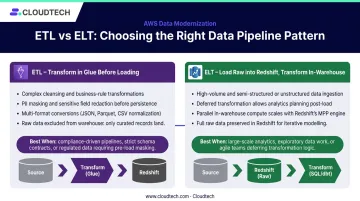
Define your target schema and analytics requirements before committing to either approach. ETL enforces structure early; ELT gives you room to evolve those requirements after data is stored.
Build for Incremental Loading
Full-table refreshes become prohibitively expensive at scale. Instead, implement Change Data Capture (CDC):
- AWS DMS provides native source CDC for ongoing database replication — capturing inserts, updates, and deletes from source transaction logs
- AWS Glue job bookmarks track already-processed input for incremental ETL jobs
- A common pattern combines DMS (to capture changes) with Glue (to process and upsert those change records downstream)
The result: lower compute costs, reduced latency, and analytics that stay current — without rebuilding entire datasets on every run.
Use Serverless to Handle Variable Loads
For SMBs without dedicated DevOps teams, serverless architectures eliminate the need to provision for peak load:
- Lambda charges by requests and execution duration
- Glue charges by DPU-hours while jobs run
- Firehose charges principally by data volume processed
This consumption model matches cost to actual usage — a meaningful advantage over EC2-based pipelines that run (and bill) regardless of load.
Apply Data Quality Validation at Every Stage
Catching bad data early is far cheaper than fixing contaminated analytics. Build validation into each pipeline stage using Glue Data Quality rules:
IsComplete— detects missing or null valuesColumnDataType— validates data type consistencySchemaMatch— checks structural consistency against expected schema
Custom Lambda checks can extend this validation for business-specific rules that DQDL doesn't cover out of the box.
Implement Robust Error Handling
Pipelines need to surface failures immediately and recover without manual intervention:
- Use Step Functions'
RetryandCatchstates for transient failures - Route failed records to Amazon SQS dead-letter queues for inspection and reprocessing
- Configure CloudWatch Alarms to notify teams before downstream users feel the impact
Security and Compliance in AWS Data Pipelines
Encrypt Everything, at Both Layers
Encryption at rest and in transit is a baseline requirement for any regulated industry — not an optional enhancement.
- At rest: Use AWS KMS to encrypt S3 buckets, Redshift clusters, and DynamoDB tables. Cloudtech implements Customer-Managed Keys (CMKs) as standard practice for healthcare and financial services clients
- In transit: Enforce TLS 1.2 or higher across all connections between pipeline components. Manage certificates through AWS Certificate Manager
Apply Least-Privilege IAM Roles
Every pipeline component — each Glue job, Lambda function, and Step Functions state machine — should have its own IAM role scoped to exactly what it needs:
- Glue: Scope job roles to required S3 locations and actions only
- Lambda: Use IAM Access Analyzer to generate fine-grained policies from CloudTrail activity
- Step Functions: Scope state-machine roles to the exact APIs and resources invoked by Task states; use
aws:SourceArnto mitigate confused-deputy risk
Wildcard permissions and shared roles are the most frequent misconfigurations that create compliance exposure.
Address Compliance Requirements Before Deployment
AWS's HIPAA Eligible Services Reference includes Glue, S3, Redshift, Lambda, Step Functions, Kinesis Data Streams, Firehose, KMS, and CloudTrail — but eligibility is not the same as compliance. Two framework-specific requirements stand out:
- HIPAA: Covered entities still need a Business Associate Addendum (BAA) and must configure services under AWS's shared-responsibility model — eligibility alone satisfies neither requirement
- PCI-DSS: Redshift's dynamic data masking applies role-based masking at query time; Redshift audit logging captures connection and user activity alongside CloudTrail's API-level records
Compliance architecture decisions must be made before deployment. Retrofitting controls post-audit typically costs 3–5x more than building them in from the start.
Enable CloudTrail and VPC Flow Logs
Without these, tracing a data breach or compliance violation through a pipeline is extremely difficult:
- CloudTrail captures every API call made to AWS services in the pipeline — the complete audit trail for compliance reviews and incident investigation
- VPC Flow Logs provide network-level visibility across pipeline components
Both should be enabled from day one on any pipeline handling sensitive data.
Monitoring, Error Handling, and Cost Optimization
Build Pipeline Observability with CloudWatch
Glue publishes metrics every 30 seconds (Glue 4.0 or later required for observability metrics). Key metrics to track:
glue.succeed.ALLandglue.error.ALL— job success and failure ratesglue.driver.aggregate.numFailedTasks— task-level failure detectionglue.driver.aggregate.elapsedTime— transformation latency vs. baselineglue.driver.workerUtilization— capacity planning for DPU right-sizing
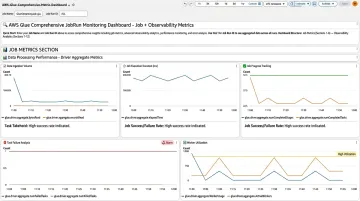
Configure CloudWatch Alarms to trigger notifications when a Glue job runs longer than its baseline threshold. Catching that delay early prevents it from cascading into data quality failures that reach end users — often before anyone downstream notices something is wrong.
Once observability is in place, the next lever is cost. Several architectural choices can reduce spend without touching your pipeline logic.
Control Costs at the Architecture Level
Several cost levers are available without changing your pipeline logic:
- Glue Flex jobs — use spare compute capacity for non-time-sensitive batch work, testing, and one-time loads; start and run times can vary
- S3 Intelligent-Tiering — automatically moves objects to Infrequent Access after 30 days without access, and Archive Instant Access after 90 days; objects below 128 KB don't auto-tier
- Redshift Concurrency Scaling — adds transient cluster capacity for eligible read and write queries automatically, avoiding permanent peak provisioning; usage beyond earned free credits is billed per second
- AWS Budgets — set cost alerts to catch unexpected spikes before they compound
When SMBs Should Consider Expert AWS Pipeline Help
Internal pipeline management has real limits. These signals typically indicate it's time to bring in specialized support:
- Recurring pipeline failures are impacting reporting accuracy or business decisions
- AWS costs are rising without corresponding improvements in performance or data freshness
- A healthcare or financial services compliance requirement — HIPAA, PCI-DSS — exceeds what the internal team can confidently address
- Months have passed building integrations that still aren't production-ready
Cloudtech's team of AWS-certified architects and data engineers — 70% of whom are former AWS employees — works specifically with SMBs in healthcare, financial services, and other regulated industries. Their engagement with Klamath Health Partnership delivered a HIPAA-compliant data lake on Amazon S3 with a 77% year-over-year reduction in infrastructure costs, achieved by replacing a managed services provider with an optimized AWS-native architecture.

The project covered encrypted hybrid file share integration, structured backup policies meeting defined RPO and RTO targets, and hands-on team training so Klamath Health's internal staff could independently maintain the infrastructure going forward.
As an AWS Advanced Tier Partner, Cloudtech can also access AWS Partner Funding that can significantly reduce — or eliminate — your out-of-pocket implementation costs. It's worth confirming availability before committing full internal budget to a pipeline engagement.
Frequently Asked Questions
What is AWS Data Pipeline?
AWS Data Pipeline is an older AWS orchestration service for automating data movement and processing between AWS and on-premises sources. New-customer access was closed in July 2024; most new pipeline builds now use AWS Glue combined with Step Functions for serverless scalability and better integration with the modern AWS analytics stack.
What's the best data pipeline for data integration?
There's no single best tool — the right choice depends on workload type, data volume, and whether you need batch or real-time processing. On AWS, Glue paired with Step Functions covers most SMB integration needs; Kinesis is added specifically for real-time streaming use cases.
How are data pipelines related to data integration?
Data integration is the goal — connecting data from multiple systems into a unified, usable form. Data pipelines are the technical mechanism that automates how data moves, transforms, and lands in its destination to achieve that goal.
What AWS services are used for data pipelines?
The core services are: AWS Glue for ETL/ELT, Amazon Kinesis for real-time streaming, AWS Step Functions for orchestration, Amazon S3 for data lake storage, and Amazon Redshift for analytics-ready data warehousing.
What is the difference between ETL and ELT in AWS?
ETL transforms data before loading — using Glue, suited for complex cleansing, PII masking, or format conversions. ELT loads raw data first and transforms inside Redshift, suited for simpler transformations that can leverage warehouse compute after storage.
How do I ensure security and compliance in an AWS data pipeline?
Start with these baseline controls for any AWS pipeline:
- Encrypt data at rest (KMS) and in transit (TLS)
- Apply least-privilege IAM roles to each pipeline component
- Enable CloudTrail audit logging
Healthcare pipelines also require HIPAA-eligible service configurations and a Business Associate Addendum. Financial services pipelines handling cardholder data require PCI-DSS controls, including data masking.