Introduction
Running a small business means every hour counts. When customers expect answers in minutes — nearly two-thirds of buyers expect a response within 10 minutes to any sales or service inquiry — a lean team of three to five people can't keep up.
AI chatbot implementation is the structured process of planning, building, integrating, and deploying a conversational agent into your customer-facing or internal operations.
For small business owners, operations leads, and startup founders, getting this right matters more than it does for large enterprises. There's less margin for wasted time, misdirected budget, or a tool that nobody actually uses.
Getting it wrong is expensive. Getting it right changes how your business operates — and what your team can actually do with their time.
Key Takeaways
- Successful implementation moves through five defined phases, from goal-setting to post-launch optimization.
- Tie chatbot deployment to specific, measurable outcomes — not general technology trends.
- Poor data preparation and skipping testing are the leading causes of failed rollouts.
- Platform choice should be driven by inquiry volume, required integrations, and budget — not name recognition.
- Treat post-launch optimization as ongoing work — chatbots that aren't updated lose accuracy over time.
Why Small Businesses Are Adopting AI Chatbots
The business case is straightforward: small teams can't scale manually, and customer expectations aren't slowing down.
According to Forrester, the cost of an automated interaction is roughly one-tenth the cost of a human agent conversation. For a business handling 50 to 200 routine inquiries per week, that difference compounds quickly — and it frees staff to focus on higher-value work that actually requires judgment.
What Chatbots Actually Solve for SMBs
Small businesses face three recurring operational pressures that chatbots directly address:
- After-hours gaps — customers submit inquiries at 10 PM and expect a response before morning
- Repetitive workload — staff answering the same 15 questions daily instead of closing deals or delivering services
- Lead response speed — slower follow-up means fewer conversions
A 2025 vendor-commissioned survey found that 51% of U.S. small businesses had already integrated AI into customer service — and 74% of those used AI-powered chatbots specifically. Broader adoption data from the U.S. Chamber of Commerce shows 58% of small businesses used generative AI in 2025, up from just 23% two years earlier.
The Cost of Waiting
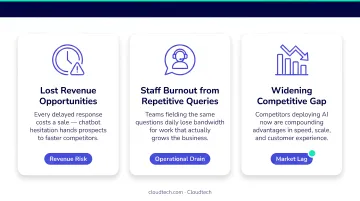
Businesses that delay automation don't stay neutral — they fall behind. Competitors who have already automated FAQ responses, appointment booking, and lead qualification are capturing inquiries around the clock. The gap shows up quickly in three ways:
- Missed leads — inquiries go unanswered outside business hours
- Slower response times — manual handling can't match automated speed
- Staff burnout — routine questions crowd out work that actually needs human judgment
How the AI Chatbot Implementation Process Works
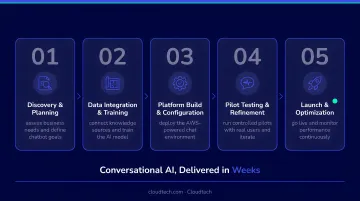
The end-to-end process moves through five distinct phases. Each one builds on the previous, and skipping any phase — especially testing — creates compounding problems post-launch.
Step 1: Define Your Goals and Use Cases
Before selecting any platform, identify exactly which interactions the chatbot will handle. Common starting points for small businesses include:
- Answering FAQs (hours, pricing, return policies)
- Booking or rescheduling appointments
- Qualifying inbound leads before routing to sales
- Routing support tickets to the right team member
The most practical approach: audit your last 90 days of customer inquiries and identify the top 10 to 15 highest-volume, lowest-complexity questions. Those become your first automation targets.
Set measurable success criteria at this stage. Without defined KPIs, you have no way to evaluate ROI after launch. Useful benchmarks include:
- Containment rate — percentage of conversations resolved without human intervention
- First response time — how quickly the bot engages a new inquiry
- Escalation rate — how often conversations get handed to a human
- Conversion rate — for lead-gen bots, how many conversations produce a qualified lead
According to Comm100's 2026 benchmark report, AI chatbots fully resolved 44.8% of conversations without human involvement in 2025. Use that as a realistic reference point when setting your own targets — not a ceiling.
Step 2: Choose the Right Platform and Tech Stack
Platform selection comes down to one key question: how complex are the workflows you need to automate?
| Business Profile | Recommended Approach |
|---|---|
| Fewer than 50 daily inquiries, standard FAQs | No-code/low-code platforms (Tidio, ManyChat, Intercom) |
| Higher volume or CRM/scheduling integrations required | Cloud-native solutions (Amazon Lex, Amazon Bedrock) |
| Regulated industry (healthcare, finance) | AWS-based infrastructure with compliance controls built in |
AWS services like Amazon Lex and Amazon Bedrock are strong options for SMBs that want scalable, cloud-native chatbot infrastructure — especially when the bot needs CRM integrations or multi-step workflows. Working with an AWS-certified consulting partner like Cloudtech can accelerate deployment significantly compared to building from scratch.
Evaluate platforms on these criteria:
- Native integrations with your CRM, calendar, or e-commerce platform
- Analytics and reporting capabilities built in
- Multilingual support if your customer base requires it
- Total cost of ownership over 12 to 18 months — not just the monthly subscription rate
Step 3: Prepare Your Data and Knowledge Base
A chatbot's accuracy depends entirely on what you feed it. A well-configured bot trained on incomplete or outdated content will still produce unreliable answers.
Build your knowledge base from:
- FAQ documents (current, reviewed, organized by topic)
- Product or service documentation
- Service policies (returns, cancellations, warranties)
- Historical support tickets — these reveal how customers actually phrase questions
Once you've assembled that content, categorize it before training begins — this protects sensitive data and keeps the bot focused on what it should answer.
Categorize your content:
- ✅ Shareable content: pricing tiers, business hours, general policies, product specs
- ❌ Excluded content: customer financial records, internal pricing agreements, confidential contracts
The FTC has been explicit that companies must uphold their privacy and confidentiality commitments — including not feeding customer data into AI models if they've promised not to. Define data governance boundaries before training starts, not after.
Step 4: Configure, Train, and Test the Bot
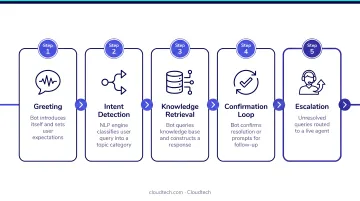
Every chatbot conversation follows the same structural logic — configure yours around this sequence:
- Greet the user and establish context
- Identify intent (what does the user actually want?)
- Provide an answer or guide them to the next step
- Collect any necessary details (name, order number, appointment preference)
- Escalate to a human if the query falls outside the bot's scope
Buttons, quick replies, and structured menus aren't just aesthetic choices — they reduce friction and keep users on track. Design fallback responses for unrecognized queries so the bot always provides a path forward rather than dead-ending the conversation.
Testing before launch should cover:
- Common scenarios (the top 15 use cases you defined in Step 1)
- Edge cases and unusual phrasing
- Human handoff triggers — verify they fire correctly and pass conversation context
- Mobile device rendering and response speed
A resolution rate of 40 to 50% during pre-launch testing is a realistic benchmark based on industry data. Anything below 30% suggests the knowledge base needs more work before going live.
Step 5: Launch, Integrate, and Monitor
Don't launch everywhere at once. Start with one channel — your website chat or a single messaging platform — and a limited set of use cases. Release to a subset of traffic first, validate your success metrics, then expand. Monitor performance daily for the first two weeks before broadening scope.
Post-launch metrics to track weekly:
- Containment rate (industry benchmark: ~75% of chats handled by AI)
- Full resolution rate (industry benchmark: ~44.8%)
- Escalation rate and handoff quality
- Customer satisfaction scores (CSAT) for bot interactions
Chatbots built on AWS Bedrock, like those Cloudtech deploys for clients across healthcare and customer service environments, include real-time performance monitoring and structured weekly tuning cycles — so the bot improves with every week of production data, not just when an issue surfaces.
Key Factors That Affect Implementation Success
Three factors consistently determine whether a chatbot implementation delivers ROI or collects dust:
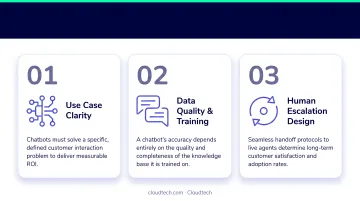
Data quality. A bot trained on incomplete, unreviewed, or poorly organized content produces unreliable responses regardless of how capable the underlying model is. Garbage in, garbage out: it's a cliché because it keeps being true.
Workflow complexity. Standard FAQ automation can be configured in days. Implementations that require CRM integration, payment workflows, or scheduling system connections take longer to configure and test. Budget your timeline accordingly. Simpler bots can go live in a week; custom-integrated solutions typically take two to six weeks.
Staff adoption. This is the factor most teams overlook entirely. If your staff don't know when to intervene, how to act on escalations, or how to update the knowledge base after launch, the bot's performance will erode over time. Train your team before go-live, not after problems appear.
Industry analysts have noted consistently that AI is frequently marketed as transformative for customer service — but results fall short when implementation support and internal adoption are treated as afterthoughts. The technology rarely fails on its own. Execution does.
Common Mistakes in Chatbot Implementation
Most chatbot failures aren't technical — they're strategic. These four mistakes show up repeatedly in small business deployments, and each one is avoidable.
- Stopping at launch. Configuring a bot and going live is only the beginning. Without regular knowledge base updates driven by real conversation data, accuracy erodes as products change, policies shift, and customers ask questions the original training never anticipated.
- Going live on too many channels at once. Launching simultaneously on your website, Facebook Messenger, WhatsApp, and SMS makes it nearly impossible to isolate what's not working. Start with one channel, validate performance, then expand.
- Mistaking a chatbot for a complete AI strategy. A chatbot handles defined, repetitive interactions — it's not built for complex sales conversations, relationship management, or nuanced problem resolution. It should complement your team's judgment, not replace it.
- Skipping business-specific training. Deploying an ungoverned public AI model in a customer-facing channel without verified, company-specific training data creates inaccurate responses and compliance risk. The FTC has flagged that AI data use practices must align with what businesses have disclosed to their customers.
When Chatbot Implementation Isn't the Right Fit
Not every small business is ready for a chatbot — and implementing one prematurely can erode customer trust and drain budget before you see a single return.
Skip chatbot implementation if:
- You receive fewer than 20–30 customer inquiries per week — the volume doesn't justify the setup and maintenance overhead
- Every customer interaction requires deep human judgment with no repeatable components
- You haven't documented your core processes, FAQs, or service policies yet
Watch for these signals that adoption is happening by default:
- The primary reason is "our competitors have one"
- No specific use case has been defined
- No one has been assigned to manage or update the bot after launch
- There are no success metrics attached to the project
In those situations, start with fundamentals: document your most common customer questions, define two or three concrete use cases, and set measurable KPIs. Once that groundwork exists, you'll have a much clearer picture of whether a chatbot will actually move the needle — or just add complexity.
Frequently Asked Questions
How do I implement AI into my small business?
Start by identifying one high-volume, repetitive customer interaction — booking requests, pricing questions, or basic support. Choose a platform suited to your scale, build a structured knowledge base from existing FAQs and documentation, and connect the two before going live. Don't attempt to automate everything at once.
Which AI chatbot is best for small business tasks?
There's no single best option. No-code platforms like Tidio or ManyChat fit businesses with simpler needs and lower inquiry volumes. Cloud-native solutions like Amazon Lex offer more scalability and integration depth for growing businesses with CRM or scheduling requirements. The right choice depends on your actual workflow complexity and where you expect to grow.
How long does it take to implement an AI chatbot for a small business?
Simple FAQ bots on no-code platforms can go live in a few days with the right content prepared in advance. Custom implementations built on cloud infrastructure — with CRM integrations, escalation workflows, and compliance requirements — typically take two to six weeks from discovery through launch when properly scoped.
How much does AI chatbot implementation cost for a small business?
Off-the-shelf tools start as low as $19 to $50 per month. Amazon Lex charges $0.00075 per text request with no minimum commitment. Cloud-native custom implementations add platform fees, integration development, and optional consulting support.
Do I need technical expertise to implement an AI chatbot?
No-code platforms require no engineering background and are manageable for most business owners. Implementations involving cloud infrastructure, CRM integrations, or HIPAA compliance benefit from technical support — whether an in-house developer or an AWS-certified consulting partner.