For SMBs and startups currently running on Azure, the migration decision is often driven by real pressure points: rising Azure costs, contract renewals that prompt a competitive review, or the need for AWS-native services that don't have strong Azure equivalents. AWS's catalog of over 200 fully featured services and its global infrastructure spanning 123 Availability Zones across 39 regions give organizations options that are genuinely hard to match.
This guide walks through everything you need to know: the business case, a practical service mapping table, a six-step migration process, and the most common pitfalls — with specific tools and approaches at each stage.
Key Takeaways
- Azure-to-AWS migration follows six phases: assess, build your AWS foundation, migrate data, move compute, handle identity and networking, then cut over.
- Most Azure services map directly to AWS equivalents, though Cosmos DB, Azure AD, and Azure Functions require real architectural decisions.
- AWS migration tools (MGN, DMS, DataSync) handle the heavy lifting for compute, databases, and storage transfers.
- McKinsey research shows 75% of migrations run behind schedule — phased execution and upfront planning keep yours on track.
- Running Azure and AWS in parallel during transition adds cost; set a hard decommission date from day one.
Why Migrate from Azure to AWS
The decision to leave Azure rarely happens overnight. For most SMBs, it comes down to three things: economics, infrastructure requirements, and a specific trigger that makes the timing feel right.
The Economics of AWS
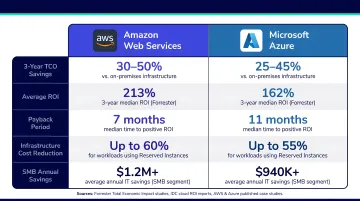
IDC's research on AWS customers reports 51% lower five-year cost of operations and 62% higher IT infrastructure staff efficiency compared to pre-migration baselines. Forrester's Total Economic Impact study on AWS Cloud Operations found 241% ROI for organizations that made the move. These figures aren't Azure-to-AWS specific, but they reflect why cost-conscious SMBs keep landing on AWS when contracts come up for renewal.
Infrastructure and Compliance Breadth
AWS operates 123 Availability Zones within 39 geographic regions, offering granular redundancy options that matter for disaster recovery planning. On compliance, AWS supports 143 security standards and compliance certifications — a meaningful advantage for SMBs in healthcare, financial services, or other regulated industries.
What Typically Triggers the Decision
Most Azure-to-AWS migrations at the SMB level don't happen randomly. Common triggers include:
- Contract expiry on Azure, which turns renewal into a reassessment moment
- Unexpected cost spikes from egress fees or compute overages
- A need for AWS-native services like SageMaker, DynamoDB, or Graviton instances
- Reduced Microsoft 365 dependency, making a Microsoft-centric cloud stack harder to justify
- AWS Partner Funding eligibility — SMBs working with an AWS Advanced Tier Partner like Cloudtech may qualify for funding that offsets a significant portion of migration costs
Azure to AWS Service Mapping
Azure and AWS use different naming conventions for functionally similar services. Understanding these equivalencies is the first practical step in scoping your migration effort.
| Azure Service | AWS Equivalent | Migration Complexity |
|---|---|---|
| Azure Virtual Machines | Amazon EC2 | Low — direct lift-and-shift |
| Azure Blob Storage | Amazon S3 | Low — DataSync handles transfer |
| Azure SQL Database | Amazon RDS | Low — DMS supports Azure SQL as source |
| Azure Cosmos DB | Amazon DynamoDB | High — data model differences |
| Azure Functions | AWS Lambda | Medium — code changes often needed |
| Azure Kubernetes Service (AKS) | Amazon EKS | Medium — YAML configs need review |
| Azure Active Directory / Entra ID | AWS IAM Identity Center | High — federate, don't replicate |
| Azure Monitor | Amazon CloudWatch + AWS X-Ray | Low — configure new dashboards |
| Azure DevOps | AWS CodePipeline / CodeBuild / CodeDeploy | Medium — pipeline rebuild required |
| Azure Key Vault | AWS KMS + AWS Secrets Manager | Low — parallel setup recommended |
Where to Pay Close Attention
Cosmos DB → DynamoDB is the trickiest mapping on this list. Cosmos DB uses an inverted index architecture; DynamoDB uses hashing for table and index partitions. Depending on which Cosmos DB API your application uses, the destination may not even be DynamoDB — it could be:
- Amazon DynamoDB — for key-value or simple document workloads
- Amazon DocumentDB — for MongoDB-compatible API migrations
- Amazon Neptune — for graph API workloads
Budget for data transformation work, not just a data transfer.
Azure AD / Entra ID should not be replicated in AWS. The right approach is federation: connect Entra ID to AWS IAM Identity Center via SAML 2.0 and SCIM provisioning. Users keep their existing credentials; AWS gains a properly governed identity layer.
This principle extends beyond identity. Azure services tied tightly to the Microsoft 365 ecosystem — Teams integrations, SharePoint-connected apps, Exchange-linked workflows — are often better retained and federated with AWS rather than replaced outright.
How to Migrate from Azure to AWS: Step-by-Step
Step 1: Assess Your Current Azure Environment
Before moving anything, you need a complete picture of what you have. A solid pre-migration assessment covers:
- Resource inventory — every running VM, database, storage account, and networking component
- Application dependencies — what talks to what, and what breaks if one thing moves
- Workload categorization — complexity, criticality, and migration priority
AWS Migration Hub gives you a central place to track migration progress across tools and applications. For the discovery phase itself, AWS Application Discovery Service works well for on-premises environments; for Azure workloads, supplement it with Azure resource exports, tagging audits, and CMDB data.
Once you have your inventory, apply AWS's 7 R framework to categorize each workload:
- Retire — shut it down; not worth migrating
- Retain — keep it on Azure for now (MS 365 integrations, for example)
- Rehost — lift-and-shift; fastest path, minimal code changes
- Relocate — move to AWS without modifying the OS or runtime
- Replatform — minor optimizations during migration (e.g., move to managed RDS instead of self-managed SQL)
- Repurchase — switch to a SaaS alternative
- Refactor — redesign for cloud-native architecture; most effort, most long-term value
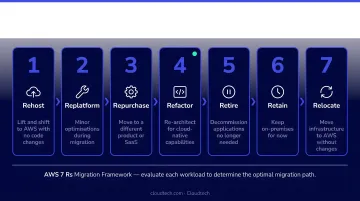
SMBs typically start with Rehost for speed and Replatform for cost efficiency. Cloudtech's AWS-certified team can conduct a formal assessment for organizations that want expert guidance before committing to a migration plan.
Step 2: Set Up Your AWS Foundation
Nothing should move until your AWS Landing Zone is in place. This is the foundational, pre-configured environment that houses all your security, governance, and networking configurations before any workloads arrive.
Using AWS Control Tower, this setup covers:
- Multi-account structure (Management, Security, Log Archive, Workload accounts)
- IAM roles, permission sets, and least-privilege boundaries via AWS IAM Identity Center
- Billing alerts and cost guardrails
- VPC networking that mirrors your Azure VNet topology without IP conflicts
- CloudTrail logging and AWS Config compliance monitoring
Skipping this step is where governance debt begins. According to McKinsey research, migration inefficiencies cost organizations 14% more than planned — a significant portion of which comes from security and architecture rework that a proper foundation would have prevented.
Cloudtech's Cloud Foundation package ($5,000 fixed price) deploys exactly this setup — AWS Control Tower, IAM configuration, VPC architecture, and compliance guardrails — with a one-week delivery timeline. At the end of that week, your AWS environment is fully configured and ready to receive workloads.
Step 3: Plan Your Data Migration
Three tools cover the majority of Azure-to-AWS data migration scenarios:
| Tool | Best For | Azure Context |
|---|---|---|
| AWS DataSync | File and object storage transfers | Azure Blob → Amazon S3; high-speed, automated |
| AWS DMS | Relational database migration | Azure SQL Database → Amazon RDS (supported natively) |
| AWS Snowball | Bulk offline transfers | When network bandwidth makes online transfer impractical |
Before any cutover, run these validation checks against every migrated dataset:
- Row counts and checksums match between source and destination
- Application queries return consistent results against the new database
- Regulated data (PHI in healthcare, financial records) passes compliance checks
For healthcare or financial services clients, this step often requires documented validation reports as part of regulatory requirements.
Step 4: Migrate Compute and Applications
Two primary approaches handle Azure VM migrations to AWS:
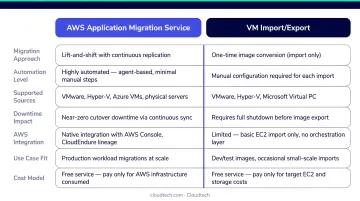
AWS Application Migration Service (AWS MGN) — agent-based, block-level replication. Installs a lightweight agent on source Azure VMs, continuously replicates data to staging resources in AWS, and cuts over with minimal downtime. The right choice for most production workloads.
VM Import/Export — imports VM images directly to Amazon EC2. Better for simpler, less time-sensitive workloads where you're migrating a defined image rather than a running system.
For application-layer migrations:
- Containerized Azure App Service workloads can move to Amazon ECS or EKS after a container and runtime assessment
- .NET applications are strong candidates for AWS Elastic Beanstalk, which handles EC2 provisioning, load balancing, and scaling
Use a wave-based approach: non-critical workloads go first. Validate them fully before touching production systems. This limits the damage if something doesn't behave as expected in the new environment.
Step 5: Migrate Identity, Security, and Networking
Identity: Federate Azure AD / Entra ID with AWS IAM Identity Center using SAML 2.0 and SCIM. Users continue authenticating through Entra ID while IAM Identity Center manages their access to AWS resources — no duplicate directory, no credential migration.
Networking: Re-create your Azure network topology in AWS:
- Build VPCs with appropriate subnet segmentation
- Configure security groups and network ACLs to mirror Azure NSG rules
- Set up Transit Gateway if you're running multi-account or multi-VPC architectures
DNS: Migrate Azure DNS zones to Amazon Route 53. For active domains, lower TTL values to 60-300 seconds before the cutover window. This lets you observe the change and roll back quickly if needed before committing to the final switch.
Step 6: Test, Validate, and Cut Over
Run these validation steps before scheduling any cutover:
- AWS Inspector — scan for vulnerabilities and unintended network exposure in the AWS environment
- AWS Security Hub — review your security posture against compliance standards and surface any misconfigurations
- Load testing — put realistic traffic against your AWS applications before go-live
- Backup and failover testing — confirm recovery procedures work as documented
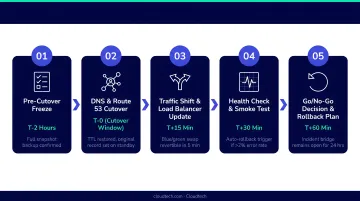
Once validation passes, schedule the cutover. A structured sequence reduces risk:
- Schedule during lowest-traffic window (typically 2-4am on a Sunday)
- Update DNS records to point to AWS endpoints
- Monitor application performance via Amazon CloudWatch immediately post-cutover
- Keep the Azure environment live for a defined rollback period — at minimum 72 hours, often 1-2 weeks for complex environments
- Decommission Azure resources only after the rollback window closes and performance is confirmed stable
Common Migration Challenges and How to Handle Them
Service Incompatibility and Data Model Differences
Teams consistently underestimate the code changes required for services that don't map 1:1. Cosmos DB to DynamoDB is the most common example — the data model differences require transformation work, not just a transfer. Azure Functions to Lambda often needs handler rewrites and dependency updates. Build dedicated sprint time for these services; don't treat them like storage migrations.
Cost Surprises During Migration
Running Azure and AWS in parallel is necessary but expensive. Industry research identifies bubble costs (dual-environment spend) as driving 34% of over-budget migration situations. Mitigate this with:
- AWS Cost Explorer active from day one
- Reserved Instances purchased for stable workloads as soon as sizing is confirmed
- A hard decommission date for Azure resources set before migration begins
SMBs working with an AWS Advanced Tier Partner like Cloudtech may qualify for AWS Partner Funding, which can significantly reduce out-of-pocket migration costs — on qualifying engagements, the funding can meaningfully offset migration costs.
Security Misconfiguration
The shared responsibility model is conceptually similar on both clouds, but IAM policy syntax, security group logic, and encryption defaults differ enough to create gaps. The most common issues:
- Over-permissive IAM policies ported from Azure role logic
- S3 buckets left publicly accessible due to unfamiliar AWS defaults
- Missing encryption configurations for data at rest
A Palo Alto Networks threat report found sensitive data in 66% of storage buckets examined. Configure AWS Security Hub and Trusted Advisor at the start of migration — not after cutover.
Skills Gap and Team Readiness
Azure-trained engineers face a real learning curve on AWS CLI syntax, IAM policy structure, and service naming conventions. The most practical path combines:
- AWS training for existing engineers before cutover begins
- Internal documentation updates covering AWS CLI syntax and service equivalents
- An AWS consulting partner to fill capability gaps during the transition
Research suggests the average organization covers only about 35% of its cloud needs in-house — plan accordingly.
Frequently Asked Questions
Is it easy to transition from Azure to AWS?
Most services have direct AWS equivalents, but differences in naming conventions, IAM models, and database architectures require careful planning. Expect a multi-week effort depending on environment size and complexity.
Which is harder to learn, AWS or Azure?
Both platforms have comparable learning curves. AWS offers a larger community and broader certification paths; Azure feels more natural for teams already using Active Directory, Visual Studio, or Microsoft 365.
What AWS tools are available for migrating from Azure?
The core toolkit includes:
- AWS MGN — server migrations
- AWS DMS — database migrations
- AWS DataSync — file and object storage transfers
- AWS Migration Hub — progress tracking across tools
- AWS Snowball — offline bulk transfers when bandwidth is limited
Can I run Azure and AWS at the same time during migration?
Yes — running both environments in parallel lets you validate AWS workloads before cutting over. Set a firm decommission date for Azure resources upfront; open-ended parallel runs are one of the most common sources of migration budget overruns.
How do I handle Azure AD during an AWS migration?
Don't try to replicate it. Federate Microsoft Entra ID (formerly Azure AD) with AWS IAM Identity Center via SAML 2.0 and SCIM provisioning. Users keep their existing credentials and sign in through the AWS access portal using Entra ID as the identity provider.