Introduction
Migrating a handful of servers to AWS is manageable. Migrating hundreds — across mixed Windows and Linux environments, multiple AWS accounts, and several business units — is a coordination problem that scales badly with every additional server and every additional wave.
That's the problem AWS Cloud Migration Factory (CMF) was built to solve. But it's frequently mischaracterized as a general-purpose migration tool, which leads teams to either adopt it when they don't need it or overlook the setup it actually requires.
This guide covers what CMF is, how it works across its three phases, and what powers it under the hood. It also covers the specific conditions where CMF earns its complexity — and where a simpler approach would serve you better.
TL;DR
- A serverless orchestration platform that automates large-scale server migrations to AWS, CMF is recommended by AWS for 100+ server environments
- CMF sits above AWS Application Migration Service (MGN): MGN moves the data; CMF coordinates the entire operation
- The wave-based model groups servers into batches, automating agent installation, replication verification, and cutover scheduling
- Scope is rehosting and re-platforming to Amazon EC2 — not discovery, assessment, or re-architecting
- For under 100 servers, CMF's setup overhead typically outweighs its benefits; direct AWS MGN is usually sufficient
What Is AWS Cloud Migration Factory?
CMF is an AWS-native, serverless orchestration platform deployed into a customer's AWS environment via AWS CloudFormation. Its job is to coordinate and automate the manual, repetitive tasks involved in migrating large server fleets to AWS — not to perform the migration itself.
The Problem It Solves
Consider a concrete example: installing replication agents on 100 Windows and Linux servers spread across 10 AWS accounts. Done manually, that task takes well over 500 minutes of operator time. According to AWS Prescriptive Guidance, a single agent installation takes roughly 5 minutes per server — CMF's automation script compresses the same 100-server job to less than 5 minutes of total operator time, and it works across both OS types and any target AWS account.
Multiply that time savings across dozens of migration waves and multiple operators, and the productivity gains become the driving reason teams adopt CMF at scale.
CMF vs. AWS MGN: Not the Same Thing
Teams that conflate these two tools consistently underestimate CMF's setup requirements:
- AWS MGN performs continuous block-level replication: it's the data movement engine
- CMF is the orchestration layer sitting above MGN, coordinating agents, scheduling, validation, and logging across a large fleet
MGN must be correctly configured in every target account before CMF can contribute anything — which means skipping that setup step is not an option.
What Migration Strategies CMF Supports
CMF is optimized for two scenarios:
- Rehosting (lift-and-shift) — moving servers to AWS EC2 without modification
- Re-platforming — adjusting configurations for EC2 while preserving core application logic
CMF's scope is deliberately narrow. It does not support re-architecting, cloud-native transformation, or containerized workload migrations to Kubernetes — teams pursuing those paths need a different toolset.
How AWS Cloud Migration Factory Works
CMF operates across three phases: pre-migration (planning and wave design), migration implementation (automated wave execution), and cutover and post-migration. Automation scripts handle the bulk of execution; operators manage configuration, approval decisions, and monitoring.
Phase 1: Pre-Migration — Planning and Wave Design
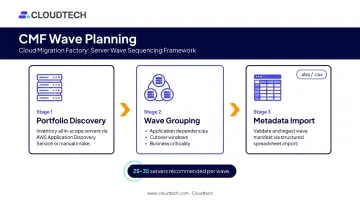
Before any migration runs, teams complete portfolio discovery and organize servers into migration waves. AWS recommends 25–35 servers per wave — small enough to troubleshoot efficiently if something goes wrong.
Waves are grouped by application dependencies, cutover windows, and business criticality. Migration metadata is imported into the CMF console via .xlsx or .csv files, and a built-in pre-upload validation layer maps file headers to schema attributes and flags configuration errors before they cause mid-execution disruptions.
Deployment uses two CloudFormation templates:
| Template | What It Deploys |
|---|---|
| Primary account template | Lambda, DynamoDB, API Gateway, CloudFront, S3, Cognito, Systems Manager Automation Document, Secrets Manager |
| Target account template | IAM roles and a user in each destination AWS account for cross-account access |
This two-template structure means every additional target AWS account needs its own target-account template deployment. Teams scoping multi-account migrations frequently underestimate this step — factor it into your planning timeline early.
Phase 2: Migration Implementation — Automated Wave Execution
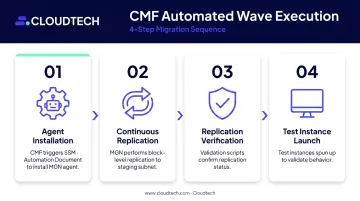
Operators trigger the migration sequence from the CMF console. The typical automated flow:
- Agent installation — CMF creates a Systems Manager automation job that runs the CMF SSM Automation Document, connects to the source environment, and installs the MGN replication agent on each server
- Continuous replication — MGN begins block-level replication from source servers to a staging subnet in the target AWS account
- Replication verification — pre-built validation scripts confirm replication status before any cutover proceeds
- Test instance launch — CMF spins up test instances from replicated data to validate server behavior in the target environment before production cutover
The Jobs page provides a centralized record of every action triggered from the CMF console, capturing job name, script name, status, and timestamps. Compliance teams get a native audit trail — no separate logging setup required — showing exactly who triggered what and when.
Phase 3: Cutover and Post-Migration
Once validation passes, CMF orchestrates cutover timing. For re-platforming scenarios, CMF converts server configuration metadata stored in its datastore into CloudFormation templates. This automatically provisions EC2 instances, EBS volumes, and volume attachments in the target account — no manual template authoring needed. Documented inputs include AMI ID, availability zone, root volume size, instance type, security group IDs, subnet ID, and tenancy.
Post-migration tasks — decommissioning source machines, right-sizing target instances — happen after cutover. Migration progress across waves, applications, servers, and databases can be tracked through optional Amazon QuickSight dashboards built on CMF's DynamoDB migration metastore.
Key Components That Power the Factory
CMF's architecture is entirely serverless. Here's what each component does:
| Component | Role in CMF |
|---|---|
| Amazon CloudFront | Delivers the CMF web interface |
| Amazon S3 | Hosts web assets and stores generated CloudFormation templates |
| Amazon API Gateway | Exposes CMF REST APIs |
| AWS Lambda | Runs administrative, migration, and tool-integration logic |
| Amazon DynamoDB | Stores migration metadata and wave configurations |
| Amazon Cognito | Authenticates web interface and REST API users |
| AWS Systems Manager | Executes CMF Automation Documents against the automation server |
| AWS Secrets Manager | Stores credentials used by the solution |
| AWS MGN | Performs actual block-level replication and rehosting |
Role-Based Access Control
CMF uses Cognito groups to implement role-based access control. Administrators define which users can trigger which automation actions. This prevents unauthorized cutover executions across large migration teams — particularly useful when multiple business units share a single CMF deployment. Only Cognito admin-group users can manage the schema configuration.
Custom Automation Scripts
CMF ships with pre-built scripts covering the most common rehosting tasks:
- Agent installation on source servers
- Replication verification checks
- Post-cutover validation routines
Teams can also upload custom script packages through the scripts management interface to handle environment-specific requirements: legacy OS configurations, proprietary middleware, and non-standard networking setups. The platform enforces a defined format for uploaded scripts to ensure compatibility with the execution engine.
Where CMF Fits in Your Migration Journey
CMF is an execution-phase tool. It assumes portfolio discovery and wave planning are already complete and activates when teams are ready to run high-volume, repeatable migration waves. Deploying it before that groundwork exists adds complexity rather than removing it.
When CMF Performs Best
CMF delivers the most value in environments that meet several conditions simultaneously:
- 100+ servers to migrate (the AWS-documented threshold)
- Mixed Windows and Linux server estates
- Multiple target AWS accounts requiring cross-account coordination
- Time-sensitive cutover windows where manual coordination introduces unacceptable risk
- Large migration teams where consistent, auditable execution across multiple operators is required
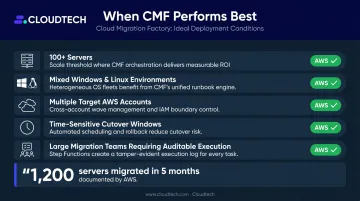
To illustrate the upper end of what's documented: AWS Prescriptive Guidance notes that customers have used CMF to migrate 1,200 servers in 5 months, including cutting over more than 600 servers in a single cutover window. If your migration is approaching that scale, the wave-based model earns its setup cost. For smaller scopes, the question is whether your environment complexity — not just server count — justifies the overhead.
Getting the Scope Assessment Right
For SMBs and mid-market companies unsure whether their migration scope justifies a full CMF deployment, the right starting point is a migration readiness assessment — not a tooling commitment. An AWS Partner like Cloudtech can help evaluate:
- Server counts and OS environment complexity
- Multi-account structures and cross-account coordination needs
- Cutover window constraints and risk tolerance
That assessment shapes the tooling decision, not the other way around.
When AWS Cloud Migration Factory May Not Be the Right Fit
Knowing where CMF underperforms is as useful as knowing where it excels.
Scenarios Where Setup Overhead Outweighs Benefits
- Migrations under 100 servers — AWS explicitly recommends using AWS MGN directly for these environments; CMF's deployment and configuration overhead isn't justified
- Single-application or proof-of-concept moves — a one-time migration doesn't benefit from the factory model, which compounds value through repeated wave execution
- Environments without completed discovery and wave planning — CMF needs clean, validated metadata to execute; feeding it incomplete data produces errors, not automation
Structural Prerequisites That Must Exist First
CMF fails to add value — or actively adds friction — when these conditions aren't met:
- Portfolio discovery and wave planning are incomplete
- AWS MGN has not been initialized in all target accounts
- IAM cross-account permissions haven't been configured for each destination account
- The team lacks AWS expertise to customize scripts for non-standard environments
These gaps don't just slow CMF down — they create the exact conditions where a simpler, direct MGN approach would have finished faster.
The Default-Adoption Risk
Organizations below the 100-server threshold often choose CMF because it's the most recognized AWS migration tool — not because their scope justifies it. CMF is an execution accelerator for large, repeatable programs — not a migration strategy. Treating it as a substitute for planning, or adopting it by default because it's well-known, typically produces over-engineered migrations with slower outcomes than a direct MGN approach would have delivered.
If your server count is under 100 or your migration is a one-time move, AWS MGN alone is almost always the faster, lower-overhead path.
Conclusion
AWS Cloud Migration Factory wraps the coordination complexity of large-scale server migration into a repeatable, auditable, wave-based execution model. The value is real, but it's specific: it shows up at scale, across mixed environments, with multiple target accounts, and in programs that run recurring waves rather than one-time moves.
For businesses evaluating whether their environment justifies CMF, the decision hinges on honest scope assessment before any tooling commitment.
Cloudtech's team — 70% ex-AWS architects with hands-on migration experience — helps SMBs and mid-market companies work through that assessment by examining:
- Server counts and OS environment diversity
- Target account structures and landing zone complexity
- Wave frequency and recurring migration requirements
That analysis determines whether CMF or a lighter direct-MGN approach fits your program.
Frequently Asked Questions
What is the difference between AWS Cloud Migration Factory and AWS Application Migration Service (MGN)?
AWS MGN is the migration engine — it performs continuous block-level replication from source servers to AWS. CMF is the orchestration layer above it, coordinating MGN and other tools across large server fleets, managing wave scheduling, agent installation, validation, and audit logging at scale. They work together; they are not interchangeable.
How many servers do you need to justify using AWS Cloud Migration Factory?
AWS recommends CMF for migrations of 100 or more servers. Below that threshold, the setup and configuration overhead of deploying CMF typically outweighs its automation benefits, and using AWS MGN directly is more efficient for most environments.
What migration types does AWS Cloud Migration Factory support?
CMF primarily supports rehosting (lift-and-shift) and re-platforming to Amazon EC2, with pre-built scripts for rehosting tasks and CloudFormation template generation for re-platforming scenarios. It is not designed for re-architecting workloads or migrating containerized applications to Kubernetes.
What are the prerequisites for deploying AWS Cloud Migration Factory?
Four prerequisites must be in place before deployment:
- Portfolio discovery and wave planning completed
- AWS MGN initialized in all target accounts
- IAM cross-account permissions configured for each destination account
- CMF deployed via its two CloudFormation templates (one for the primary account, one per target account)
Can AWS Cloud Migration Factory be customized for specific environments?
Yes. CMF includes pre-built automation scripts for common rehosting tasks, and teams can upload custom scripts through the scripts management interface to handle legacy OS configurations, proprietary middleware, or non-standard networking setups. Custom scripts must conform to CMF's supported format.
How much does it cost to run AWS Cloud Migration Factory?
According to the AWS implementation guide (last revised November 2024), CMF costs approximately $14.31 per month under default settings in US East (N. Virginia), assuming 200 servers migrated per month. This covers solution infrastructure only — services like MGN and Systems Manager add to this base cost depending on migration volume and duration.