This is where the process breaks down. A simple OCR scan can't tell the difference between a patient's name and their diagnosis, or an invoice number and a line item total. According to the Centers for Medicare & Medicaid Services, dealing with paper-based prior authorizations alone consumes an average of 13 hours per provider every week.
Amazon Textract is AWS’s answer to this problem. It’s a machine learning service that goes far beyond basic OCR to extract structured data—forms, tables, and key-value pairs—at scale. This guide covers how it works, its core APIs, real-world use cases, and how to get started.
Key Takeaways
- Beyond OCR: Textract doesn't just read text; it understands document structure, identifying forms, tables, and key-value pairs to preserve context.
- API-Driven Features: Use targeted APIs like
AnalyzeDocumentfor forms and tables, or specialized APIs likeAnalyzeExpensefor invoices andAnalyzeIDfor identity documents. - Flexible Processing: Choose synchronous APIs for real-time, single-page analysis or asynchronous APIs for large, multi-page documents up to 3,000 pages.
- Industry-Specific Impact: Textract accelerates workflows in healthcare (patient forms), finance (loan applications), and manufacturing (purchase orders) by automating data extraction.
What Is AWS Textract?
AWS Textract is a fully managed machine learning service that automatically extracts text, handwriting, and structured data from scanned documents like PDFs, PNGs, and JPEGs. Its main advantage over traditional OCR is its ability to understand a document's layout and the relationships between data elements.
Instead of returning a wall of undifferentiated text, Textract processes a document and returns a structured JSON response composed of "Block" objects. Each block represents a detected element and contains key information:
- Detected text — words, lines, or cell contents pulled from the document
- Page location — geometry coordinates pinpointing exactly where the element appears
- Block relationships — how one block connects to another, such as a value belonging to a specific key
- Confidence score — a numeric rating indicating how certain Textract is about each extraction
This block structure is what allows you to programmatically understand that "Jane Smith" is the value for the key "Patient Name."
Textract supports printed text in English, Spanish, German, French, Italian, and Portuguese. Handwriting recognition, however, is currently limited to English.
For teams wanting to test its capabilities before committing any code, the AWS console includes a demo tool that lets you upload your own documents and see extraction results directly.
AWS Textract's Core APIs and Feature Types
Textract's power comes from its set of distinct APIs, which allow you to request only the information you need. You don't have to pay for table extraction if all you need is plain text.
The two primary APIs are:
- DetectDocumentText: A fast, synchronous API for extracting raw text from a document. Use this when you only need the words and lines, without any structural analysis.
- AnalyzeDocument: The more powerful API for structured data extraction. You specify which
FeatureTypesyou want it to find, such asFORMS,TABLES,QUERIES, orLAYOUT.
Specialized APIs
For common, high-value document types, AWS provides pre-trained APIs that extract normalized data without requiring you to parse the raw output.
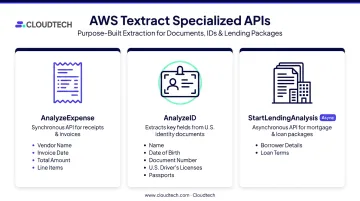
- AnalyzeExpense: Extracts key information from invoices and receipts, such as vendor name, invoice date, total amount, and line items.
- AnalyzeID: Pulls structured data from U.S. driver's licenses and passports, including fields like name, date of birth, and document number.
- StartLendingAnalysis: A specialized asynchronous API for processing mortgage and loan document packages, extracting borrower details, loan terms, and other critical financial data.
FORMS and Key-Value Pair Extraction
The FORMS feature is designed to identify and link labels to their corresponding values. In the Textract response, this creates a KEY_VALUE_SET block that connects a key (like "Invoice Number:") to its value ("INV-12345"). This is the engine behind automating data capture from documents like:
- Patient intake forms
- Insurance claims
- Loan applications
- HR onboarding paperwork
By preserving these relationships, Textract eliminates the need for manual data entry and brittle, template-based scripts.
TABLES and Layout Analysis
The TABLES feature handles tabular data well, even in documents with complex or non-standard layouts. It detects rows, columns, and individual cells, and can identify column headers. The output preserves each cell's row and column index, so you can reconstruct the table accurately.
The LAYOUT feature works differently — it identifies the semantic structure of a document: headers, footers, page numbers, lists, and section titles. This matters most when processing long-form documents like contracts or reports, where preserving the original structure is essential for understanding the content.
Queries Feature
The QUERIES feature offers a more intuitive, natural-language approach to data extraction. Instead of parsing the entire JSON response, you can ask Textract a direct question, such as:
- "What is the customer's name?"
- "What is the total due?"
- "What is the closing date?"
Textract finds the answer in the document and returns it along with its location and a confidence score. This method is highly resilient to changes in document layout, as it doesn't depend on a field's fixed position. You can also fine-tune this feature with Custom Queries, training Textract on your own business-specific documents to improve accuracy for unique fields.
Synchronous vs. Asynchronous Processing
Textract offers two processing modes: synchronous for real-time, single-document needs and asynchronous for large or batch workloads. Picking the wrong one adds latency, cost, or unnecessary complexity to your pipeline.
Synchronous Processing
Synchronous APIs are best for real-time applications where an immediate response is required.
- Use Cases: Single-page documents, images, real-time ID verification, or interactive web forms.
- APIs:
DetectDocumentText,AnalyzeDocument. - Limits: Supports JPEG, PNG, PDF, and TIFF files up to 10 MB. For PDFs and TIFFs, only the first page is processed.
- Workflow: You call the API with the document bytes, and the full JSON response is returned in a single call.
Asynchronous Processing
Asynchronous APIs are designed for large, multi-page documents and batch processing scenarios where immediate results aren't necessary.
- Use Cases: Processing multi-page contracts, large batches of invoices, or entire loan packages.
- APIs:
StartDocumentTextDetection,StartDocumentAnalysis. - Limits: Supports PDF and TIFF files up to 500 MB and 3,000 pages.
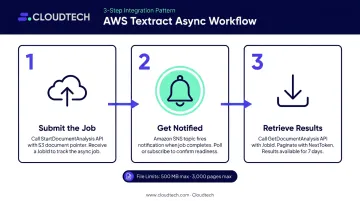
- Workflow: The asynchronous process involves a few steps:
- Submit the Job: You call a
StartAPI, passing a pointer to a document stored in an S3 bucket. Textract returns aJobId. - Get Notified: Rather than polling, configure an Amazon SNS topic to notify your system the moment the job finishes.
- Retrieve Results: A
GetAPI call using theJobIdretrieves the results. Because the response can be large, you may need to paginate through it using aNextToken. The results are available for 7 days.
- Submit the Job: You call a
Common serverless pattern: An S3 event triggers a Lambda function to start the Textract job. A second Lambda — fired by the SNS notification — fetches and stores the results. For more complex pipelines, AWS Step Functions can orchestrate the full workflow, including error handling and parallel processing.
AWS Textract Use Cases by Industry
Intelligent Document Processing (IDP) is transforming how businesses operate, with the market expected to reach $2.09 billion by 2026. Textract is a key enabler of this shift across multiple sectors.
Healthcare
Healthcare organizations are often overwhelmed by paper and fax-based workflows. Textract automates the extraction of patient data, diagnoses, and lab results from intake forms and medical records. This helps populate Electronic Health Records (EHRs) more accurately and speeds up billing cycles. At Cloudtech, we've helped healthcare providers like Klamath Health Partnership modernize their AWS workflows to better manage high document volumes with limited administrative staff.
AWS customer Symbeo used Textract to process over 16 million claims pages, reducing processing time from 3 minutes per page to under 1 minute.
Financial Services
In finance, speed and accuracy are critical. Textract accelerates loan processing by combining AnalyzeID and StartLendingAnalysis to extract applicant data from IDs and lending packets. Mortgage processor Rocket Close built a pipeline with Textract that reduced manual effort from 30 minutes to under 2 minutes per package.
Other use cases include:
- Accounts Payable: Using
AnalyzeExpenseto automatically extract line items from vendor invoices. - Compliance: Digitizing and indexing contracts and tax forms to create searchable archives.
- Client Onboarding: Automating data capture from new account applications.
Manufacturing and Supply Chain
Manual data entry from purchase orders, shipping manifests, and quality reports creates bottlenecks in the supply chain. Textract extracts structured data from these documents and feeds it directly into ERP and inventory management systems. The downstream benefits include:
- Procurement accuracy: Structured data reduces keying errors in purchase orders and vendor records.
- Order processing speed: Automated extraction cuts manual handling time across shipping manifests.
- Supply chain visibility: Real-time data feeds give operations teams a clearer picture of inventory status.
Legal and General Business
Legal teams deal with the same document overload as every other industry — just with higher stakes. Textract converts scanned contracts, research papers, and reports into structured, searchable data. When combined with Amazon Comprehend for entity recognition and sentiment analysis, teams can locate key clauses or specific information across thousands of documents in seconds rather than hours.
AWS Textract Limitations
Textract is a capable service, but it has real constraints worth mapping before you commit to a workflow design.
- Language and Text Constraints: Textract supports six languages for printed text but only English for handwriting and queries. It also does not support vertical text alignment.
- No On-Premise Deployment: Textract is a cloud-only service. All documents must be sent to the AWS cloud for processing, a real constraint for organizations with strict data residency or compliance requirements.
- No Native Fraud Detection: While
AnalyzeIDextracts data from identity documents, it does not perform fraud detection or verify the authenticity of the document. - Customization is Focused: Textract's
Custom Queriesfeature lets you train it on your specific documents to improve field-level accuracy. It doesn't retrain the underlying models — improvements stay scoped to the Queries feature.
Each of these constraints is manageable with the right workflow design. The most practical safeguard is building around confidence scores — every piece of data Textract extracts includes a confidence percentage. Set a threshold (95% is a common starting point), then route anything below it to human review via Amazon Augmented AI (A2I). This keeps automated throughput high while catching the extractions most likely to be wrong.
AWS Textract Pricing and Getting Started
Textract uses a pay-as-you-go pricing model based on the number of pages you process. Costs vary by the API or feature you use. As of July 2026, pricing in the US West (Oregon) region starts at:
- DetectDocumentText: $0.0015 per page
- AnalyzeDocument (Forms): $0.05 per page
- AnalyzeDocument (Tables): $0.015 per page
- AnalyzeExpense: $0.01 per page
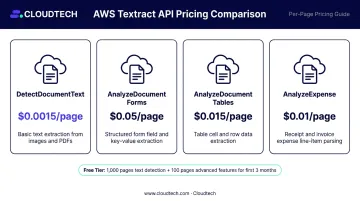
AWS offers a free tier for new customers that includes a monthly allowance for the first three months. This typically includes 1,000 pages for text detection and 100 pages for more advanced features like forms, tables, and expense analysis.
Getting Started
Once your account is ready, these four steps will get you from zero to a working Textract integration:
- Create an AWS Account: If you don't have one, sign up on the AWS website.
- Try the Console Demo: Navigate to the Textract console and use the demo tool to upload a few of your own documents. This is the fastest way to see how it performs on your specific use cases.
- Use the AWS SDK: To integrate Textract into your applications, use the AWS SDK for your preferred language (like boto3 for Python).
- Implement Security Best Practices: From day one, use least-privilege IAM roles, enable AWS CloudTrail for auditing, and encrypt sensitive documents in S3 with KMS.
Step 4 is where many teams underestimate the work involved. If you need a production-ready Textract pipeline — including S3 ingestion, IAM configuration, and structured data output — Cloudtech's AWS-certified team can design and deploy the full workflow in as little as two weeks.
Frequently Asked Questions
Is AWS Textract free?
AWS Textract has a free tier for new customers for the first three months. After that, it follows a pay-as-you-go model where you are charged per page, with prices varying based on the specific feature used.
Does AWS Textract use OCR?
Yes, Textract uses OCR as its foundation to detect text. On top of that, it applies machine learning to understand document structure — pulling structured data from forms and tables in a way raw OCR cannot.
Is AWS Textract good?
Textract is highly accurate for structured and semi-structured documents like invoices, receipts, and forms. It connects directly to the AWS ecosystem, though businesses should evaluate its language support and customization options before committing.
What file formats does AWS Textract support?
Textract supports PNG, JPEG, TIFF, and PDF files. Size limits depend on the processing mode: synchronous calls are limited to 10 MB, while asynchronous jobs can handle PDFs up to 500 MB and 3,000 pages.
What languages does AWS Textract support?
Textract supports printed text detection in English, Spanish, German, French, Italian, and Portuguese. Handwriting recognition and the Queries feature currently work with English-only documents.
How does AWS Textract differ from traditional OCR?
Traditional OCR returns raw text with no awareness of layout. Textract preserves document context — outputting structured key-value pairs from forms and properly bounded data from tables, not just a flat string of characters.