Who can realistically do this? Teams with cloud engineering expertise, either in-house developers comfortable with AWS services or an experienced consulting partner. Generic chatbot builders fall short when your business has proprietary data, specific compliance requirements, or workflows that don't fit a template.
RAND's 2024 research found that over 80% of AI projects fail — with root causes including inadequate data preparation, poor infrastructure choices, and selecting technology before defining the actual user need. Rushed chatbot implementations follow the same pattern: hallucinations erode user trust, broken integrations create silent failures, and compliance gaps in handling sensitive data create legal exposure.
This guide covers the complete implementation path — from planning through production — designed for SMBs that need enterprise-grade chatbot performance without enterprise-scale budgets.
Key Takeaways
- Custom AI chatbot implementation follows five phases: planning → tech stack → build → testing → launch and monitoring
- Define your use case first — it drives every downstream decision, from LLM selection to data requirements, integrations, and architecture
- For most SMBs, RAG on a managed AWS platform is the right architecture — scalable, cost-controlled, and faster to deploy
- Test with functional accuracy checks and realistic conversation simulations before launch
- Monitor accuracy, escalation rate, and user satisfaction post-launch to keep the chatbot delivering results
What to Plan Before You Implement a Custom AI Chatbot
Skipping the planning phase is the leading cause of custom chatbot failures. Scope creep, data gaps, and integration surprises all originate from decisions that weren't made before a single line of code was written.
Define Your Use Case and Chatbot Type
Different use cases require fundamentally different architectures. Customer support automation, internal knowledge retrieval, transactional workflows, and sales qualification each demand different conversation flows, data sources, and backend logic. Picking the wrong type locks in technical debt before you've started.
The three chatbot types relevant to SMB implementations:
| Type | Best For | Limitation |
|---|---|---|
| Rule-based | Narrow, predictable tasks (FAQ lookup, routing) | Breaks on unexpected inputs |
| AI-powered (LLM) | Open-ended queries, complex reasoning | Requires robust knowledge grounding |
| Hybrid | High-volume support with structured escalation paths | More complex to configure |
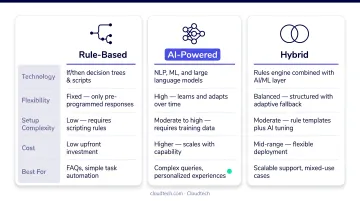
Before writing any requirements, answer these scoping questions:
- What specific tasks should the chatbot handle?
- What must it escalate to a human — and within how many turns?
- Which channels will it operate on: website, Slack, Teams, CRM, mobile app?
Assess Your Data and Compliance Requirements
How accurate your chatbot will be depends directly on the quality and completeness of its knowledge base. Internal FAQs, product documentation, CRM records, support transcripts, and operational manuals are the raw material.
Data requirements to confirm before you build:
- HIPAA applies if the chatbot handles protected health information; NIST AI 600-1 mandates data security and privacy controls for any generative AI application
- Who updates the knowledge base after launch, and how often?
- Who maintains the ingestion pipeline post-deployment?
Do not proceed to build if your organization cannot identify a minimum viable dataset for the chatbot, or if compliance requirements haven't been reviewed by a qualified data privacy or legal advisor.
Map Out Your Integration and Architecture Requirements
List every system the chatbot must connect to: CRM, helpdesk, knowledge base, inventory or billing systems. These integration points define backend complexity and realistic timelines.
Three implementation paths for SMBs:
- No-code platform: Fast to launch, but hard ceilings on customization and data control — suitable only for simple FAQ bots
- Cloud-native managed services (AWS): Best balance of speed, control, and scalability for most SMBs; uses pre-built AWS AI/ML services instead of custom model infrastructure
- Fully custom code: Maximum flexibility, longest timeline, highest cost — appropriate only when requirements exceed what managed services support
Choosing Your Tech Stack and AWS Infrastructure
Selecting an underpowered tech stack is the second leading cause of failed chatbot projects. Businesses frequently underestimate the infrastructure needed to support reliable LLM inference at production scale.
Core AI and NLP Components
The essential components of a custom AI chatbot stack:
- LLM (for response generation): Accessed via Amazon Bedrock, which provides managed access to models including Anthropic Claude, Meta Llama, Amazon Titan, Cohere, and Mistral AI
- Embedding model (for semantic search): Converts text chunks to vector representations for retrieval
- Vector store (for RAG retrieval): Amazon OpenSearch Service or pgvector on Aurora PostgreSQL
- Conversational interface (for intent recognition and routing): Amazon Lex
Standard LLM prompting draws from pre-training data alone, making hallucinations on proprietary topics a constant risk. RAG fixes this by retrieving relevant document chunks from your knowledge base before generating each response. ACL's 2024 RAGTruth research confirms RAG still requires faithfulness evaluation, but it significantly reduces fabrication risk compared to ungrounded prompting.
Cloud Infrastructure and Serverless Architecture
The recommended AWS infrastructure layer for SMB chatbot builds:
- Amazon S3 — stores source documents and knowledge base files for RAG ingestion
- AWS Lambda — executes chatbot logic serverlessly, scaling automatically without server management
- Amazon DynamoDB — stores chat session history and conversation state
- API Gateway — exposes secure endpoints for the chatbot frontend to call
Here's how these services connect:
- User message hits API Gateway
- API Gateway triggers a Lambda function
- Lambda queries the vector store for relevant context
- Lambda passes context and chat history to the LLM via Bedrock
- Response streams back through API Gateway to the frontend
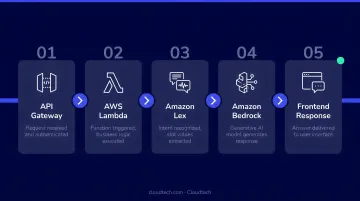
Cloudtech's AWS-certified solutions architects, several of them former AWS engineers, help SMBs configure this exact stack and avoid the trial-and-error that typically adds weeks to a build.
Integration, Channel, and Security Requirements
Integration layer:
- API connectors link the chatbot to CRM, helpdesk, or ERP systems
- Channel-specific SDKs handle website widget embedding vs. Slack/Teams/WhatsApp messaging platforms
- Authentication and rate limiting must be configured per integration endpoint
Security requirements (non-negotiable):
- TLS encryption for all data in transit
- IAM role scoping on AWS following least-privilege principles
- PII redaction in conversation logs
- Industry-specific compliance guardrails (HIPAA business associate obligations, SOC 2 controls) baked in before build begins — not retrofitted after
How to Implement a Custom AI Chatbot: Step-by-Step
Implementation is sequential — each step builds directly on the last. Skipping steps, particularly knowledge base preparation and testing, creates downstream failures that are expensive to undo.
Step 1: Build and Load Your Knowledge Base
The document processing pipeline:
- Load source files (PDFs, FAQs, web pages, CRM exports) into Amazon S3
- Split text into chunks with appropriate overlap
- Convert chunks to vector embeddings using an embedding model
- Store vectors in your chosen vector database (OpenSearch or Aurora PostgreSQL)
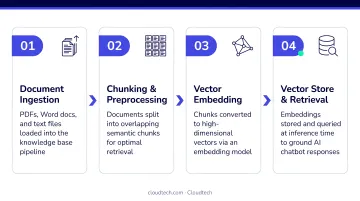
Chunk sizing matters. Chunks that are too large reduce retrieval precision — the model retrieves sections containing the answer buried in irrelevant content. Chunks that are too small lose the surrounding context needed for coherent responses. A typical starting point is 512–1,024 tokens per chunk with 10–20% overlap, adjusted based on your document structure and query patterns.
Step 2: Configure the LLM, Prompts, and Conversation Logic
System prompt engineering defines the chatbot's behavior:
- Establishes persona: role, name, and communication style
- Sets scope boundaries defining what the chatbot will and won't answer
- Controls response format: length, citation behavior, and tone
- Specifies RAG citation rules for attributing responses to source documents
Conversation flows also need:
- Intent routing for common query categories
- Fallback responses that acknowledge limitations and offer alternatives for out-of-scope queries
- Escalation triggers based on specific keywords, two unresolved turns, or a direct user request for a human agent
Step 3: Develop the Backend API and Session Management
Core backend requirements:
- POST /chat endpoint that accepts a user message and session ID, queries the vector store, calls the LLM, and returns a response
- GET /session endpoint that retrieves conversation history for a given session
- Multi-turn memory passing the last 4–6 conversation turns as context per API call; without this, every message is treated as a new conversation
- Token streaming for real-time response delivery rather than waiting for full generation
AWS Lambda with API Gateway is the recommended approach. Lambda scales automatically and eliminates server management overhead — SMB chatbot usage is rarely consistent, so automatic scaling matters more than it might seem.
Step 4: Build or Configure the Frontend Interface
Frontend options:
- JavaScript widget or iframe embed: fastest to deploy, suitable for most website integrations
- Messaging platform SDK: required for Slack, Teams, or WhatsApp deployment
- Custom React interface: maximum control, highest effort, appropriate when the chatbot is a primary product surface
Design essentials regardless of approach:
- Brand-consistent visual styling
- Mobile responsiveness (most users will access on phones)
- A clearly visible escalation path to a human agent in the UI
Step 5: Connect Business Systems and Set Escalation Paths
Integration sequence:
- Authenticate API connections to CRM/helpdesk systems
- Map chatbot data fields to CRM object schemas
- Set up ticket creation or escalation webhooks
- Test data flow end-to-end with mocked payloads before live testing
- Validate that escalation passes full conversation context to the receiving human agent
Step 6: Deploy to Production with Monitoring Enabled
Production deployment checklist:
- Environment variables managed via AWS Secrets Manager (never hardcoded)
- IAM permissions scoped to minimum required access
- CloudWatch logging and alerting enabled from day one
- Staging environment validated before production cutover
- Rollback strategy defined and tested
Monitoring must be active from the first live session. Track response latency, error rate, and unresolved query rate from day one. These three metrics surface problems early, before users start abandoning the bot. Once you're live and stable, the next priority is ongoing optimization — refining prompts, expanding the knowledge base, and reviewing escalation patterns.
Testing and Validating Your Custom AI Chatbot
Run a defined battery of scripted test conversations before any production rollout, covering:
- Expected queries: Confirm correct retrieval and accurate responses
- Ambiguous inputs: Verify the bot asks clarifying questions rather than guessing
- Multi-turn exchanges: Confirm session context is maintained across at least five turns
- Out-of-scope questions: Verify the bot acknowledges limitations and escalates appropriately
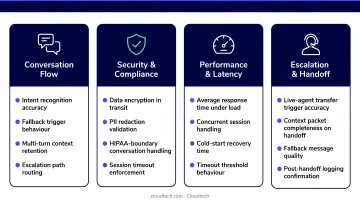
Functional accuracy is only half the picture. Once scripted tests pass, shift to performance testing: simulate concurrent user load to surface latency degradation, test time-to-first-token under realistic conditions, and verify streaming renders correctly across all target channels.
Launch readiness checklist:
- Stays within knowledge base scope; does not fabricate information
- Cites sources accurately in RAG mode
- Transfers to a human within two turns when unable to resolve
- Handles peak concurrent load without meaningful latency increase
Any deviation from these behaviors is a blocker before launch. Inaccurate responses that reach live users erode trust faster than any technical issue, and recovering that trust after go-live is far harder than getting the testing right upfront.
Common AI Chatbot Implementation Challenges and How to Fix Them
Even well-planned implementations encounter predictable failure patterns. Recognizing them early is the difference between a quick fix and a multi-day outage.
Hallucinations and Off-Script Responses
The chatbot generates plausible-sounding but factually incorrect answers not grounded in the knowledge base. This usually traces back to insufficient RAG grounding, weak system prompt scope constraints, or knowledge base gaps on high-frequency query topics.
To address this:
- Strengthen the system prompt with explicit instructions to answer only from retrieved sources
- Audit knowledge base coverage for your top query categories
- Set a confidence threshold below which the chatbot escalates rather than guesses
Broken Conversation Context Across Turns
The chatbot treats each user message as a new conversation, forcing users to repeat themselves. This typically stems from chat history not being passed to the LLM context window, session ID mismanagement, or overly short history retention settings.
To fix it:
- Implement persistent session management with DynamoDB
- Pass the last 4–6 messages as context in each API call
- Validate session continuity in multi-turn test scenarios before launch
Integration Failures with Existing Business Systems
The chatbot fails to retrieve CRM data, create tickets, or trigger workflows — resulting in silent failures (errors that don't surface to the user) or generic fallback responses. Common causes include API authentication errors (expired tokens, incorrect IAM roles), data format mismatches between chatbot output and CRM input schemas, or missing error handling in Lambda functions.
To resolve integration failures:
- Implement structured error logging on all integration endpoints
- Use API Gateway request validation to catch malformed requests early
- Test each integration independently with mocked chatbot payloads before end-to-end testing
Pro Tips for Implementing a Custom AI Chatbot Successfully
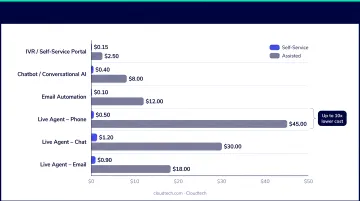
Start with one use case and prove ROI first. Chatbots built to handle a single function well — Tier 1 support queries, for example — consistently outperform those trying to serve every function from day one. Gartner's 2024 benchmark shows median cost per contact at $1.84 for self-service vs. $13.50 for assisted channels — that gap is where focused chatbot ROI lives.
Instrument analytics from day one. Track four metrics from the first production session:
- Response accuracy rate
- Conversation completion rate
- Escalation-to-human rate
- User satisfaction score
These four metrics tell you exactly where to focus the next iteration.
Explore AWS Partner Funding Programs
As an AWS Advanced Tier Partner, Cloudtech has access to AWS Partner Funding benefits — including cash or AWS promotional credits — that can significantly reduce the cost of cloud infrastructure and implementation consulting for eligible SMBs.
Available programs include the Migration Acceleration Program (MAP), APN Innovation Sandbox Credits, and Marketing Development Funds. Eligibility and amounts are confirmed through the AWS Partner Funding Portal — ask about it during scoping.
Schedule knowledge base maintenance. A chatbot trained on stale data degrades in accuracy and user trust over time. Plan quarterly knowledge base audits and prompt reviews as a standing operational calendar item — this is especially critical in regulated industries like healthcare and financial services.
Frequently Asked Questions
How long does it take to implement a custom AI chatbot?
A focused AWS-managed-services implementation can move from scoping to production in 4–8 weeks with the right expertise. Fully custom builds with extensive CRM and ERP integrations typically take 3–6 months. Data readiness and integration complexity are the primary timeline drivers — not the chatbot itself.
What AWS services are best suited for building a custom AI chatbot?
The core stack: Amazon Bedrock (LLM access), Amazon Lex (conversational interface), AWS Lambda (serverless logic), Amazon S3 (knowledge base storage), and Amazon OpenSearch or DynamoDB (vector search and session storage). Each service is managed by AWS, so your team focuses on business logic rather than infrastructure.
How much does it cost to implement a custom AI chatbot?
Simple AI chatbots on managed cloud services can start from $5,000–$20,000. Medium-complexity custom builds with CRM integrations typically range from $20,000–$80,000. Costs depend on use case complexity, number of integrations, and whether an AWS consulting partner is involved.
What is the difference between a custom AI chatbot and a no-code chatbot platform?
No-code platforms offer speed and lower upfront cost but impose functionality limits, scalability ceilings, and vendor dependency. A custom AI chatbot trained on your proprietary data and connected to your existing systems delivers higher accuracy and adapts as your business requirements evolve.
How do I keep my custom AI chatbot accurate after launch?
Run quarterly knowledge base audits, monitor unresolved query rate as a real-time freshness indicator, and schedule prompt reviews alongside each knowledge base update. In healthcare and financial services, stale responses carry compliance risk — so tie your maintenance schedule directly to policy or regulatory update cycles.
Do I need in-house developers to implement a custom AI chatbot?
In-house developers can implement using AWS-managed services, but SMBs achieve faster, lower-risk results with an AWS-certified consulting partner who brings pre-built implementation patterns. The difference is weeks vs. months to production.