The billing model isn't the problem. Misconfiguration is. Excess memory allocation, default timeouts left untouched, verbose logging, and poor network topology decisions quietly inflate Lambda bills — often without triggering any alert until month-end.
This post breaks down 10 actionable optimization methods across three levers: decisions made at configuration time, how Lambda is governed at runtime, and the architecture surrounding it.
Key Takeaways
- Lambda billing covers requests, GB-seconds, and architecture type, with additional charges from CloudWatch Logs, NAT gateways, and data egress
- Memory allocation controls both RAM and vCPU; right-sizing it is the single highest-impact configuration change
- Switching to Graviton2 (ARM64) cuts duration pricing by 20% with no code changes for most functions
- Provisioned Concurrency reduces cold starts but raises costs; reserve it for latency-critical functions only
- Compute Savings Plans apply a 15% discount to Lambda duration with no function changes required
How AWS Lambda Costs Build Up
Lambda costs don't appear as one clean line item. They accumulate across multiple dimensions, often becoming visible only after a traffic spike or significant scale increase.
The math compounds fast. A function over-provisioned by 256 MB seems trivial per invocation. Across 50 million monthly executions, that misconfiguration can represent hundreds of dollars in unnecessary spend.
The Hidden Cost Problem
Three indirect charges catch most SMBs off guard:
- CloudWatch Logs ingestion costs $0.50/GB in US East. Functions logging full payloads in production generate this charge continuously.
- NAT Gateway fees run $0.045/hour plus $0.045/GB when Lambda functions inside a VPC access AWS services without VPC endpoints.
- Data egress starts free for the first 100 GB/month, but Lambda-driven APIs and data pipelines exceed that threshold quickly.
None of these appear under Lambda's direct pricing. They surface as separate line items in CloudWatch, VPC, or EC2, which is why most teams miss them until the bill arrives.
Understanding where costs hide is the first step. The methods below address each one directly.
Key Cost Drivers for AWS Lambda
Lambda's base billing uses two meters:
| Billing Item | Rate (US East) | What Drives It |
|---|---|---|
| Requests | $0.20 per 1M | Invocation count, retry policies |
| x86 duration | $0.0000166667/GB-second | Memory × execution time |
| ARM64 duration | $0.0000133334/GB-second | 20% lower than x86 |
| Free tier | 1M requests + 400K GB-seconds/month | Sufficient only for testing |
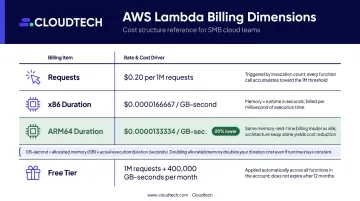
The GB-second model creates a direct relationship between memory and cost. Memory setting controls both available RAM and vCPU: over-provisioning increases the per-invocation rate, while under-provisioning can extend execution time enough to raise total cost. The optimal setting is almost never at either extreme.
Operational decisions drive additional cost spikes:
- Misconfigured retry policies triggering repeated invocations on failures
- Recursive functions accidentally invoking themselves
- Provisioned Concurrency left enabled without consistent traffic to justify the continuous charge
- Default maximum timeouts letting stuck executions bill until they time out
10 Cost-Reduction Strategies for AWS Lambda
These methods fall into three categories: configuration choices, runtime management, and the architecture around your functions.
Strategies That Change Upfront Decisions
1. Right-size memory allocation
Lambda's memory setting is your most direct cost lever. AWS's own benchmark showed a compute-intensive function completing in 1.465 seconds at 1,024 MB versus 11.722 seconds at 128 MB — for nearly identical cost per 1,000 invocations.
Provisioned Concurrency is a latency purchase, not a cost reduction. Use it only for latency-sensitive functions with consistently high utilization — AWS recommends target tracking at around 70% utilization. For predictable peak windows, scheduled scaling avoids paying for initialized capacity during off-hours.
Reserved Concurrency costs nothing to configure and is one of the most underused cost controls available.
6. Set billing alerts and budget thresholds
Cost spikes from misconfigured retries or traffic anomalies are invisible without guardrails. Configure AWS Budgets alerts for Lambda spend and set per-function cost thresholds. Without these controls, you're finding out about problems when the monthly bill arrives — not when they start.
7. Reduce CloudWatch logging costs
Every console.log or print statement in production Lambda code generates CloudWatch ingestion charges at $0.50/GB. At scale, verbose logging becomes a significant cost center.
Practical steps to reduce logging costs:
- Set log level to WARN or ERROR in production (not DEBUG)
- Never log full request/response payloads unless actively debugging
- Configure log retention periods — leaving logs indefinitely accumulates $0.03/GB-month in storage
- Route archival logs to S3 or Data Firehose for lower-cost long-term storage
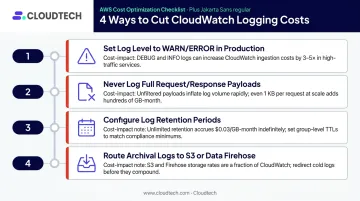
If you're unsure where your logging spend is going, a CloudWatch cost audit — reviewing retention policies, log verbosity, and routing — typically surfaces quick wins. Cloudtech's AWS-certified team runs these as part of broader Lambda cost reviews for SMBs.
Strategies That Change the Context Around Lambda
8. Commit to Compute Savings Plans
Compute Savings Plans apply a 15% discount to Lambda duration charges in exchange for a $/hour commitment over one or three years. Requests are not discounted. No function code or configuration changes required.
This is one of the lowest-effort optimizations available — but only after establishing a stable usage baseline. Model your scenarios in the AWS Pricing Calculator before committing to any term. An over-estimated commitment doesn't recover; you pay for capacity you don't use.
9. Adopt event-driven architectural patterns
Lambda functions that poll for work bill duration during wait states. Replacing polling with native event triggers eliminates idle compute charges entirely.
Effective patterns:
- S3 events, DynamoDB Streams, EventBridge rules: Functions execute only when real activity occurs
- AWS Step Functions Wait states: The state machine holds the workflow without invoking Lambda during delays
- SQS batching: Lambda processes up to 10,000 records per invocation instead of one — dramatically reducing total request count
SNS alone doesn't reduce invocation count. The cost savings come from SQS batch processing, where one invocation handles many records.
10. Eliminate unnecessary NAT gateway charges
Lambda functions inside a VPC require a NAT gateway for outbound internet access — $0.045/hour plus $0.045/GB in data processing fees. For functions that primarily call S3 or DynamoDB, this is avoidable.
Gateway VPC endpoints for S3 and DynamoDB carry no additional charge from AWS. Configure the relevant route tables and traffic bypasses NAT entirely for those service calls.
For other AWS services, compare Interface endpoint fees against your current NAT gateway spend before switching — Interface endpoints have their own hourly and processing charges. Also keep Lambda functions and their downstream services in the same AWS region, since cross-region calls add transfer fees that grow with invocation volume.
Conclusion
Lambda cost optimization starts with knowing where cost actually originates. Most overspend traces back to three categories:
- Configuration: Memory allocation, timeout limits, architecture (x86 vs. Arm64), and logging verbosity
- Management: Concurrency controls, budget alerts, and observability governance
- Architecture: Event patterns and network topology, which set the cost floor
These optimizations also require revisiting as workloads evolve. Memory settings that made sense six months ago may be wrong today. Provisioned Concurrency thresholds shift as traffic patterns change.
That ongoing reassessment takes time most SMB teams don't have. Cloudtech's AWS-certified team — an AWS Advanced Tier Partner with 12 Service Delivery Designations — can compress this process significantly. Their serverless assessments cover the full cost surface: configuration, concurrency, logging, and architecture. Reach out at connect@cloudtech.com or (332) 222-7090 to discuss where your Lambda spend is coming from.
Frequently Asked Questions
What makes AWS Lambda expensive?
Lambda becomes expensive through misconfiguration, not base pricing. Excess memory allocation, over-generous timeouts, verbose logging generating CloudWatch ingestion fees, and NAT gateway charges from VPC placement are the most common culprits.
Is AWS Lambda cheaper than EC2?
Lambda is generally more cost-effective for sporadic, event-driven, or short-duration workloads where idle time produces no charges. EC2 becomes more economical for long-running, continuous processes with predictable utilization where Reserved Instance or Savings Plan pricing applies.
How does memory allocation affect Lambda costs?
Memory controls both RAM and vCPU, and cost is calculated as memory × execution time. A higher memory setting can lower total cost if it reduces execution duration proportionally — test multiple memory settings rather than assuming the lowest allocation saves the most money.
What is a Lambda cold start and does it affect cost?
A cold start is an initialization delay when a function starts after inactivity. As of August 2025, AWS bills INIT-phase duration across all managed runtimes, so cold starts contribute directly to billed duration — smaller deployment packages and Lambda Layers help minimize this.
Can I reduce Lambda costs without changing my code?
Yes. Switching to Graviton2 architecture, right-sizing memory with AWS Compute Optimizer, committing to a Compute Savings Plan, and adjusting timeout and logging settings are all configuration-level changes requiring no code modifications.
What is the AWS Lambda free tier and when does it run out?
Lambda's always-free tier covers 1 million requests and 400,000 GB-seconds of compute per month, resetting monthly. This covers testing and minimal production use. CloudWatch Logs, NAT gateway charges, and data transfer costs are not included in Lambda's free tier.