But moving quickly without a plan is exactly where most integrations break down. API incompatibilities, undertrained NLU models, and missing escalation rules cause far more failures than the underlying technology ever does.
This article covers the exact integration sequence, what needs to be in place before you start, the four variables that determine real-world success, and the specific mistakes that stall most deployments before they deliver value.
Key Takeaways
- Audit your existing systems before selecting a platform — API gaps found mid-rollout cost more than upfront planning.
- Follow this order: system audit → platform selection → API/CRM setup → voice and NLU configuration → phased testing and deployment.
- Latency, NLU accuracy, escalation protocol design, and CRM sync reliability are the four controllable variables that determine outcomes.
- Most post-launch failures trace back to generic training data and undefined escalation rules, not the technology.
- A phased rollout starting with one use case consistently outperforms full-scale "big bang" deployments.
How to Integrate AI Voice Chatbots Into Existing Systems
Step 1: Audit Your Existing Systems and Define the Use Case
Before evaluating a single platform, define exactly what the voice chatbot will own. Inbound support, lead qualification, appointment booking, and order status each carry different system dependencies. Mixing them up front creates scope creep that's hard to unwind later.
Map every system the chatbot must connect to:
- CRM (Salesforce, HubSpot, Zoho)
- Ticketing or helpdesk (Zendesk, Freshdesk)
- Payment gateways or order management systems
- Calendaring tools for appointment workflows
- Telephony infrastructure and PBX
Undocumented or deprecated APIs in these systems are the leading cause of stalled integrations. Find them now, not after you've selected a platform and signed a vendor agreement.
Also document:
- Current call and conversation volumes
- Peak traffic windows
- Languages your customer base uses
This scoping data directly determines whether a given platform can handle your actual operational load—not just a demo scenario.
Step 2: Select the Right AI Voice Chatbot Platform
Evaluate platforms against three criteria before anything else:
Native integration depth — Does it have prebuilt connectors for your CRM, helpdesk, and telephony stack? Platforms like Amazon Connect and Google CX Agent Studio can deploy conversational AI in weeks rather than months using no-code or low-code capabilities—a meaningful advantage over custom-built solutions.
Voice response latency — Human conversation gaps average around 200ms. Research on spoken-dialogue systems puts acceptable silence thresholds at 700ms to 1,000ms. Test vendor-quoted latency specs under real-traffic conditions in your target geography, not just in lab settings.
Compliance certifications — Match the platform's certifications to your industry:
- Healthcare: HIPAA compliance for audio storage and PHI handling
- Financial services: SOC 2 and relevant sector regulations
- All industries: GDPR obligations if processing voice data for biometric identification
Confirm data residency and encryption standards before signing anything.
Step 3: Connect APIs and Integrate Core Business Systems
With your platform selected, the next step is wiring it into the systems that make it useful. Bidirectional API connections between the chatbot and your CRM are non-negotiable. Call outcomes (lead status updates, conversation summaries, follow-up tasks) must write back automatically. Manual data entry defeats the purpose entirely.
Key technical setup steps:
- Configure webhook triggers for event-driven actions (call ended, intent resolved, escalation triggered)
- Implement OAuth 2.0 authentication for secure API access
- Validate in a sandbox environment before connecting to production systems
- Build retry logic with exponential backoff for failed webhook attempts—silent failures compound fast at scale
Common integration targets and what each unlocks:
| System | Integration Value |
|---|---|
| CRM (Salesforce, HubSpot, Zoho) | Real-time customer data during calls |
| Helpdesk (Zendesk, Freshdesk) | Automatic ticket creation on escalation |
| Telephony / SIP trunking | Call routing without replacing existing PBX |
| Calendaring tools | Appointment scheduling in a single call |
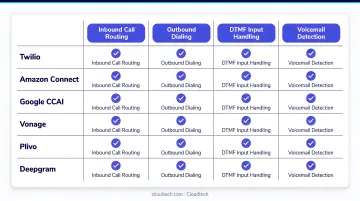
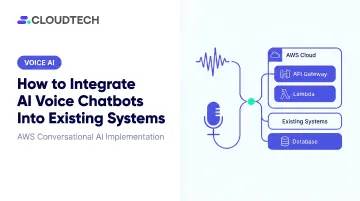
For legacy systems without documented APIs, AWS-native tools like Step Functions, EventBridge, and Lambda can bridge the gap—or API Gateway can create a managed layer in front of systems that can't expose an endpoint directly.
Step 4: Configure the Voice Experience and Conversation Flow
Once integrations are confirmed, turn to the experience itself. Define the bot's persona, tone, and escalation triggers before writing any conversation flow. These decisions are much harder to retrofit after the fact.
Escalation triggers to configure before launch:
- Explicit human request ("I want to speak to a person")
- Three consecutive unresolved intents
- Low confidence score below defined threshold
- Detected negative sentiment signals
Full conversation context—every intent, every data point collected—must transfer to the human agent on every handoff. Customers who repeat themselves after an escalation are a signal that this wasn't configured correctly.
On NLU training: Train on real conversation data from your own support logs and call transcripts, not vendor sample FAQs. Domain-specific utterances consistently outperform generic pre-trained models — even small amounts of domain-relevant labeled data produce measurable accuracy gains over generic baselines, which directly affects call containment rates.
For data splits, Nuance's NLU documentation recommends 80/10/10 (training/validation/blind-test) with at least 20 utterances per intent in test sets. That benchmark applies broadly across major platforms.
Every fallback response should acknowledge the failure, offer an alternative path, and avoid dead ends that force call abandonment.
Step 5: Test, Go Live in Phases, and Monitor Performance
With configuration complete, don't skip straight to launch. Run three test types before any customer interaction goes live:
- Functional testing — Does each intent resolve correctly across expected variations?
- Integration testing — Are CRM records updating accurately after each call?
- Load testing — Can the system maintain latency targets at peak concurrent call volume?
Post-launch KPIs to define before go-live (not after):
- Containment rate — Conversations resolved without human escalation
- Average handle time — Per-call duration trend over time
- Escalation rate — How often the bot hands off, and why
- CRM sync accuracy — Percentage of calls with accurate record updates
- Customer satisfaction score — Collected via post-call survey
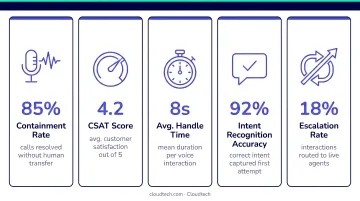
Review these weekly for the first 60 days. Without pre-set benchmarks, you cannot identify what's underperforming or demonstrate improvement over time.
Start with one use case or one channel. Most SMBs see meaningful containment rate improvements within 60–90 days of a focused first deployment — that baseline is what justifies expanding to additional workflows.
What You Need Before Starting the Integration
Teams that skip pre-integration readiness checks pay for it mid-rollout — in delays, rework, and costs that dwarf what upfront planning would have taken. Getting these three areas locked down before you touch a platform will save weeks.
System and API Requirements
Confirm every system the chatbot must connect to exposes a documented, active API. For legacy or undocumented systems, plan a middleware or abstraction layer before platform selection — not during it.
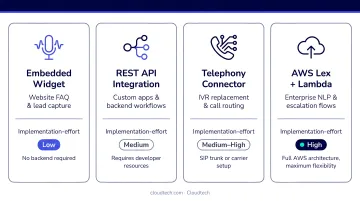
Four primary integration methods:
| Method | Best For | Effort |
|---|---|---|
| Prebuilt connectors | Popular platforms (Salesforce, Zendesk, HubSpot) | Low — minimal code required |
| REST APIs | Custom systems needing full flexibility | High — developer effort, longer timelines |
| Middleware / iPaaS | Multi-system orchestration (AWS: Step Functions, EventBridge, AppFlow) | Medium — configuration-heavy |
| SIP trunking | Connecting AI voice agents to existing telephony and PBX | Low-Medium — no replacement needed |
Data and Training Readiness
Before touching any platform configuration:
- Pull labeled intent examples from real customer conversation logs
- Compile a curated FAQ database with accurate, current answers
- Remove duplicates, outdated entries, and ambiguous examples
Raw or uncleaned data degrades NLU accuracy from day one. Poor training data shows up immediately in containment rates — and it's one of the most common reasons pilots stall.
Compliance and Infrastructure Readiness
Data readiness and compliance readiness aren't separate workstreams — they feed each other. Obtain IT security sign-off on data access scopes before procurement. Key obligations by industry:
- GDPR: Voice data used for biometric identification is Article 9 special category data; a Data Protection Impact Assessment (DPIA) is required
- HIPAA: HHS guidance classifies voice prints as HIPAA identifiers; audio files, transcripts, and call metadata containing health information require full Security Rule protections
- SOC 2: Applies to vendors handling sensitive data; review logical access, encryption, monitoring, and incident response commitments
For SMBs building on AWS, Cloudtech's AWS-certified team can assess cloud architecture readiness and confirm HIPAA and SOC 2 requirements are met before the integration is built.
Key Parameters That Affect Integration Success
Integration outcomes vary based on four controllable variables. Organizations that optimize these before launch consistently outperform those that treat them as post-deployment concerns.
Response Latency
Human conversation gaps average around 200ms. Spoken-dialogue systems typically operate within a 700ms to 1,000ms silence threshold before the interaction feels unnatural. Beyond that window, users repeat themselves, speak over the bot, or abandon the call entirely—and as NICE notes, abandon rate correlates directly with wait time.
Test latency under real load in your target geography. Vendor lab specs are not a reliable proxy for production performance.
NLU Model Accuracy
An undertrained model misclassifies intents, routes calls to human agents unnecessarily, and erodes both cost savings and customer experience simultaneously. Genesys reports virtual agents can deflect more than 60% of interactions—but that outcome depends heavily on how well the model is trained.
Measure NLU accuracy using:
- Blind test sets and confusion matrix analysis
- Fallback rates during pilot traffic
- Containment rate as the primary output metric
Retrain iteratively using actual post-launch conversations.
Escalation Protocol Design
A bot that escalates too aggressively negates cost savings. One that refuses to escalate damages customer satisfaction and creates regulatory liability, particularly in healthcare and financial services where unresolved interactions carry real consequences.
Configure clear triggers before launch:
- Explicit human requests
- Consecutive unresolved intents or low confidence scores
- Sentiment signals indicating frustration
Every handoff must pass full conversation history and customer data to the agent. No exceptions.
CRM Sync Reliability
If call outcomes don't reliably write back to the CRM, support and sales teams re-ask questions already answered, create duplicate records, and lose customer context at scale.
According to Genesys, AI-powered virtual agents with auto-summarization save up to five minutes per interaction and reduce case escalations by 43%. Those gains disappear if CRM sync is unreliable.
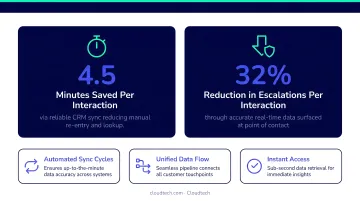
Bidirectional real-time sync is the target standard. One-directional or delayed sync creates data gaps that compound with call volume.
Common Mistakes to Avoid When Integrating AI Voice Chatbots
Run your pre-integration audit before selecting a platform — API incompatibilities discovered mid-rollout are the costliest delays in any integration project.
Train on your own data, not vendor samples. NLU models built on generic FAQs fail on real customer queries from day one. Use labeled conversation logs and call transcripts.
Define escalation rules before go-live. A bot without handoff conditions creates compliance exposure — especially in insurance, banking, and healthcare where regulators expect clear human-transfer protocols.
Set baseline KPIs before launch. Without benchmarks for containment rate, escalation frequency, and CRM sync accuracy, you have no way to identify underperformance or prove improvement over time.
Conclusion
Most AI voice chatbot integration failures trace back to skipped preparation steps, not the technology itself. A thorough system audit, clean and domain-specific training data, validated bidirectional API connections, and defined escalation rules are the foundation—and every shortcut taken here shows up later as a costly rollback.
Teams that follow a disciplined sequence consistently reach time-to-value faster and with fewer disruptions:
- Start with a single-use-case rollout — limit scope and risk in the first phase
- Track KPIs closely for the first 60 days — surface issues before they compound
- Scale only from a proven baseline — expand what works, not what's assumed to work
For SMBs building on AWS infrastructure, that sequence becomes easier with the right implementation partner. Cloudtech's AWS-certified team handles the compliance frameworks, API configuration, and phased deployment that make voice chatbot integrations stick — without the cost structure of a large enterprise engagement.
Frequently Asked Questions
What systems can an AI voice chatbot integrate with?
AI voice chatbots connect to CRM platforms (Salesforce, HubSpot, Zoho), helpdesk tools (Zendesk, Freshdesk), telephony systems via SIP trunking, calendaring tools, payment gateways, and order management systems—accessible via REST APIs, prebuilt connectors, or middleware solutions like AWS EventBridge and AppFlow.
How long does it take to integrate an AI voice chatbot into existing systems?
Timelines vary based on system complexity. Tools with prebuilt connectors (Salesforce, Zendesk, HubSpot) typically deploy in days to a few weeks, while custom REST API integrations for proprietary or legacy systems take several weeks depending on API documentation quality and middleware complexity.
Do I need to replace my existing CRM or telephony system to add an AI voice chatbot?
No. Voice chatbots are designed to work alongside existing systems via API or SIP trunking, not replace them. They extend current infrastructure—adding automation and data capture without disrupting what's already in place.
What is the difference between a prebuilt connector and a REST API integration?
Prebuilt connectors are plug-and-play links for popular platforms (Salesforce, Zendesk, HubSpot) that configure in hours without custom code. REST API integration is custom-built for proprietary systems, offering full flexibility but requiring developer effort and longer timelines.
How do I ensure data security and compliance when deploying an AI voice chatbot?
Verify the vendor's compliance certifications (GDPR, HIPAA, SOC 2) against your industry requirements—especially in healthcare or financial services—confirm data residency and encryption standards, and obtain IT security sign-off before connecting to production systems.
How do I measure whether my AI voice chatbot integration is successful?
Track five core KPIs from day one: containment rate, average handle time, escalation rate, CRM sync accuracy, and customer satisfaction score. Review them weekly for the first 60 days to catch underperforming flows before they compound.