Introduction
AWS has become the default infrastructure choice for businesses building generative AI applications — and the reasons are concrete. Between Amazon Bedrock's managed access to foundation models from Anthropic, Meta, and Mistral, and SageMaker's full ML pipeline control, AWS offers more integrated GenAI tooling under one compliance framework than any comparable platform. Amazon Bedrock alone now powers GenAI for more than 100,000 organizations worldwide.
That said, access to powerful tools doesn't guarantee results. Outcomes vary dramatically based on how clearly a use case is defined, how ready your data actually is, and whether the architecture decisions made on day one will hold up at production scale. A poorly scoped project can consume substantial time and budget without shipping a working application.
This guide walks through the exact steps to build a generative AI application on AWS: what you need before starting, how to choose between Bedrock and SageMaker, which variables most affect performance, and the mistakes that trip up first-time builders most often.
Key Takeaways
- Amazon Bedrock is the fastest path for most SMBs — no infrastructure to manage, pre-trained models ready via API
- Data quality and chunking strategy determine RAG accuracy more than model selection
- IAM configuration and compliance validation must happen before deployment, not after
- Model drift is real — skip monitoring and retraining pipelines post-launch and your model's accuracy will degrade fast
- AWS cost tools — Spot Instances, Inferentia, Savings Plans — only deliver savings when built into the architecture from day one
Why Build Generative AI Applications on AWS?
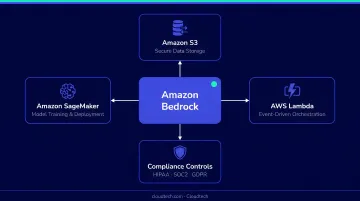
AWS's advantage for GenAI development isn't any single service — it's the integration. You get pre-trained foundation models via Bedrock, custom training via SageMaker, serverless execution via Lambda, and enterprise-grade storage through S3, all within a single security and compliance framework.
That framework carries real weight for regulated industries. AWS supports 143 security standards and compliance certifications, including HIPAA, GDPR, and SOC 2, making it a practical fit for healthcare and financial services workloads.
The scalability story is equally practical. SageMaker endpoints auto-scale dynamically as inference demand fluctuates, and on-demand GPU instances mean teams pay for compute only when they're using it. According to AWS's Generative AI Adoption Index, organizations ran an average of 45 AI experiments in 2024, with 20 expected to reach end users by 2025 — a pace that requires exactly this kind of elastic infrastructure.
When AWS May Not Be the Right Fit
AWS is the right choice when scalability, compliance, or integration with existing AWS services is the priority. It's less ideal when:
- Your dataset is very small and unlikely to grow
- You have no existing cloud infrastructure and aren't planning to build any
- The project is purely experimental with no production path in sight
For those scenarios, the setup overhead may outweigh the near-term benefit.
How to Build a Generative AI Application on AWS
Step 1: Define Your Use Case and Success Criteria
GenAI development on AWS has to start with a specific, measurable business problem. "Use AI to improve operations" is too vague to act on. Without a defined problem, you'll almost certainly select the wrong model, misconfigure the architecture, and burn budget on rework.
Well-defined use cases include:
- AI-powered customer support chatbots (DoorDash built a Bedrock-based contact center handling hundreds of thousands of calls per day with ≤2.5 second response latency, ready for live testing in two months)
- Automated document summarization for legal, financial, or clinical content
- Personalized product or maintenance recommendations using Amazon Nova Pro on Bedrock
- AI-assisted code generation and security review via Bedrock and Amazon CodeGuru
Before selecting any AWS service, define these success criteria upfront:
- Expected accuracy — what response quality threshold is acceptable?
- Latency targets — what's the maximum tolerable inference time?
- Compliance requirements — does this data touch HIPAA, GDPR, or financial regulations?
- Query volume — how many requests per day at peak?
These four inputs determine which services, deployment patterns, and cost structures are appropriate.
Step 2: Prepare and Store Your Data
Model accuracy is a direct function of data quality. No prompt engineering or model selection decision compensates for poorly prepared source data.
The standard AWS data stack:
- Amazon S3 — primary storage layer for training data and RAG documents
- AWS Glue — ETL pipeline for extraction, transformation, and loading
- Amazon Comprehend / Rekognition — preprocessing for text and image data respectively
RAG vs. fine-tuning — choose the right path before you start:
| Approach | Data Required | AWS Service |
|---|---|---|
| RAG | Well-structured, chunked documents | Bedrock Knowledge Bases |
| Fine-tuning | Labeled training examples | SageMaker Training Jobs |
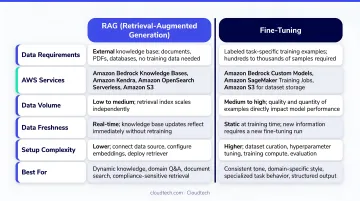
Choosing the wrong data preparation path is one of the most common sources of mid-project rework. RAG lets teams build question-answering systems for custom documents without fine-tuning — it's faster and cheaper for most SMB use cases. Fine-tuning is the right call when domain specificity goes beyond what RAG can deliver.
Step 3: Choose and Configure Your AWS AI Service
With your data prepared, the next call is which AWS service handles the AI logic. That decision comes down to two options:
Amazon Bedrock — the right starting point for most teams. Managed API access to foundation models from Anthropic, Meta, Mistral, AI21 Labs, Cohere, and others. No infrastructure to maintain. Supports RAG via Knowledge Bases, content safety via Guardrails, and multi-step task automation via Agents.
Amazon SageMaker — appropriate when the use case requires fine-tuning on proprietary data, training a custom model from scratch, or running specialized inference pipelines with full ML pipeline control.
Key Bedrock configuration steps:
- Select your foundation model based on use case (reasoning, code generation, language understanding)
- Configure Bedrock Knowledge Bases if the application needs RAG
- Set up Bedrock Guardrails to reduce hallucinations and enforce content safety
- Use Bedrock Agents for applications requiring multi-step task workflows
Step 4: Build, Test, and Deploy Securely
Once your service is configured, three components wire the application together:
- Amazon API Gateway — exposes the model as an API endpoint
- AWS Lambda — handles serverless backend logic, signs requests to Bedrock with AWS credentials
- Amazon CloudFront — caches and distributes AI-generated content globally
Before any deployment goes live, test across four dimensions:
- Run SageMaker Clarify to detect fairness and bias issues in model responses
- Stress test with AWS Load Testing tools to validate performance under peak query volume
- Configure IAM roles with least-privilege access scoped to authorized services only
- Run HIPAA/GDPR compliance checks through AWS Audit Manager
For healthcare and financial services teams especially, compliance gaps found post-deployment cost significantly more to remediate than building controls in from the start.
Step 5: Monitor, Retrain, and Optimize Costs
GenAI models drift. As real-world data evolves away from training data, response quality degrades, often gradually enough that teams don't notice until users do. Left unchecked, even a well-built application can see measurable accuracy drops within months of deployment.
Monitoring and retraining setup:
- SageMaker Model Monitor — detects anomalies and drift, triggers alerts
- SageMaker Pipelines — automates retraining workflows when drift thresholds are crossed
Cost optimization levers (build these in from day one):
| Tool | Savings Potential |
|---|---|
| EC2 Spot Instances | Up to 90% vs. On-Demand for training |
| Amazon Inferentia chips | Up to 40% lower cost per inference |
| Compute Savings Plans | Up to 66% reduction in compute spend |
| ML Savings Plans (SageMaker) | Up to 64% cost reduction |
| AWS Compute Optimizer | Right-sizes GPU and accelerated instances |
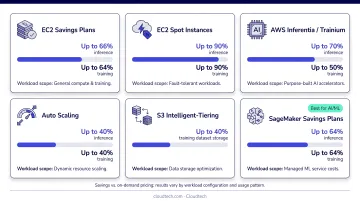
Each of these tools requires baseline configuration during the design phase to work correctly. Teams that add cost controls after launch typically recover only a fraction of the potential savings compared to those who architect for cost from day one.
What You Need Before You Start Building
Preparation determines how quickly development moves and how much rework is required. Teams that skip this phase typically restart at least one major phase mid-project.
Technical and Account Requirements
- Active AWS account with service limits enabled for SageMaker, Bedrock, and EC2 GPU instances in the target region
- IAM roles and policies pre-configured for least-privilege access
- Confirmed availability of required foundation models in the deployment region — not all Bedrock models are available in every AWS region
Data and Use Case Readiness
- Data sources identified and volume confirmed as sufficient for the chosen method
- RAG requires well-structured, chunked documents; fine-tuning requires labeled examples
- Data governance and privacy requirements understood before any data enters the AWS environment
Expertise and Partner Readiness
Before writing a line of code, assess whether your team has depth in these three areas where gaps tend to be most expensive:
- IAM security — misconfigured roles are the most common source of GenAI compliance failures
- Cost management — foundation model inference costs can spike unexpectedly without guardrails
- Model evaluation — knowing how to measure output quality before production is non-negotiable
If those gaps exist, working with an AWS Advanced Tier Partner like Cloudtech — staffed by former AWS engineers with hands-on GenAI implementation experience — can close them quickly and keep the build on track.
Key Variables That Affect Your Application's Performance
The same AWS services configured differently produce dramatically different outcomes. These four variables are where production-ready applications diverge from prototypes that never ship.
Foundation Model Selection
Different models have different strengths — language understanding, multi-step reasoning, code generation, domain specificity. Selecting based on benchmark scores alone without testing against your actual use case data is a frequent cause of poor production performance.
Amazon Bedrock's built-in model evaluation tools support structured comparison of model outputs using your own prompt datasets. Third-party benchmarks like Stanford HELM provide directional context, but use Bedrock's evaluation tools against your own data before making a final call.
Data Quality and Chunking Strategy (for RAG)
For RAG applications, how source documents are chunked, embedded, and indexed in Bedrock Knowledge Bases directly determines retrieval accuracy. Poorly chunked documents pass incomplete or irrelevant context to the model, producing hallucinations or generic answers.
Bedrock Knowledge Bases supports advanced parsing, chunking, and query reformulation controls — each one directly affecting what context the model receives. Chunk size, overlap settings, and embedding model selection all affect output quality. This variable is underestimated during initial setup more than any other.
Prompt Engineering and System Prompts
The instructions given to the foundation model via system prompts and prompt templates shape every response the application generates. Without structured prompt engineering, even a well-selected model produces inconsistent or off-brand outputs.
Iterative prompt optimization using Bedrock's model evaluation tools directly improves response relevance and safety — without requiring model retraining. Prompt changes take hours, not weeks — making this the fastest path to measurable output improvement for most teams.
Guardrails and Safety Configuration
Bedrock Guardrails controls content filtering, topic restrictions, and hallucination reduction. AWS reports Guardrails can block up to 88% of harmful content and identify correct model responses with up to 99% accuracy using Automated Reasoning checks.
Applications deployed without guardrails in regulated industries face compliance risk and reputational exposure. The core configuration trade-off to manage:
- Too permissive: harmful or non-compliant content reaches end users
- Too restrictive: legitimate responses get blocked, degrading user experience
- Well-calibrated: guardrails run invisibly, enforcing policy without interrupting utility
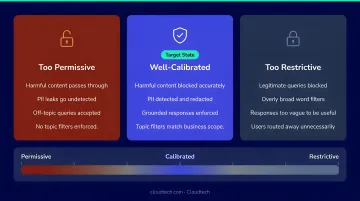
Getting this balance right requires iterative testing against real production scenarios, not just sandbox prompts.
Common Mistakes When Building Generative AI Applications on AWS
Most GenAI builds don't fail at the model level — they fail at the planning and process level. These four mistakes are the most common culprits.
Skipping use case scoping: Teams that pick a service before defining the problem, success metrics, and data availability almost always face a full restart. The use case determines every downstream architectural decision.
Over-relying on default configurations: Bedrock and SageMaker defaults are built for exploration, not production. IAM permissions are too broad, model parameters aren't tuned, and guardrails aren't enabled — each one a security gap or a cost surprise waiting to happen.
Neglecting compliance before deployment: In healthcare and financial services, skipping pre-deployment audits via AWS Audit Manager and SageMaker Clarify risks deploying applications with bias, data exposure vulnerabilities, or regulatory non-compliance. Fixing these post-launch costs far more than building them in.
Treating deployment as a one-time event: Model drift, shifting business data, and changing user behavior degrade a GenAI application without continuous monitoring. Teams that don't build SageMaker Model Monitor and automated retraining pipelines into their deployment plan end up with accuracy problems users notice before the team does.
Frequently Asked Questions
What is the difference between Amazon Bedrock and Amazon SageMaker for generative AI?
Bedrock provides managed API access to pre-trained foundation models with no infrastructure to maintain — ideal for most application builders who want to build on top of existing models. SageMaker is for teams that need to train, fine-tune, or host their own custom models with full control over the ML pipeline.
Do I need to train my own AI model to build a generative AI app on AWS?
Most businesses don't. Amazon Bedrock provides access to powerful foundation models that can be customized through prompt engineering and RAG without any model training — cutting both cost and deployment time.
How much does it cost to build a generative AI application on AWS?
Costs depend on services used, query volume, and whether training is involved. AWS's Generative AI Application Builder baseline runs approximately $20/month, with total costs scaling with usage. Architect in Spot Instances and Inferentia chips from the start to keep inference costs manageable.
Can small and mid-sized businesses realistically build generative AI applications on AWS?
Yes — AWS's managed services like Bedrock are specifically designed to lower the barrier. SMBs can access enterprise-grade GenAI capabilities without a large data science team, particularly when working with an AWS-certified partner to architect cost-efficient solutions aligned to their actual use case.
How long does it typically take to build and deploy a generative AI application on AWS?
DoorDash's RAG-based Bedrock contact center was ready for live testing in two months. Timelines range from a few weeks for simpler Bedrock-based chatbots to several months for custom-trained SageMaker models. Scope clarity, data readiness, and team expertise are the primary variables.
What AWS compliance tools are available for generative AI in regulated industries?
Amazon Bedrock Guardrails handles content safety, SageMaker Clarify covers bias detection, AWS Audit Manager provides prebuilt HIPAA and GDPR frameworks, and AWS KMS handles data encryption — making AWS a credible choice for healthcare and financial services GenAI workloads.