A 2023 Small Business & Entrepreneurship Council survey found 93% of small businesses already use some form of cloud service — but using cloud tools and successfully migrating core infrastructure are different challenges entirely (SBE Council, 2023).
Automation can make migration more repeatable and measurable. It can't replace architecture decisions, security reviews, or human judgment about what should move and when. This guide covers migration strategies, the 7 Rs, tool selection, cost factors, implementation steps, and what happens after cutover.
Key Takeaways
- Automation cuts repetitive work in discovery, provisioning, and validation; strategy stays with your team
- Match the migration strategy to each workload before you standardize on any tool
- Security and governance belong at the start of a migration, not after cutover
- Phased, wave-based migrations with tested rollback plans reduce business disruption
- Treat post-migration optimization as continuous work after cutover
What Is Cloud Migration Automation?
Cloud migration means moving applications, workloads, data, infrastructure, or supporting services from on-premises systems (or one cloud environment) into a new cloud environment.
That is different from modernization, which often changes the application's underlying architecture rather than just its location.
Cloud migration automation applies scripts, migration services, Infrastructure as Code (IaC), replication tools, orchestration, policy checks, and monitoring to reduce manual effort across five phases: assessment, provisioning, transfer, cutover, and validation.

What Automation Handles vs. What It Doesn't
Automation excels at repeatable execution. It is not a substitute for judgment. Automation can:
- Discover servers, applications, and dependencies at scale
- Replicate data continuously with integrity checks
- Provision infrastructure consistently across environments
- Run validation tests and flag anomalies
What automation cannot do on its own:
- Decide your acceptable downtime window
- Determine regulatory obligations for data handling
- Choose whether a workload should be retired, retained, or rebuilt
- Resolve ownership disputes between teams
Example: A company migrating 15 nearly identical regional office environments gets the most value from a repeatable IaC template: build it once, deploy it 15 times with consistent security groups and logging. Doing the same work by hand invites configuration drift and inconsistent audit trails.
The Layers That Need Coordination
A migration touches more than servers. Plan across these layers together:
| Layer | What it covers |
|---|---|
| Infrastructure & networking | VPCs, subnets, connectivity |
| Applications & data | Code, databases, storage |
| Identity & security | IAM, encryption, access control |
| CI/CD & operations | Deployment pipelines, monitoring |
| Governance & cost | Policy, tagging, budget tracking |
Treating these as separate projects is how teams miss dependencies.
Why Automate Cloud Migration?
Small teams rarely have spare headcount to manually configure dozens of environments. Automation through IaC tools like AWS CloudFormation or Terraform lets a small team define infrastructure once and redeploy it consistently across development, staging, and production—without reinventing configuration each time. For SMB teams, that consistency is often the difference between a controlled cutover and weeks of manual rework.
Reducing Overlooked Dependencies
Manual discovery misses things. Tools such as AWS Application Discovery Service automatically collect CPU, memory, disk, and network data, then map application dependencies — catching integrations a spreadsheet-based audit might skip.
One regional medical practice's migration omitted an on-premises directory service entirely, locking staff out of systems for hours. A pilot run with proper dependency mapping would have caught it before production cutover.
Business Continuity Through Phased Execution
Automation supports safer cutovers through:
- Parallel environments: running legacy and cloud systems simultaneously during transition
- Replication: continuous data sync via tools like AWS DMS or DataSync
- Blue-green or canary cutovers: shifting traffic gradually rather than all at once
- Tested rollback procedures: a documented path back if validation fails
Financial Reality Check
Automation reduces labor-intensive rework, but it doesn't eliminate migration costs. Budget for:
- Tooling and consulting fees
- Data transfer and egress charges
- Temporary duplicate ("double bubble") infrastructure during parallel runs
- Remediation and testing time
- Ongoing cloud consumption post-migration
Where Automation Delivers the Most Value
Automation pays off fastest with:
- Repeated, similar workloads (multiple offices, environments, or regions)
- Large data transfers requiring integrity checks
- Standardized environments across dev/staging/production
- Frequent deployments needing consistent pipelines
- Hybrid or multi-cloud setups requiring coordination
What Automation Won't Fix
Tools don't compensate for weak foundations. The Cloud Security Alliance's 2024 Top Threats report ranks identity and access management issues first, insecure interfaces and APIs second, and misconfiguration and inadequate change control third among cloud risks—none of which a migration tool resolves on its own (CSA, 2024). Other persistent risks include:

- Inaccurate or incomplete inventory data
- Overly permissive IAM policies carried over from legacy systems
- Hidden dependencies discovered too late
- Lift-and-shift applied to workloads that needed re-architecture
- Insufficient staff training on the new environment
A Practical Automated Cloud Migration Framework
Start With Business Objectives, Not Tools
Before touching infrastructure, define why you're migrating. Cost reduction? Compliance? Faster deployment cycles? Document workload owners, recovery objectives, downtime tolerance, and budget constraints. This becomes your filter for every later decision.
Build an Inventory and Dependency Map
Capture the full estate before you move anything:
- Applications, databases, and servers
- Storage, network paths, and integrations
- Identities, data classifications, and licensing
- Performance baselines
Discovery tools (like AWS Application Discovery Service or Systems Manager Inventory) handle data collection. Human review still catches context tools miss, such as which systems a compliance team treats as in-scope for HIPAA.
Choose a Strategy Per Workload
Not every application should move the same way. AWS documents seven distinct migration strategies, each suited to different situations (AWS Prescriptive Guidance):
| Strategy | What it means | Best for |
|---|---|---|
| Rehost | Move as-is ("lift and shift") | Time-sensitive migrations, legacy apps |
| Replatform | Minor cloud optimizations | Apps needing light tuning, not a rebuild |
| Refactor | Redesign for cloud-native services | Long-term scalability needs |
| Repurchase | Switch to a SaaS alternative | Outdated or hard-to-maintain software |
| Relocate | Move virtualized environments as-is | Large VMware/Hyper-V estates |
| Retain | Leave in place for now | Compliance blockers, recent investments |
| Retire | Decommission entirely | Unused or redundant systems |
Decision criteria should weigh business criticality, technical debt, time-to-value, compliance exposure, and whether your team can actually operate the resulting architecture.
Design the Landing Zone
Define the target baseline before workloads arrive, not after:
- Accounts and networking
- IAM and logging
- Encryption, tagging, and backup policies
AWS describes a landing zone as the foundational baseline for account structure, identity, networking, and security. Building this with IaC from day one keeps it reviewable and repeatable instead of assembled ad hoc.
Prepare, Test, Then Migrate in Waves
- Configure replication using tools like AWS DMS or DataSync for continuous data sync
- Automate provisioning through CloudFormation, Terraform, or AWS CDK templates
- Define validation checks covering data integrity and application behavior
- Set up monitoring before cutover, not after
- Document approval gates for high-risk production changes
Begin with lower-risk, representative workloads before touching business-critical systems. Wave sequencing should account for dependencies, data state, and how complex a rollback would be if something breaks.

Cutover and Validate
At cutover, verify:
- Data integrity and application behavior
- Latency, security controls, and integrations
- User access, logs, and alerts
- Backup and recovery procedures
Define rollback triggers before switching production traffic. Do not wait until you are troubleshooting a live incident.
Top Tools for Automated Cloud Migration
Rather than chasing a "best tool" list, organize by job to be done.
Discovery and Dependency Mapping
These tools collect server metadata and map dependencies automatically when teams lack time for manual audits:
- AWS Application Discovery Service: Gathers infrastructure inventory and dependency data
- AWS Systems Manager Inventory: Tracks installed software and configuration details across instances
Data Transfer and Replication
- AWS DataSync: Automates large-scale data transfer with built-in validation
- AWS Database Migration Service (DMS): Migrates databases while the source stays operational
Workload Migration
AWS Transform MGN (formerly AWS Application Migration Service) handles continuous block-level replication for rehosting lift-and-shift workloads.
Note: AWS Migration Hub, once used for centralized tracking, is no longer available to new customers as of November 2025. Verify current availability with AWS before building a plan around it.
IaC and Provisioning
Reusable templates and governed account setup reduce drift from manual provisioning:
- AWS CloudFormation: Provisions AWS infrastructure from declarative templates
- Terraform: Fits hybrid or multi-cloud teams that need cloud-agnostic IaC
- AWS Control Tower: Automates multi-account landing zone and guardrail setup
Observability, Security, and Cost
| Category | Tools |
|---|---|
| Monitoring | Amazon CloudWatch, AWS CloudTrail |
| Security | AWS Security Hub, Amazon GuardDuty |
| Cost management | AWS Cost Explorer, AWS Budgets |
Provider-Specific vs. Cloud-Agnostic
AWS-native tools offer deeper integration and often lower friction for AWS-committed teams. Cloud-agnostic platforms like Terraform suit organizations running hybrid or multi-cloud environments. Either way, verify current features, pricing, and licensing directly from vendor documentation — tool capabilities and availability change (as the Migration Hub example shows).
Evaluation checklist: source/target compatibility, supported OS and databases, replication method, downtime tolerance, scale, security model, auditability, and whether your team can actually operate it day-to-day.

Cloudtech, an AWS Partner with AWS-certified experts, helps SMBs and startups assess which tool mix fits the workload, compliance needs, and day-to-day team capacity.
Best Practices, Measurement, and Post-Migration Operations
Security and Governance First
Build least-privilege IAM, encryption, secrets management, and logging into the landing zone before workloads arrive. Industries like healthcare and financial services carry additional obligations (HIPAA, SOC 2, FINRA) that should shape account structure from the outset, not get retrofitted later.
Repeatable, Reviewable Infrastructure
Version-controlled IaC turns infrastructure changes into something reviewable and recoverable. Include approval gates for high-risk production changes. Fully unattended production changes are rarely wise, no matter how mature the automation.
Protect Data and Continuity
- Test backups regularly, not just after setup
- Monitor replication health continuously
- Define recovery point and recovery time objectives (RPO/RTO) clearly
- Rehearse the cutover process before the real one
Metrics Worth Tracking
Define success metrics before migration begins:
- Migration completion by wave
- Downtime and failed change rate
- Application latency and error rates
- Recovery test results
- Cloud spend against forecast
- Deployment frequency and support incidents
Automation Doesn't Stop at Cutover
Patching, scaling, backup verification, drift detection, and cost optimization continue indefinitely. Treating migration as a one-time project is how environments quietly drift out of compliance within a year.
Cost Planning Snapshot
Solid estimates start with workload-specific discovery. Typical budget categories include:
- Assessment and consulting
- Migration software and licensing
- Engineering labor
- Data transfer and egress fees
- Parallel-run ("double bubble") infrastructure
- Remediation, testing, and training
Those same discovery and continuity practices show up in real engagements. Cloudtech's work with Klamath Health Partnership started with a one-day workshop to capture technical and business goals, then moved into a phased migration with backup policies matched to the client's RPO/RTO targets. The result was 77% year-over-year infrastructure cost savings, plus hands-on training so staff could run the environment independently.

For SMBs, Cloudtech pairs pre-packaged accelerators with the governance and training smaller teams often cannot staff internally. Fixed price and timeline commitments follow that initial assessment, because every environment's complexity differs.
Make Automation a Controlled Migration Advantage
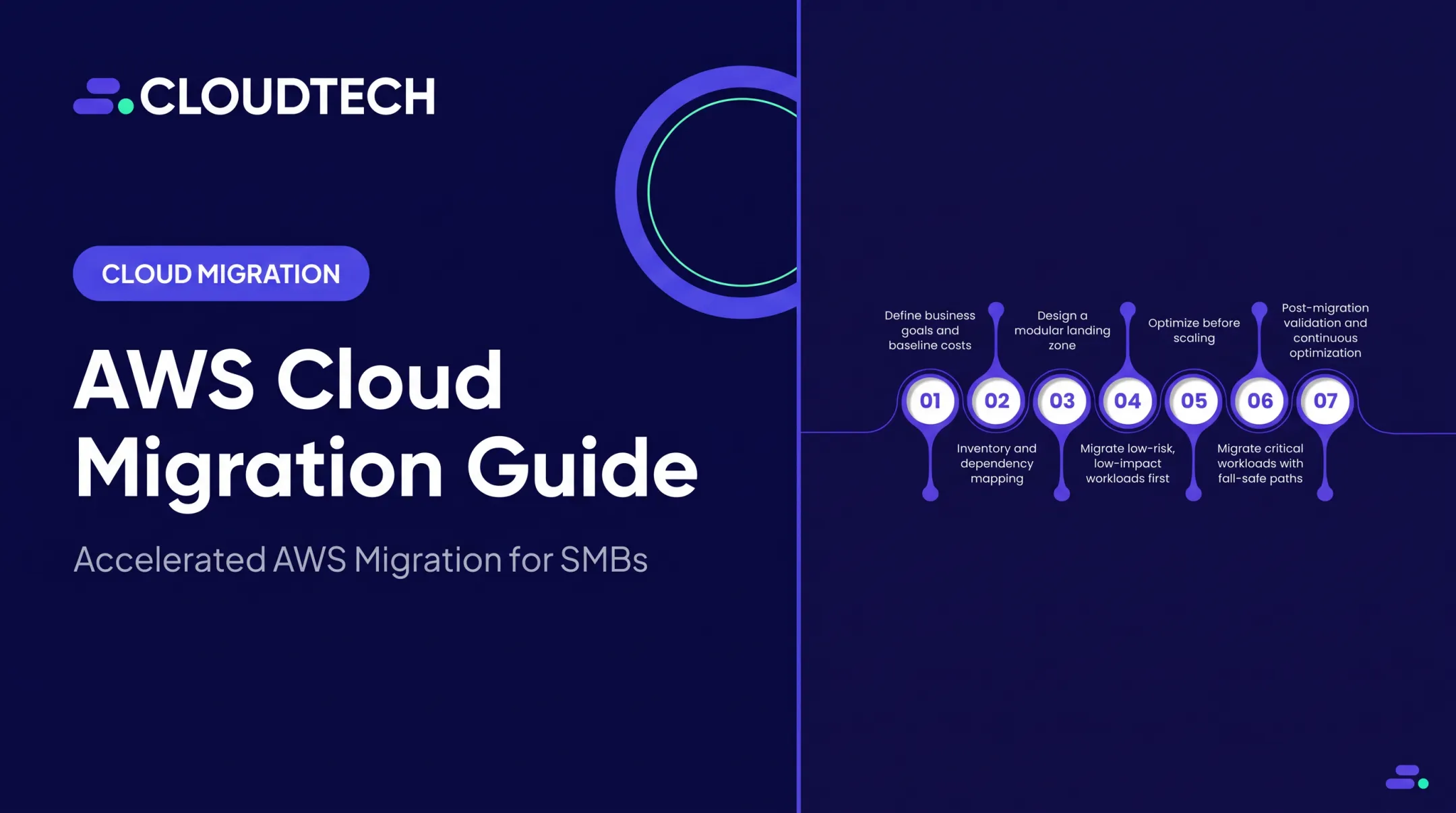
Cloud migration is a business and operating-model change — not just moving servers from one place to another. The sequence that works:
- Assess application and infrastructure dependencies
- Choose a migration strategy per workload
- Automate repeatable execution steps
- Secure the target environment first
- Migrate in controlled waves
- Validate thoroughly before cutover
- Keep optimizing after go-live
If your team doesn't have the bandwidth or experience to run this safely, that's a reasonable thing to recognize early. Start with a workload inventory and a migration-readiness assessment. From there, working with Cloudtech's AWS-certified specialists can save far more time than it costs.
Frequently Asked Questions
How much does automated cloud migration cost?
Cost depends on workload count and complexity, data volume, downtime requirements, tooling, consulting, parallel infrastructure, and ongoing cloud usage. A workload-specific assessment gives a far more reliable number than any generic estimate.
What are the 7 R's of automated cloud migration?
The seven strategies are rehost, replatform, repurchase, refactor, relocate, retain, and retire. Automation helps execute and validate whichever strategy you select. It doesn't choose the right one for you.
What are the top tools for automated cloud migration?
Leading options are grouped by function: discovery (Application Discovery Service), replication (DataSync, DMS), workload migration (AWS Transform MGN), IaC (CloudFormation, Terraform), and observability (CloudWatch). The right combination depends on your workload, destination, compliance needs, and team capacity.
Can a small team manage cloud migration automation without AWS experience?
It's possible, but risky without prior experience. Many SMBs partner with certified AWS specialists for the initial setup and training, then operate independently afterward.
Does automation eliminate downtime during migration?
No. Automation reduces downtime risk through phased cutovers and tested rollback plans, but some downtime tolerance should still be planned for and agreed upon in advance.