Introduction
VMware Hybrid Cloud Extension (HCX) on AWS is a set of services that connects your on-premises VMware environment to VMware Cloud on AWS, so you can move or extend virtual machine workloads between the two without rebuilding everything from scratch.
This guide is built for US-based IT leaders, VMware administrators, cloud architects, and SMB teams planning a VMware-to-AWS migration. If network continuity, security, downtime, and operational control keep you up at night, you're in the right place.
HCX is often sold as a migration shortcut. The reality is messier. Teams deploy it without mapping connectivity requirements, migration method trade-offs, or the points where it breaks down.
This article covers the migration methods, connectivity decisions, readiness checks, and limitations you need before your first migration wave.
Key Takeaways
- HCX links on-premises VMware to VMware Cloud on AWS for mobility, network extension, and orchestrated migration.
- Workload size, downtime tolerance, bandwidth, and rollback needs determine the right migration method.
- Layer 2 extension cuts re-IP work, but it needs careful design—not a stand-in for network modernization.
- Direct Connect, VPN, firewall rules, DNS, and appliance capacity all need validation before you move a single VM.
What Is VMware HCX on AWS and Why Use It?
VMware HCX (Hybrid Cloud Extension) is a migration and network-extension platform that connects your source vSphere environment to a destination VMware Cloud on AWS SDDC (Software-Defined Data Center). It builds a secure transport fabric between those endpoints, then uses that fabric to move workloads and, when needed, extend specific Layer 2 networks so VMs keep their original IP addresses during a move.
That's the core value: less reconfiguration than a from-scratch cloud rebuild. You're not re-architecting applications on day one. You're relocating them with their networking largely intact, then modernizing later on your own timeline.
HCX-Assisted Migration vs. Native AWS Migration
This distinction trips up a lot of planning teams. HCX moves VMs into VMware Cloud on AWS, an SDDC running on AWS infrastructure but still operating as vSphere. It does not convert a VM into Amazon EC2, Amazon RDS, or Amazon S3 automatically.
- Some applications run fine as-is on EC2 after a separate rehost effort
- Others benefit from re-platforming onto Amazon RDS, AWS Lambda, or Amazon ECS
- Application modernization is typically a distinct, later-phase project
When Organizations Reach for HCX
- Data center consolidation or lease expirations forcing a hardware/facility exit
- Capacity expansion without new on-premises hardware purchases
- Disaster recovery using VMware Cloud on AWS as a recovery site
- Cloud bursting for temporary compute needs
- Staged modernization, where lift-and-shift buys time before refactoring
Licensing and Version Compatibility
HCX for VMware Cloud on AWS includes both HCX Advanced and HCX Enterprise capabilities at no additional license cost when paired with a VMware Cloud on AWS SDDC. The Enterprise feature set in that bundle includes:
- Mobility Optimized Networking
- Replication Assisted vMotion
- Network Extension High Availability
Version compatibility shifts frequently under Broadcom's release cadence. Always confirm your specific HCX build against the current Product Interoperability Matrix before locking in a design.
How HCX Supports a VMware-to-AWS Migration
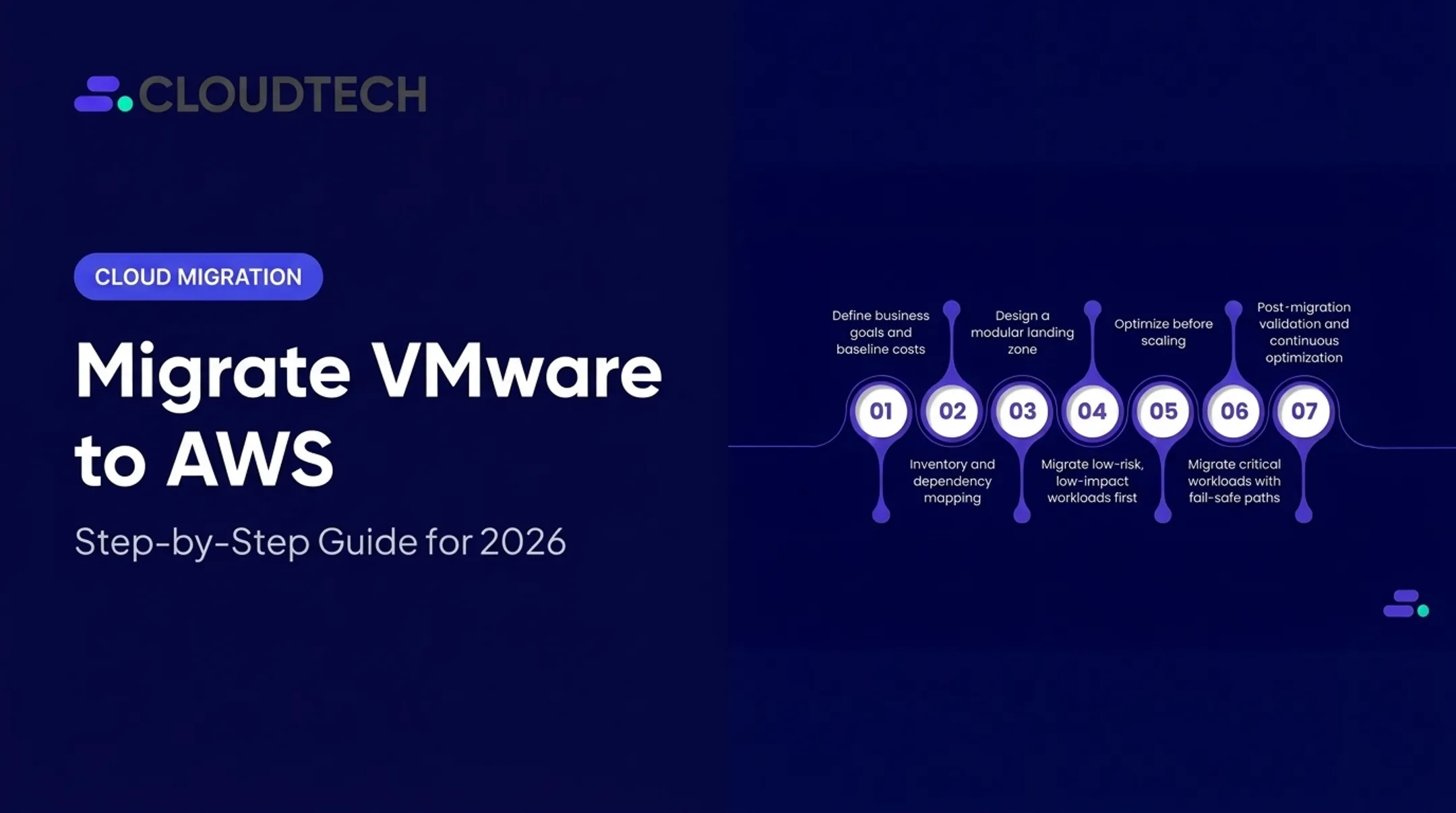
A typical HCX migration follows a predictable arc:
- Discovery and readiness assessment — inventory VMs, dependencies, and constraints
- Destination SDDC preparation — provision the VMware Cloud on AWS environment
- HCX deployment and site pairing — connect source and destination managers
- Compute/network profile configuration — define resource pools and IP ranges
- Service Mesh creation — HCX presents paired vSphere resources as an end-to-end mesh
- Pilot migration — move a low-risk workload first
- Migration waves — move grouped workloads on a schedule
- Validation and decommissioning — confirm success, retire or repatriate

When VMware Cloud on AWS is the destination, HCX Cloud Manager is installed automatically once the service is enabled. You do not stand that component up manually.
On the source side, three pieces do the heavy lifting:
- HCX Interconnect handles the tunnel
- Network Extension bridges selected Layer 2 segments
- OS Assisted Migration covers non-vSphere guest VMs that need to land in vSphere first
Comparing the Migration Methods
| Method | Best For | Downtime Profile | Notes |
|---|---|---|---|
| HCX vMotion | Single, high-priority VMs | Live migration, no service interruption | One VM at a time; sensitive to network conditions |
| Bulk Migration | Scheduled groups of VMs | Interruption similar to a reboot | Runs in parallel; VM stays live at source until cutover |
| Cold Migration | Powered-off VMs | N/A (VM is already off) | Uses NFC protocol automatically |
| Replication Assisted vMotion (RAV) | Larger groups needing zero-downtime cutover | No service interruption | Combines Bulk parallelism with vMotion-style handoff |
Don't assume "zero downtime" applies universally. vMotion and RAV are designed for it, but they carry real bandwidth and latency dependencies. Bulk Migration explicitly involves a reboot-equivalent interruption at cutover — plan around it, don't ignore it.
Layer 2 Extension: A Double-Edged Tool
Network Extension preserves IP and MAC addressing during a move, which largely removes re-IP work. It also creates an extended broadcast domain spanning your data center and the cloud. That means:
- Routing decisions get more complex, not less
- Security teams need visibility into traffic crossing the extension
- Each Network Extension appliance supports up to eight extended networks, with a five-minute delay before a newly extended network is ready for migration
A practical wave example:
- Start with one low-risk VM to validate pairing and pilot the vMotion path
- Move a small dependency-mapped group (app server plus database) and monitor cutover closely
- Scale to larger scheduled waves once confidence builds
- Retire or redesign extended networks after workloads stabilize in the SDDC; do not leave Layer 2 bridges running as permanent architecture
Key Migration Insights for Connectivity and Workload Planning
Connectivity is where most HCX plans break down. Get this wrong and everything downstream — bandwidth, latency, cutover timing — suffers.
Connectivity Options
- Internet-based connectivity — fastest to stand up, least predictable performance
- AWS Direct Connect — private, dedicated connection with more consistent throughput
- VPN overlays — viable for site pairing only
A VPN tunnel terminated on the VMware Cloud on AWS NSX Edge is not supported for HCX Interconnect or Network Extension tunnels themselves.
AWS guidance notes that public VIFs do not support bidirectional vMotion between SDDCs and on-premises environments. That limitation pushes serious migration workloads toward Direct Connect or a properly configured private VIF.
For organizations running multiple SDDCs, VMware Transit Connect (a managed Transit Gateway pattern) routes traffic across SDDC Groups and connected VPCs at scale.
Pre-Migration Network Checklist
Before opening a single service mesh, validate:
- CIDR overlap between source and destination networks
- Routing advertisements and any 100-route limits on VPN paths
- DNS and NTP reachability from both sites
- MTU consistency (HCX encryption adds 28 bytes of overhead, which matters if your cloud provider caps MTU at 1500 bytes)
- Bandwidth and latency against documented minimums — vMotion and RAV typically need higher throughput and tighter latency tolerance than Bulk Migration
- Firewall rules for required ports, including HCX Manager-to-Cloud Manager and appliance-to-appliance tunnels
- NAT behavior and proxy requirements along the path

Published underlay guidance sets different thresholds by operation type: vMotion and RAV generally require higher throughput and lower packet loss tolerance than Bulk or OS Assisted Migration. Match your migration method to what your link can actually sustain, not what looks good on paper.
Choosing Private vs. Internet-Based Paths
| Factor | Favors Direct Connect | Favors Internet-Based |
|---|---|---|
| Workload sensitivity | High (financial, healthcare data) | Lower-risk, non-critical VMs |
| Throughput consistency | Required | Acceptable variability |
| Compliance requirements | HIPAA, SOC 2, PCI-DSS environments | Minimal regulatory scope |
| Implementation time | Weeks to provision | Days |
| Budget | Higher upfront investment | Lower cost, less predictable |
Workload Discovery and Success Criteria
Path choice only pays off if you know what will ride that path. Skipping discovery is the most common reason migration waves stall mid-project. At minimum, document:
- VM inventory, OS versions, and vSphere compatibility
- Application tiers and hard-coded IP dependencies
- Storage replication dependencies and data gravity
- Identity integrations, backup agents, and monitoring hooks
Tools like AWS Application Discovery Service and the AWS Well-Architected Tool help surface interdependencies before you lock a wave sequence.
"The VM is running" is not success. Define criteria such as:
- Application transaction testing
- DNS and identity validation
- Security control verification
- Performance baselines vs. pre-migration numbers
- A rollback plan you have actually tested
Cloudtech's AWS-certified architects run readiness assessments for SMB and mid-market teams that cover dependency discovery, connectivity architecture, wave sequencing, and post-migration optimization before any production VM moves.
Common Issues and When HCX May Not Be Appropriate
Most HCX problems trace back to a handful of repeat offenders:
- Incomplete firewall rules blocking appliance-to-appliance tunnels
- Incorrect HCX URLs or expired credentials during site pairing
- Unsupported vSphere/HCX version combinations
- Insufficient IP addresses reserved for appliance deployment
- Overlapping CIDR ranges between source and destination
- Poor DNS or NTP configuration causing intermittent failures
- Bandwidth that looks sufficient on paper but can't sustain vMotion under load
Misconceptions Worth Correcting
HCX does not:
- Automatically modernize applications
- Eliminate downtime across every migration method
- Remove the need for testing
- Make every workload a suitable lift-and-shift candidate
When HCX Is a Poor Fit
- Workloads tightly coupled to physical hardware (specialized cards, dongles, local peripherals)
- Unsupported or legacy operating systems outside current compatibility matrices
- Applications that genuinely need architectural redesign, not relocation
- Strict latency-sensitive workloads that can't tolerate any variable network path
- Environments where native AWS services (EC2, RDS, ECS) are the real long-term target, making HCX an unnecessary detour

Extended Layer 2 networks also raise the troubleshooting bar considerably — a routing issue that used to live entirely in one data center now spans two environments. If your team is spending more time debugging the extension than migrating workloads, that's a signal to prioritize re-IP work, application redesign, or a different migration tool entirely.
Before you move production workloads, lock in three basics:
- Run a limited pilot on representative VMs
- Confirm compatibility docs for your exact HCX and vSphere versions
- Document an exit path if HCX is not the right fit
Conclusion
HCX bridges VMware environments and VMware Cloud on AWS through connectivity, network extension, and several distinct migration methods. Those capabilities alone do not guarantee a successful migration.
Outcomes depend on a few disciplined choices:
- Choose the right migration method per workload
- Validate dependencies before cutover
- Design connectivity that can sustain the traffic
- Test every wave before the next one starts
Use HCX when VMware workload mobility is genuinely the goal. When the real objective is long-term cloud transformation, weigh native AWS services and application modernization into the plan from the start — not as an afterthought two years later.
Frequently Asked Questions
What is VMware HCX used for?
HCX connects VMware sites, extends selected networks at Layer 2, and supports workload migration into VMware Cloud on AWS. Exact capabilities depend on your configured services and supported HCX/vSphere versions.
Does VMware HCX migrate workloads directly to native AWS services?
No. HCX moves VMs into a VMware Cloud on AWS SDDC, which still runs vSphere. Converting workloads to native services like EC2 or RDS requires separate modernization tools and planning.
What is the difference between HCX vMotion and bulk migration?
vMotion moves one VM at a time live, with no service interruption. Bulk Migration moves groups in parallel on a schedule, with an interruption similar to a reboot at cutover. Choose based on downtime tolerance and scale.
Does HCX require AWS Direct Connect?
No. HCX supports internet, Direct Connect, and VPN for site pairing. Direct Connect offers more predictable performance for Interconnect and Network Extension tunnels, so verify current AWS and VMware guidance for your workload.
Can HCX migrate workloads without changing their IP addresses?
Yes, through Network Extension in Layer 2 migration scenarios. This isn't automatic; it requires deliberate routing, security, and lifecycle planning for the extended network.
What should be checked before using HCX for an AWS migration?
Confirm version compatibility, map VM and application dependencies, resolve CIDR overlaps, validate DNS and bandwidth, and open required firewall ports. Document success criteria and a rollback plan before the first wave moves.