This uncertainty has accelerated the search for a viable exit strategy. The AWS VMware Migration Accelerator (VMA) offers a powerful answer, providing both a technical and financial bridge to move virtualized workloads from VMware directly to native AWS services. This framework isn't just a lift-and-shift tool; it's a comprehensive pathway to modernize your infrastructure, optimize costs, and regain control.
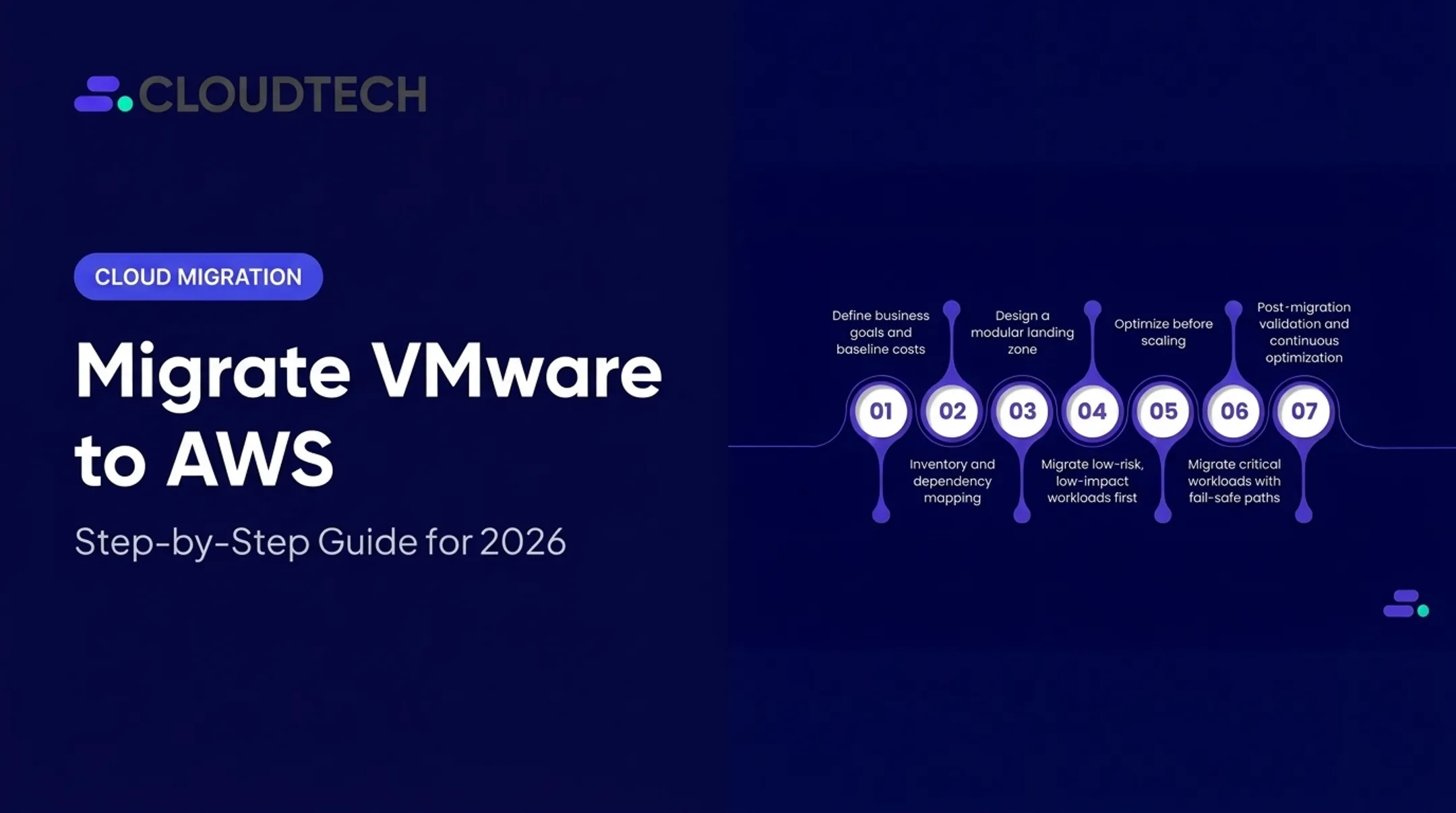
This guide provides a roadmap for navigating your migration, from understanding the economic incentives and AI-powered discovery tools to executing a step-by-step rehosting plan with minimal disruption.
Key Takeaways
- VMA Credits Target Specific Migrations: The VMware Migration Accelerator (VMA) provides significant promotional credits, but primarily for workloads moving from VMware Cloud on AWS to Amazon EC2. On-premises VMware migrations are typically funded through the AWS Migration Acceleration Program (MAP).
- Automated Discovery Saves Weeks: AWS Transform uses AI-driven analysis to ingest inventory data (like RVTools exports), map application dependencies, and intelligently group servers into migration waves, replacing weeks of manual spreadsheet work.
- Agentless Replication Simplifies Execution: The AWS Application Migration Service (MGN) vCenter Client enables block-level replication directly from the hypervisor, eliminating the need to install and manage agents on every virtual machine.
- Funding Programs Minimize Costs: Combining VMA or MAP funding with AWS Partner programs can significantly reduce or even eliminate out-of-pocket migration expenses, especially when working with a partner like Cloudtech.
- Migration Unlocks Modernization: Rehosting your VMs to EC2 is the first step. The real value comes from post-migration optimization, containerization, and integrating managed services like Amazon RDS and Aurora.
Understanding the AWS VMware Migration Accelerator: Financial Incentives and Licensing Relief
For many teams, the push to leave VMware is financial. Perpetual licenses have given way to subscription bundles, and that change has made budgets harder to predict. AWS VMA pairs promotional credits with cloud pay-as-you-go pricing so you can offset transition cost instead of absorbing it twice.
Tiered Promotional Credits and Cost Offsets
A major hurdle in any migration is the "double-bubble" cost—paying for both the old and new environments during the transition. AWS VMA offsets that overlap with promotional credits.
Eligibility is narrow: VMA applies to migrations from VMware Cloud on AWS to Amazon EC2. If you are moving from on-premises VMware, AWS points you to the Migration Acceleration Program (MAP) instead—a separate funding path with its own rules.
For qualifying VMA migrations, the incentives are tiered based on monthly volume:
- Up to $200 per VM for migrating 40–79 VMs in a calendar month
- Up to $400 per VM for migrating 80 or more VMs in a calendar month
To qualify, each migrated VM must run on an eligible Amazon EC2 instance for at least 720 hours. Credits post to your AWS bill and offset compute charges during the transition window.
Navigating the Shift from VMware Licensing to AWS On-Demand Economics
Beyond temporary credits, the move to AWS changes how you buy capacity. VMware licensing often means large upfront commitments—some new minimums reportedly jumped from 16 to 72 cores. On AWS, that model gives way to flexible, pay-as-you-go pricing.
AWS offers several purchasing options to align costs with usage:
- On-Demand: Pay by the second with no long-term commitment—useful for unpredictable workloads or the first weeks after cutover
- Savings Plans: Commit to a steady compute spend for 1 or 3 years for lower rates; Compute Savings Plans stay flexible across instance families and regions and can reach up to 66% off On-Demand
- Reserved Instances (RIs): For stable workloads, RIs go deeper—up to 72%—when you commit to a specific instance type and region

An AWS Partner can model the mix for your estate. At Cloudtech, we help SMB and mid-market teams capture AWS MAP funding where they qualify, stack it with VMA credits when the path is VMware Cloud on AWS to EC2, and lock in Savings Plans or RIs so migration cost and run-rate both stay predictable.
Automated Discovery, Assessment, and Wave Planning with AWS Transform
One of the most time-consuming phases of any migration is understanding what you have. Manual audits, outdated CMDBs, and undocumented dependencies can derail projects before they even start. AWS Transform is an AI-powered service that automates this entire process.
Ingesting Heterogeneous Inventory Data
AWS Transform eliminates weeks of manual effort by directly ingesting data from your existing tools. It can parse various formats, including:
- RVTools exports
- CMDB dumps
- vCenter data
- Automated discovery appliance outputs
This process creates a digital twin of your on-premises estate. It analyzes actual CPU, memory, and storage utilization, not just the over-provisioned specs common in virtualized environments. This provides a realistic baseline for right-sizing your instances in AWS from day one.
AI-Driven Dependency Mapping and TCO Analysis
Transform uncovers hidden connections between your systems. Using graph-based analysis, it maps cross-application dependencies, identifies shared datastores, and visualizes network links that are often missed in manual reviews.

This data feeds into a TCO modeling engine. You can run what-if scenarios to:
- Compare different EC2 instance families
- Model the cost impact of various storage tiers, such as gp3 vs. io2
- Evaluate deployment across different AWS Regions
Those models support a defensible business case for leadership, with projected costs and savings grounded in your real environment.
Intelligent Migration Wave Grouping
With a clear picture of your inventory and dependencies, Transform intelligently sequences applications into migration waves. It groups servers based on a combination of technical and business logic:
- Business criticality, so tier-1 applications get appropriate care
- Interconnected dependencies, keeping tightly coupled application tiers together
- Downtime tolerance, aligning cutover windows with business requirements
The proposed wave plan is presented in a collaborative interface where cloud architects and application owners can inspect, modify, and approve the plan before any data is moved.
Translating VMware Network Architecture to AWS-Native Infrastructure
Replicating complex on-premises network topologies in the cloud is a notorious migration bottleneck. Translating years of accumulated VMware NSX configurations, vSphere distributed switches, and VLANs into AWS Virtual Private Clouds (VPCs) is a meticulous process.
Automated Mapping of Network Constructs
AWS Transform includes Network Migration APIs designed to automate this heavy lifting. The service can automatically map legacy network constructs to their AWS-native equivalents:
- VMware NSX and vSphere networks are translated into distinct VPCs.
- VLANs and network segments become subnets and routing tables.
- Firewall rules and access lists are converted into AWS Security Groups and Network ACLs.
This automation accelerates the timeline and reduces human-error risk that can create security gaps or broken connectivity after migration.
Infrastructure as Code (IaC) Generation and Validation
Once the network mapping is complete, AWS Transform exports the entire target architecture as modular Infrastructure as Code (IaC). That supports repeatable, version-controlled deployments. Supported formats include:
- AWS CloudFormation
- AWS Cloud Development Kit (CDK)
- Terraform
- Landing Zone Accelerator (LZA) compatible YAML
Before cutting over any workloads, validate that the new network functions as expected. Transform uses Amazon VPC Reachability Analyzer to run a static analysis of the configuration.
The check confirms routing paths between subnets, through NAT Gateways, and across Transit Gateway connections are correct. This pre-flight step catches issues before they can affect a live migration.

Step-by-Step Technical Execution: Rehosting via AWS Application Migration Service and Agentless vCenter Client
With planning complete, AWS Application Migration Service (AWS MGN) handles rehosting. An agentless client replicates VMs with minimal overhead on the source environment.
1. Prerequisites and AWS Environment Setup
First, configure the target environment in the AWS Management Console.
- Activate AWS MGN in your target AWS Region.
- Define dedicated staging subnets within your VPC. This is where replicated data will be stored on lightweight EC2 instances before cutover.
- Configure templates that define how servers are replicated and launched:
- Replication Templates: Set data routing and throughput throttling policies.
- Launch Templates: Define target subnets, security groups, and automatically right-size EC2 instance types based on the assessment from AWS Transform.
- Post-Launch Templates: Automate actions after cutover, such as installing the AWS Systems Manager agent for ongoing management.
2. Deploying the Agentless vCenter Client Appliance
To enable agentless replication, you deploy a small appliance in your VMware environment.
- Create IAM credentials with the necessary permissions, primarily the
AWSApplicationMigrationVCenterClientPolicy. - Deploy the vCenter Client VM from the provided template into your vCenter environment.
- Install the VMware Virtual Disk Development Kit (VDDK) on the client appliance.
- Establish secure outbound connectivity from the appliance to the AWS MGN service endpoint over TCP port 443.
3. Continuous Block-Level Replication
Once the client is connected, replication begins with minimal source impact:
- Initial Sync: MGN takes an initial full snapshot of each source VM's disks.
- Continuous Replication: Using VMware's Changed Block Tracking (CBT) feature, the client detects and replicates only incremental block-level changes.
That keeps the AWS-side replica moments behind the on-premises source and ready for a fast cutover. Monitor health, lag, and backlog for all replicating VMs from the AWS MGN console.
4. Non-Disruptive Testing and Validation
Before the final cutover, validate that workloads run correctly in AWS. MGN launches test instances into an isolated subnet without impacting live production systems.
Check:
- OS boot-up and stability.
- Network accessibility via SSH or RDP.
- Application-level functionality and sanity checks.
- Performance benchmarks to ensure the new EC2 instances meet requirements.
5. Executing the Final Cutover
After successful testing, you're ready for the final cutover, which is typically scheduled during a planned maintenance window.
- Terminate any running test instances.
- Initiate the cutover, which performs one final differential synchronization.
- Launch the new production EC2 instances from the latest replicated data.
- Redirect DNS records and other traffic endpoints to the new instances.
In the rare event of an issue, MGN provides a "Revert to ready for cutover" option, allowing you to troubleshoot and re-launch without a complex rollback procedure.

Post-Migration Modernization: Beyond Lift-and-Shift to Cloud-Native
Getting workloads onto EC2 is a major milestone. Lasting cloud value comes from modernization: rightsizing what you lifted, containerizing what should scale, and shifting undifferentiated ops to managed AWS services.
Immediate Rightsizing and Cost Governance
Your first post-migration task is to optimize costs. Use native AWS tools to fine-tune your environment based on live production data, not pre-migration estimates.
- AWS Compute Optimizer: Analyzes utilization metrics to recommend more cost-effective EC2 instance types and sizes.
- AWS Cost Explorer: Provides detailed visibility into spending so you can track costs by project, department, or application.
Containerization and Platform Refactoring
Once applications are stable in AWS, refactor for efficiency and scale. AWS Transform can analyze source code and help generate Dockerfiles and configs so you can containerize workloads, then run them on a managed orchestrator:
- Amazon ECS (Elastic Container Service): Fully managed service for running Docker containers with less control-plane overhead.
- Amazon EKS (Elastic Kubernetes Service): Managed Kubernetes for standardized, portable container deployments.
Integrating AWS-Native Managed Services
Next, offload operational burden by replacing self-hosted components with managed AWS services. A common next step is moving databases off VMs onto:
- Amazon RDS (Relational Database Service): Managed PostgreSQL, MySQL, SQL Server, and other popular engines.
- Amazon Aurora: MySQL- and PostgreSQL-compatible database built for the cloud, with strong performance and availability.
Add native backup, disaster recovery, and security services so day-2 operations shrink while the architecture hardens. Cloudtech often folds these choices into a short post-migration modernization roadmap so SMB teams gain cost and reliability wins without a multi-year rewrite.

Accelerating Your VMware-to-AWS Journey with Cloudtech
A successful VMware migration takes expertise, not just tools. As an AWS Advanced Tier Partner with a specialization in serving SMBs and mid-market companies, Cloudtech provides the hands-on guidance to ensure your migration is fast, cost-effective, and successful.
Boutique AWS Expertise with Proven Methodologies
Our team is over 70% former AWS employees and 100% AWS-certified. We skip enterprise-level overhead and price tags, offering a human-first consulting approach that makes us an extension of your team.
We use a four-step migration framework to deliver predictable outcomes:
- Analyze
- Build
- Optimize
- Support
Maximizing AWS Funding and Accelerated Delivery
We specialize in helping our clients access and maximize funding from programs like the AWS Migration Acceleration Program (MAP), often reducing or completely offsetting out-of-pocket migration expenses. Our pre-packaged migration frameworks allow us to deliver for most SMBs in just a few weeks, not months.
If VMware's changing landscape is putting pressure on your roadmap, we can help you move to a more flexible, cost-effective future on AWS.
Schedule a free 15-minute VMware-to-AWS readiness assessment and roadmap consultation today.
Frequently Asked Questions
How do I migrate VMs from VMware to AWS using the AWS VMware Migration Accelerator?
You combine AWS Transform for assessment, AWS MGN with the Agentless vCenter Client for replication, and VMA promotional incentives. That stack covers discovery, replication, testing, and cutover from VMware Cloud on AWS to EC2.
Is the AWS Migration Hub still available?
Existing customers can keep using AWS Migration Hub for ongoing projects, but AWS is not accepting new customers. For new discovery, planning, and migration tracking, AWS recommends AWS Transform.
What workloads and environments qualify for AWS VMware Migration Accelerator promotional credits?
VMA incentives primarily target workloads transitioning from VMware Cloud on AWS to Amazon EC2. Migrations from on-premises VMware environments are typically funded through the separate AWS Migration Acceleration Program (MAP).
Can I migrate VMware workloads to AWS without installing agents on every virtual machine?
Yes. The AWS MGN Agentless vCenter Client enables VM discovery and continuous block-level replication directly at the hypervisor level. This eliminates the operational overhead of installing and managing agents on each source server.
How does AWS handle VMware NSX network configurations and IP schema during migration?
AWS Transform's Network Migration APIs can automatically analyze NSX configurations, routing rules, and security policies. It then maps these constructs directly into AWS-native resources like VPCs, subnets, route tables, and Security Groups.